Written by Sem
Edited on
13 October 2025
·
14:57
Compare the PlayStation 5 Slim to the PlayStation 5
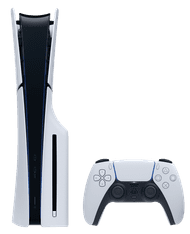
The PlayStation 5 Slim is the substitute for the PlayStation 5. In addition to the fact that the PS5 Slim is both smaller and lighter, it also has more storage and has room for a disc drive. This allows you to convert your Digital Edition into a Disc Edition. In this article, we'll compare both PlayStation 5 consoles. That way, you'll know how much the PlayStation 5 has changed.
Comparison PS5 and PS5 Slim
| PlayStation 5 | PlayStation 5 Slim | |
|---|---|---|
| Dimensions | 39x10.4x26cm | 35.8x9.6x21.6cm |
| Weight | 4.5kg | 3.2kg |
| Storage space | 825GB | 1TB |
| Separate Disc Drive | No | Yes (only the PS5 Slim Digital Edition) |
| Stand | Universal stand (upright and flat) | Horizontal stand (flat) |
| USB ports | USB-C (1x, front) and USB-A (3x, 1x front and 2x back) | USB-C (2x, front) and USB-A (1x, back) |
PlayStation 5 Slim Disc Edition
- The PlayStation 5 Slim is 30% smaller than the original PS5, so it takes up less space on your desk or next to your TV.
- You can game in 4K resolution and experience games more realistically thanks to the powerful video card of this console.
- Thanks to the haptic feedback and dynamic trigger effects of the DualSense controller, you get more out of your game experience.
€ 529,-
In stock
Size and weight

PlayStation 5: large and heavy
With a weight of 4.5kg, the PlayStation 5 is relatively heavy. The Digital Edition weighs 3.9kg. The size of the PlayStation 5 isn't very convenient either, or maybe you don't like the way it looks as much. For example, it might not fit into your TV cabinet. You won't have this problem with the PlayStation 5 Slim. If you place it upright, the original PS5 Disc Edition is 39cm tall, 10.4cm thick, and 26cm deep. The digital edition is as tall and thick, but 1cm thinner.

PlayStation 5 Slim: convert it
If you want the PlayStation 5, you can choose between a Disc and Digital Edition. The Disc Edition has a fixed disc tray, just like the regular PS5. The disc tray has been mounted into the console. Do you have a Digital Edition, but do you want to be able to play games on a disc or Blu-ray movies? You have to buy a separate Disc Drive. You can easily mount this into your PS5 Slim Digital Edition. That way, you can turn your Digital Edition into a PS5 Slim Disc Edition.
Storage space
PlayStation 5: 825GB
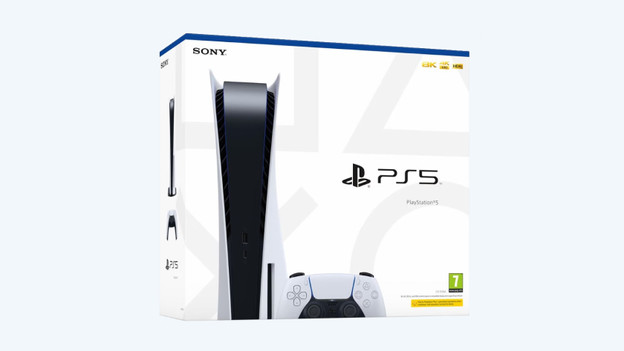
The original PlayStation 5 has 825GB of storage space for your games, clips, movies, screenshots, and more. The operating system of the PlayStation takes up about 150GB. This means that you'll have 675GB of storage space left. You can download about 5 or 6 large games on your PlayStation, because you'll need to keep room for clips and apps, for example. The storage space of your PS5 fills up quickly due to this.

PlayStation 5 Slim: 1TB
The new PlayStation 5 has 1TB of storage space. This is the same as 1000GB of storage, which means you'll have 175GB more than on the PlayStation 5. If you subtract the space you need for the operating system, you'll have about 850GB of storage space left. This allows you to download 7 or 8 large games onto your PlayStation, so you don't have to remove old games or need an SSD.
Separate Disc Drive

PlayStation 5: no separate Disc Drive
The PlayStation 5 has a Disc and a Digital Edition. Do you have a Disc Edition? The disc tray has already been mounted into your console. You can't take it out. Do you have a Digital Edition? You can't play games from a disc or play Blu-ray movies. You can't convert your PS5 Digital Edition into a Disc Edition. You'll be able to do this with the new PlayStation 5 Slim Digital Edition.

PlayStation 5 Slim: convert it
If you want the PlayStation 5, you can choose between a Disc and Digital Edition. The Disc Edition has a fixed disc tray, just like the regular PS5. The disc tray has been mounted into the console. Do you have a Digital Edition, but do you want to be able to play games on a disc or Blu-ray movies? You have to buy a separate Disc Drive. You can easily mount this into your PS5 Slim Digital Edition. That way, you can turn your Digital Edition into a PS5 Slim Disc Edition.
Conclusion
The greatest differences between the PS5 and PS5 Slim are the size, weight, storage space, and separate Disc Drive. The PS5 Slim is smaller and lighter. With 1TB of storage, you'll have enough room for your games. Do you want to play physical games or Blu-ray movies on the Slim Digital edition in the future? You can build the separately available Disc Drive into your PS5 Slim Digital.
Article by Sem
Gaming Expert.