Written by Jorn
Edited on
23 August 2022
·
12:42
How do you connect your Sony TV to the internet?
Many of the functions on your brand new Sony TV require an internet connection, such as the Netflix or YouTube app. It can be quite a search for the settings that allow you to connect your TV to the internet. That's why we explain the steps here.
Get started with the internet connection
Many of the functions of your television require an internet connection. We'll explain how you connect your TV to a wireless network.
- Step 1: go to Settings.
- Step 2: open Network & Internet.
- Step 3: select your WiFi network and enter the password.

Step 1: go to Settings
First, you press the settings button on your remote. This is the button with the gearwheel icon on it.
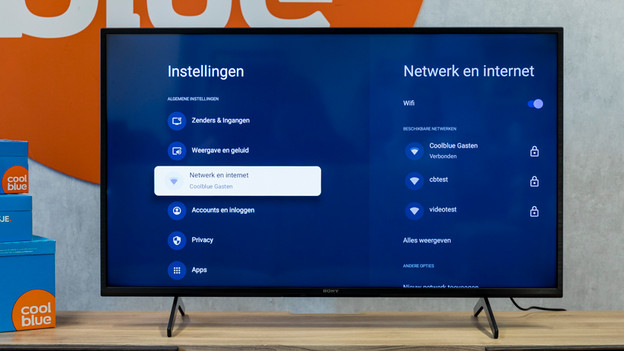
Step 2: open Network & Internet
Select Network & Internet and press the enter button.

Step 3: select the right WiFi network
You'll see different options, including the name of your WiFi network. Did you never give your network a new name and do you not know what it's called? Check the side of your router. You'll find both the network name and the password. Once you've selected the right name, a screen will appear where you have to enter the password. Enter your password. Your Sony television is now connected to the internet.
Article by Jorn
Television Expert.