Written by Jorn
Edited on
28 January 2025
·
08:54
How do you reduce the energy consumption of your Sony TV?
A lower energy consumption is good for the environment and for your wallet. That's why a Sony TV has multiple settings to reduce the energy consumption. We'll explain where to find those settings and how to set them correctly.
Get started with the energy consumption
With a couple of adjustments in your settings, you can make your TV more energy-efficient.
- Step 1. Go to 'Settings'.
- Step 2. Find the 'System settings'.
- Step 3. Navigate to 'Power saving'.
- Step 4. Adjust the brightness.
- Step 5. Turn on the light sensor.
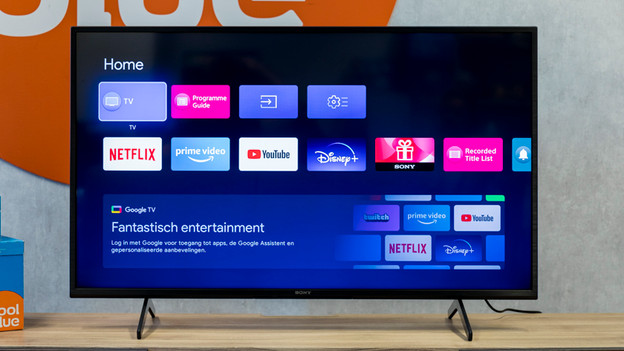
Step 1: go to 'Settings'
After you've set up your Sony TV, the Home menu appears. You can also use the Home button on the remote to go to the menu. From here, you can go to 'Settings'. You can find it on the first row of icons on the right, the gearwheel icon. You can also use the gearwheel icon on the remote.
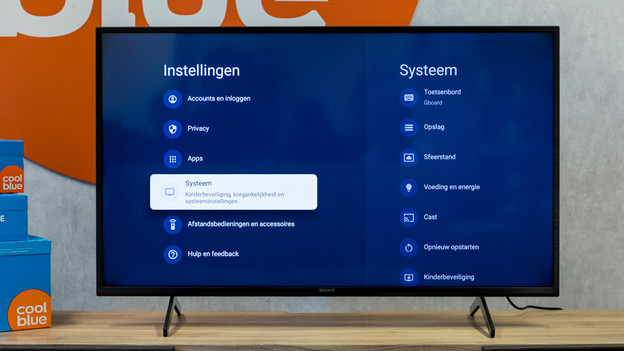
Step 2: go to 'System settings'
When you've found the settings, you'll see a list with subheadings on the left side on the screen. The 4th from the top is the system settings submenu. Click on it.

Step 3: navigate to 'Power saving'
Scroll down again with the arrows to 'Power saving'. In this submenu, you'll see various options for a lower energy consumption. You can turn on the 'Power saving mode' here to reduce the energy consumption. In addition, you can choose after how much time your TV should switch off when you're not using it. This is called the sleep mode.
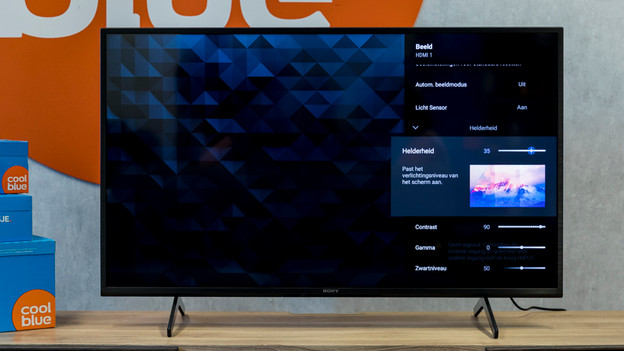
Step 4: adjust the brightness
Navigate to the image settings with the remote. In this menu, select 'Brightness'. The lower the brightness, the less energy your TV consumes. You can adjust the brightness with the left and right arrows on your remote.

Step 5: turn on the light sensor
In the image settings, you'll also find the settings of the light sensor. This sensor automatically adjusts the brightness of the television to the ambient light. The brightness of your television is never too high as a result, which saves energy
Article by Jorn
Television Expert.