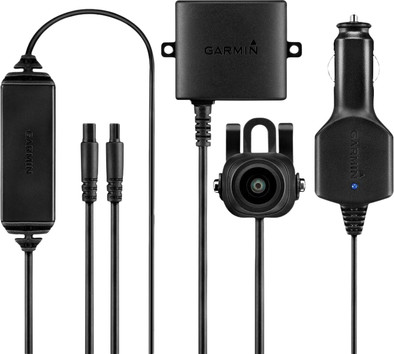
Garmin BC 30
Never available again
View alternatives in the sidebar
It is time for a piece of safety with the Garmin BC30. Mount this rear view camera on your rear window and connect it to your navigation device. This way you can easily see what is happening at the rear of your car. The image from the camera appears automatically the moment you 'reverse' your car. Handy, right?
Note: The Garmin BC30 is compatible with many Garmin navigation devices, but not with the Camper 760LMT-D and DezlCam 760LMT. So take a good look at whether your navigation device is suitable to pair with the BC30. Do you also want to receive traffic information via the BC30? Then purchase the Antenna Extension Cable from Garmin.
5 stars
5
4 stars
11
3 stars
1
2 stars
0
1 star
0
1 screen in your car
pelkmans johnny
20 October 2015
Automatically translated from Dutch
After installation on my v70:
-Does exactly what I expected! -Not too noticeable, just mounted on number plate -Already had Garmin GPS so I didn't need an extra screen
Willem Bosmans
25 March 2016
Automatically translated from Dutch
It only took a while to find a correct attachment in the bumper of a Renault twingo.
J.M. van der Leije.
16 October 2016
Automatically translated from Dutch
Product number | 615903 |
|---|---|
Manufacturer code | 010-12242-00 |
Brand | Garmin |
Warranty | 2 years |
Processing of your defect | Carry-in warranty |
Digital zoom | 0 | |
|---|---|---|
Viewing angle | 140 ° | |
Image stabilization |
Technology image sensor | CMOS |
|---|
Type of image definition support | Full HD (1080p), HD ready (720p), VGA | |
|---|---|---|
Video file format | MOV |
Minimum requirements storage system | Class 10 |
|---|
Loop recording | ||
|---|---|---|
Motion detection sensor | ||
Parking mode | ||
GPS sensor |
USB port |
|---|
HDMI connector | ||
|---|---|---|
Microphone connector |
Bluetooth | ||
|---|---|---|
NFC | ||
Built-in WiFi |
Power supply type | Car charger 12V | |
|---|---|---|
Replaceable battery | ||
Charging dock included |
LCD screen |
|---|