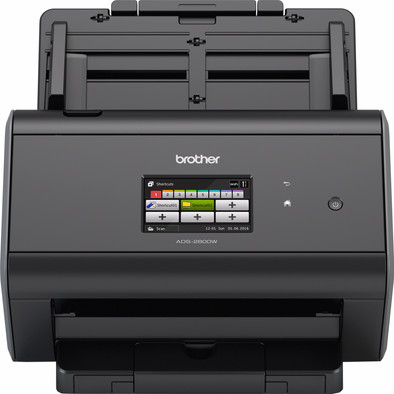
Brother ADS-2800W
Never available again
View alternatives in the sidebar
View alternatives in the sidebar
Scanner type | File scanner | |
|---|---|---|
Scan sizes | A4 | |
Automatic document feeder (ADF) | ||
Automatic duplex scanning |
According to our scanner expert
With this Brother ADS-2800W in your office, you'll be able to scan documents at high speed. This scanner can reach a speed of up to 30 pages per minute, and supports automatic duplex scanning to help you save paper and time. You can send all your jobs wirelessly via WiFi, or link it to your network with a wired connection, allowing all employees to scan to the network drive. Another useful feature of the ADS-2800W is that you don't need a PC to make scans. Simply use the 3.7-inch color touchscreen to scan documents to USB or to mail them straight to an email address. This scanner also features a 'Secure Function Lock', which lets you set permissions for certain scanner functions per user or user group. This helps you prevent unauthorized people scanning documents to a USB flash drive.
5 stars
14
4 stars
5
3 stars
0
2 stars
0
1 star
0
Scans fast and well: Effectively measured speed of 44 pages per minute at 300 dpi, in color to a PDF on a network drive. That's front and back, so 88 pages per minute. That is a lot faster than in the specifications.
The document feeder works very well. I had previously bought the ADS-2600WE, but that device had a very unreliable document feeder. This device is an improvement in almost all areas. The automatic document feeder can easily handle 80 sheets of paper at once (more than 50 in the specifications). You can also set it to continue in the same file after one scan task has been completed. This allows you to immediately lose a whole pack in 1 document.
The Brother software itself is a big improvement over the ADS-2600WE, but it's still not perfect. Quite a few utilities are installed with it that remain active on your system all the time.
I keep scanning to a network folder. This means you don't actually have to install anything on your PC. This works easily and quickly. The only downside is that you can't directly create "searchable PDFs" this way. Now, when you scan from PC, this feature takes so long that I didn't use it anyway. Now, if I occasionally want a searchable PDF, I use the included third party software (ABBY finereader sprint) to make the PDF editable with OCR afterwards.
The biggest drawback of this device is the poorly used function for the 'multiple input'. The device has a sensor (based on ultrasonics) to measure variations in the thickness of the paper. As a result, it can give an error message when detecting 'multiple sheets'. This function is for when the ADF pulls multiple sheets at once.
However, this system will also give an alarm if you have confirmed something on the paper. For example with a post-it, or a note with adhesive tape. In that case, there is usually nothing wrong and the device is allowed to continue scanning.
If the multiple feed detection is on, scanning will stop immediately when it detects multiple feeds. So you can't choose to continue anyway. Ideally, you will receive a warning, but you can then choose to continue anyway (eg because it is a post-it that can be scanned). This does not work with this device. You can turn off the multiple input detection, but you have to turn this off in the settings on the web server. So you cannot create different scan profiles, one that has the function on and one that has it off. It would have been nicer if you could set this yourself before posing, on the device itself, or in the scan profiles.
Conclusion: super scanner that works very smoothly and reliably! There are not many scanners that work autonomously via a network cable (and therefore scan without a PC to, for example, a NAS). So if you want this functionality, this device is definitely the best buy.
B. Willems
11 April 2018
Automatically translated from Dutch
Device works accurately and quickly.
Michelle Stam-Laban
29 February 2020
Automatically translated from Dutch
After the purchase, the scanner worked well over the network and USB was no problem at all. In the meantime, scanned something to his Macbook Air (desktop) for someone. Since then, the Brother continues to try to connect to the MacBook. Already tried everything. New firmware, software, contacted Brother service but Scanner has become unusable as it hangs saying 'There was a problem connecting to the server.
RPos
26 March 2019
Automatically translated from Dutch
With Coolblue Extended Warranty, you are protected against costs due to quality defects of your scanner for the next 4 years. During the entire term, we will reimburse up to the original purchase price. You can easily add the Extended Warranty in your shopping cart.
€ 20,99
one-timeAdd your scanner to your shopping cart. In the next step, you can add the Extended Warranty. You can exchange or return your purchase for free within 30 days.
Product number | 744053 | |
|---|---|---|
Manufacturer code | ADS2800WUX1 | |
Brand | Brother | |
Warranty | 2 years | |
Processing of your defect | Carry-in warranty |
Maximum optical scan resolution height | 600 dpi | |
|---|---|---|
Maximum optical scan resolution width | 600 dpi | |
Scan speed (PPM) | 30 ppm | |
Automatic duplex scanning | ||
Maximum paper weight ADF | 27 - 413 g/m2 | |
Maximum paper size ADF | A4 | |
ADF capacity | 50 | |
Color scanner | ||
Color depth output | 24 bpp | |
Automatic document feeder (ADF) | ||
Maximum scan size | A4 (21x29.7cm) | |
Gray tones output | 8 bpp | |
Scan to | Cloud, Email, Email address, FTP, File, Image, Microsoft SharePoint Connector, OCR, PC (network), USB | |
Scan without PC/laptop | ||
Scanner type | File scanner |
OCR | ||
|---|---|---|
Scan drivers | ICA, ISIS, SANE, TWAIN, WIA | |
Double input detection | ||
Portable (mobile use) | ||
Skew correction | ||
Skip blank page | ||
Digital photo optimization |
Network connector | ||
|---|---|---|
Number of Ethernet ports | 1 | |
Wired connector type | Port (in device) | |
Port type | Ethernet, Power connector, USB | |
Total number of ports | 4 | |
Type of USB port | Standard USB-B (2.0 form), standard USB-A | |
Number of USB ports | 2 | |
Gender standard USB-A port | Female | |
Gender standard USB-B (2.0 form) port | Female | |
Number of female standard USB-A ports | 1 | |
Female standard USB-A port version | 2.0 | |
Ethernet speed | Gigabit Ethernet (1000Mbps) | |
Female standard USB-B (2.0 form) port version | 2.0 | |
Number of female standard USB-B (2.0 form) ports | 1 |
Built-in WiFi | ||
|---|---|---|
WiFi direct | ||
Bluetooth |
Built-in screen | ||
|---|---|---|
Compatible with Android version | Android 4.4 KitKat, Android 5.0 Lollipop | |
Compatible with iOS version | iOS 10.0, iOS 9.0 | |
USB port | ||
Width | 25,8 cm | |
Depth | 30,6 cm | |
Height | 25 cm | |
Number of USB ports | 1 | |
Color screen | ||
Screen size | 3,7 inches | |
Touchscreen | ||
Compatible with operating system | Android, Linux, Windows, iOS, macOS | |
Color | Black | |
Weight | 4,55 kg | |
USB version | USB 2.0 |
