Never available again
View alternatives in the sidebar
View alternatives in the sidebar
With Coolblue Extended Warranty, you are protected against costs due to quality defects of your access point for the next 5 years. During the entire term, we will reimburse up to the original purchase price. You can easily add the Extended Warranty in your shopping cart.
€ 11,99
one-timeAdd your access point to your shopping cart. In the next step, you can add the Extended Warranty. You can exchange or return your purchase for free within 30 days.
Product number | 771335 | |
|---|---|---|
Manufacturer code | WAC510-10000S | |
Brand | Netgear | |
Warranty | 2 years | |
Processing of your defect | Carry-in warranty |
Speed class | Mid-range | |
|---|---|---|
Number of access points | 1 | |
Quality of Service (QoS) | ||
Suitable for IPv6 | ||
Guest network | ||
Bridge option | ||
Repeater function | ||
IGMP Snooping | ||
Beamforming | ||
Seamless roaming | ||
Can be expanded with extra stations | ||
On/off switch | ||
Mounting possible | ||
Mounting surface | Ceiling, Wall |
WLAN security | 802.1X, WEP, WPA, WPA-PSK, WPA2, WPA2-PSK | |
|---|---|---|
Number of WiFi antennas | 4 | |
Frequency bands | Simultaneous dual-band | |
WiFi speed | AC1300 | |
5GHz band speed | 867 Mbit/s | |
2.4GHz band speed | 300 Mbit/s | |
External antennas | ||
Signal transmission | Omnidirectional | |
Antenna connection type | Without connector | |
Replaceable WLAN antennas | ||
MAC address filter | ||
MIMO | ||
MU-MIMMO |
Ethernet speed | Gigabit Ethernet (1000Mbps) | |
|---|---|---|
Number of Ethernet ports | 2 | |
WAN ports | 1 | |
PoE support | ||
Type of PoE | 802.3af (PoE) | |
Number of PoE ports | 1 |
Type of access point | Indoors | |
|---|---|---|
Material | Plastic | |
Height | 3,7 cm | |
Width | 19,73 cm | |
Depth | 19,73 cm | |
Color | White |
anything for a smile
Type of access point | Indoors | |
|---|---|---|
Number of access points | 1 | |
Frequency bands | Simultaneous dual-band | |
Ethernet speed | Gigabit Ethernet (1000Mbps) | |
PoE support | ||
Mounting surface | Ceiling, Wall | |
5GHz band speed | 867 Mbit/s | |
Seamless roaming |
According to our access point expert
The access point has 2 network ports to connect devices.
Powered by the network cable, so you don't need a socket.
This access point supports VPN Passthrough, allowing you to log into an external company network.
To reach the highest speed of this access point, the connected devices need to support 5GHz.
This access point doesn't include an AC adapter, you can only connect it with a PoE switch or PoE injector.
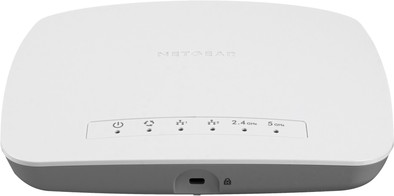
The Netgear WAC510 is an access point for small and medium-sized companies. 1 point can provide a small office or a floor with wireless internet. Thanks to MU-MIMO, the access point creates a separate connection for each device. This way, your wireless network remains fast and stable. Even with 200 connected devices. Use the Netgear Insight app to install and manage the Netgear WAC510. You can also use the app when you're adding extra access points to the network to expand its coverage to create 1 big WiFi network for a larger office. The access point is powered by the network cable, so you don't need to worry about installing it near a socket.
The access point comes in a remarkably compact square box. What is immediately noticeable is that no power adapter is included. So you must have a PoE switch, or provide an adapter yourself. The AP can be powered with “regular” 15W PoE, but if you prefer 12V power you will need to provide a 30W copy (2.5A). It's not entirely clear why. One of the novelties of this AP is that you can configure the device via an app on your phone. So let's give that a try! You must first create an account, and set your location (country) there. When you install the app you have the option to scan a QR code that will automatically connect your phone to the default SSID of the AP. A firmware update is immediately available, but the upgrade process is not very clear. Before I knew it I had started the upgrade three times, but in the end it was done correctly. Afterwards I can do the configuration. The first thing I am asked is my country, although I had just entered it. And I also have to state the time zone again, while Belgium is really not so big that it spreads over several time zones. A cosmetic flaw. The configuration via the app is simple: you set the SSID, type of encryption with password and band (2.4 or 5 GHz). So far nothing special, although it strikes me that the AP does not support WPA Enterprise. An odd choice for an AP positioning for the business market, especially since any 10-year-old Linksys for home use can. If you open the app again afterwards, it sometimes takes a long time before the AP is detected again, which is a bit annoying. The AP allows you to create a guest network and then offers a few interesting options. You can set up a captive portal where you have to accept, for example, general terms and conditions. In addition, you can set a bandwidth limitation for the guest network, and by default for the guest network isolation is on so that devices on the guest network can't connect with each other, because they shouldn't. What I miss is the possibility to isolate users on the guest network from the local network, ie a filter that allows guests to access the internet, but not to devices on my own local network (printer, NAS,...). You can set a URL filter, but that works for all networks at the same time (so ALSO for my own SSID) so that is not a solution. You can put the guest network in a separate VLAN, extend that VLAN to your router and then filter there, but I think that's a bit too complex for the target audience. The more advanced settings must be configured via the web interface. For example, you can turn off the Wi-Fi network at certain times, start a packet capture, and see information about the connected devices. And then just test. I compared this AP to a much more expensive AP from a major player that has a namesake in skin care. Both are AC wave 2. Each time I downloaded a 1 GB file; near the AP, at 10m and 20m away (with walls in between). I deliberately didn't play with settings, so eg NOT forced the client to 5 GHz. I think that the AP should send that. The Netgear AP gave the following results: 24.5 Mbps at 2m, 13 Mbps at 10m, and 5.5 Mbps at 20m. The other AP gave surprising results: at 2m 44 Mbps (so a lot better than the Netgear) but at 10m (6.6 Mbps) and 20m (3 Mbps) the expensive AP scored a lot less than the much cheaper Netgear. The conclusion of this brief test is that the device works well, although there are some minor flaws that make me question why you would choose this AP over one designed for home use. Especially since the AP does not support handover from one AP to another.
Kelly De Koninck
29 May 2017
Automatically translated from Nederlands
Very quick and easy installation. Sober design (discreet), with a very graphic and well-arranged dashboard to clearly see all useful information (number of WiFi customers, traffic, etc.). A lot of configuration options, 2.4 GHz and 5 GHz WiFi signal, with also gigabit LAN: it is fast and speed is constant. iOS and Android app to manage the device. Really handy to quickly arrange everything in an efficient way from anywhere in the company and thus save time. No stability problem after 15 days of use, really satisfied!
Antoine M.
29 May 2017
Automatically translated from Nederlands
Latest technology, beautiful design, power supply via POE, I have other Netgear products in my network
Paul Du Faux
7 March 2018
Automatically translated from Nederlands