Reason for choice :
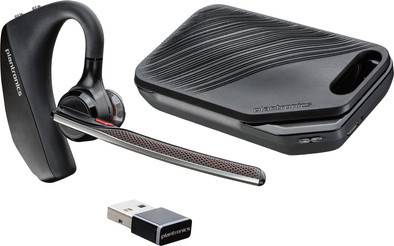
The Corona quarantine has created the need for me to find a decent hands-free solution for the enormous amount of video conference calls and regular mobile phone calls I make daily from the home work situation. After a first attempt with a cheapo New Bee BT headset (25Euro at the competitor Am*on), we chose this more expensive Plantronics 5200 UC.
The disadvantage of the cheap BT headset was that it offered a lousy sound quality, could also connect to PC and smartphone at the same time, but as soon as I did that it was as if the sound quality was divided between the two connections, even worse. In order to be able to call video conf properly, I also started looking for a headset for the PC. But I actually wanted a combined solution for both conf calls and mobile calls.
And the comfort of that cheap headset was also not of such a nature to withhold during a working day, putting it on the ear was not easy either, in short, returned it a week later. After a few days of reviews and testing, I chose this Plantronics Voyager 5200 UC.
Because of the included charging case, I chose this more expensive combination, transporting the headset without a case does not seem convenient to me. An additional advantage is the BT dongle, which ensures a good connection with the laptop. Although the headset can of course also connect directly to the bluetooth of the laptop, I can imagine that it is better matched with the dongle (is already paired with the dongle in the box)
With smart phone:
Pairing went smoothly, manual mentions NFC pairing but I have not tested it.
Comfort : very wearable for a whole working day without discomfort, tried the three sizes of earplugs supplied but still chose the standard middle one.
Sound quality : is regarded as very good by interlocutors. There is noise canceling with an active DSP with 4 microphones, but I can't judge that, the device was only used in a quiet home work environment.
Ease of use: taking a call by giving a voice command is great! And if the headset is not on the ear and someone calls, hanging it on the ear is enough to accept the call, the built-in sensors know whether it is on the ear or not.
The 4 buttons are also handy and easy to find by touch: volume + and -, mute and close/record a conversation, but I usually do the latter with voice command. The range is large, according to the manual 30 meters, and he certainly achieves that, even in a house with walls in between.
Connecting is always problem free, headset also gives voice feedback "PC connected", "phone 1 connected", or "Battery high", etc...
With supplied bluetooth USB dongle (BT-600):
Very convenient to use because the headset can be connected to a smartphone and PC simultaneously.
On the PC, use for virtual meetings with Jitsi, Google Meet or Zoom is problem-free with good intelligibility on both sides.
Watching Youtube or online news on PC is also perfectly possible with good sound quality (mono of course).
Supplied storage box with charging function:
Is useful for transporting the headset, which is too fragile to just throw in the backpack. An additional advantage of the case is the possibility to unfold the headset in order to recharge in between, it to the ear hanging up is then easy and fast when a call is made (and that action then automatically takes the call).
Battery life :
Never had the feeling that it fell short, when fully charged the headset indicates that there are more than 7 hours of talk time. This corresponds to the manual, which also states that the charging case provides an extra talk time of 14 hours (i.e. two full charges).
Standby time according to manual is 7 to 9 days (for dongle and smartphone respectively), but I have not verified that. I have not reached full use of talk time either, but as said never without cases, with regular long-term use (video conference, calling, Youtube, watching news ..) with a short charging session during lunch break.
Software:
on the PC there is the Plantronics Hub software, useful to bring in the necessary firmware updates (both Dongle and headset). Some settings can also be adjusted.
on Android there is also an app called Plantronics Hub with similar functionalities as the PC version, you can also locate your headset with it by playing a sound signal on the headset. The apps (both PC and Android) are useful for monitoring the status of the headset and taking full advantage of the features.