Never available again
View alternatives in the sidebar
According to our NAS expert
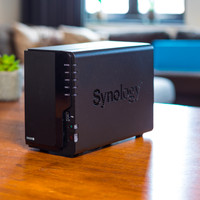
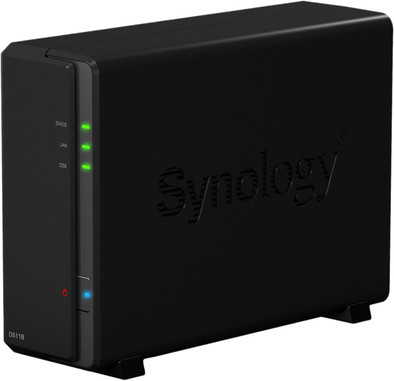
The Synology DS118 is an NAS without a disk, for home offices and private use. The NAS is capable of streaming media, as well as backing up and managing files. Connect your NAS via DLNA to your smart TV or computer, and you can instantly watch 4K movies without converting them. Thanks to the extensive file management system, you can search, filter, and cluster all your files clearly. On top of that, the software keeps multiple versions of your spreadsheets, text files, and other documents, so you can always access previous versions. Use QuickConnect to easily access the files on your NAS via a web browser.
Number of hard drive slots | 1 | |
|---|---|---|
Suitable for hard drive size | 3.5-inch HDD | |
Internal RAM | 1 GB | |
Processor cores | Quad-Core (4) | |
Built-in hard drive |
5 stars
66
4 stars
28
3 stars
2
2 stars
0
1 star
1
Installation
Energy consumption
Speed
Software
This NAS is used for multiple purposes, including storage of images from two 4mp ip cameras. It works so well right away that I would have preferred the DS218 which can be used to install two hard drives. No delays in the images, performance remains good. Simple and good management can be performed via the web interface.
Michiel
28 August 2018
Automatically translated from Dutch
I debated for a long time whether I should buy a NUC or a NAS. Ultimately opted for the DS118 because it saved me half the cost and was allowed to try it for 30 days at Coolblue. Now I don't want to return it, what a nice device.
NZBGet runs like a charm and so does streaming to my Nvidia Shield. It is a 1 Bay NAS but for everything I want to keep safe there is automatic backup to my cloud via an easily adjustable app. Never worry about it again. Accessing from the internet with Quickconnect also works fine and relatively safe. Synology has a wiki for all your questions, rarely seen such extensive support and then there is also a very active community.
Because the DS118 does not have an Intel SoC but a new RTD1296 architecture, it takes a while before all packages are available, but I have every confidence in this brand.
The only downside for me is that part of the fun is in installing and figuring out how everything works. That quickly ends at Synology because everything just works perfectly right away. Now just enjoy this beautiful device.
Robin
21 September 2018
Automatically translated from Dutch
For the past 6 years I had a USB HD attached to my ASUS RT-AC66U router (with Merlin firmware), as a NAS. Worked fine satisfactorily. Merlin has discontinued this router firmware, and I wanted to stay current with security updates from ASUS, but I found the support for SMB server and OpenVPN in the ASUS firmware to be insufficient. I considered buying a new router, but then again I would be dependent on 3rd party firmware and the router's USB port speeds.
Then I had a "Duh!" moment... of course, I must have an HD hooked up directly to the Ethernet!
After a lot of research, I came across Synology - I read a lot of positive experiences about it, and the extra packages - including OpenVPN, HyperBackup, Drive and Surveillance Station - seemed very useful to me. And I was able to find a good affordable configuration!
I found it difficult to choose between the different models... what are the major advantages and disadvantages of DS218j vs DS218play vs DS218 vs DS218+ for example? Well, ultimately I think it's about CPU architecture (and therefore available packages) and extensibility. But it would be useful if Synology had a good decision aid (or just less different models!).
The Realtek CPU was the right choice for me: broad support for the packages I wanted (I don't need Plex, among others) and a good price. (For me the only advantage of an Intel CPU would be that I could possibly run a Windows 10 VM on the NAS itself.) 1 disk without RAID is enough for the time being.
I chose the DS118 without discs, because it basically has everything I need for an attractive price. I already had a fairly new WD Elements Deskop 4TB USB drive, and in it was a WD Blue drive. WD Blue (re-branded WD Green) is a better choice than WD Red for a NAS with 1-bay (so without RAID; if you have multiple bays with RAID, it's better to choose WD Red). (FYI: I've had too many issues/malfunctions with Seagate; I've only been buying WD for the past few years.)
The DS118 is a nice little device - a lot smaller than I expected. The case is plastic, but looks good. You close the case with regular screws - would have been much better if they were screws that you loosen and tighten with your hand, and also better if the screws are metal instead of plastic.
In my opinion, the 'Quick Installation Guide' is really insufficient. I sometimes wonder how people with less computer knowledge ever get this NAS to work properly!
The DS118 has been running for a week now, and I'm very excited about it: very smooth and stable, with many more features that I'm still trying out. I have, among other things, OpenVPN running on it, and finally got my ASUS router firmware back to the current official version from ASUS. Hyper Backup to an external USB drive is very smooth, Drive Sync (v2) for my laptop works great.
Surveillance Station with two Foscam IP cams is going well. Images can be stored on the internal disk (with automatic rotation of recordings, max number of days, max GB etc.) or to an external USB disk/stick. The nice thing is that you can use detection from the cam or let SurSt do it itself. To my surprise, it doesn't eat too much CPU power. The disadvantage may be that you only get 2 licenses, and additional licenses are very expensive.
As for speed, I can now easily run some office programs (lots of small files) from the NAS that I previously had to have locally. And my backup to the NAS is also much smoother.
Very satisfied!
daniël
28 June 2019
Automatically translated from Dutch
With Coolblue Extended Warranty, you are protected against costs due to quality defects of your NAS for the next 4 years. During the entire term, we will reimburse up to the original purchase price. You can easily add the Extended Warranty in your shopping cart.
€ 12,99
one-timeAdd your NAS to your shopping cart. In the next step, you can add the Extended Warranty. You can exchange or return your purchase for free within 30 days.
Product number | 797866 |
|---|---|
Manufacturer code | DS118 |
Brand | Synology |
Warranty | 2 years |
Processing of your defect | Carry-in warranty |
Built-in hard drive | ||
|---|---|---|
Number of hard drive slots | 1 | |
Suitable for hard drive size | 3.5-inch HDD | |
RAID | Basic | |
Internal RAM | 1 GB |
Connection type | Wired | |
|---|---|---|
LACP Link aggregation | ||
Thunderbolt connector | ||
Number of Ethernet ports | 1 |
NAS functions | Backup server, Download server, FTP server, Media server, Photo server, Surveillance station, VPN server, Web server | |
|---|---|---|
NAS application center | ||
Maximum number of shared folders | 256 | |
Maximum number of local users` | 2048 | |
Plex support | ||
Number of IP camera licenses included | 2 | |
DLNA | ||
UPnP AV support | ||
FTP server | ||
On/off switch | ||
Automatic switch on/off | ||
Kensington lock | ||
Apple Time Machine support | ||
Chromecast support | ||
Suitable for IFTTT | ||
Recommended for use | Making a backup, Personal cloud, Store photos and videos |
Processor brand | RealTek | |
|---|---|---|
Processor family | RealTek | |
Processor code name | RealTek | |
Processor cores | Quad-Core (4) | |
Clock speed | 1,4 GHz |
Depth | 22,4 cm | |
|---|---|---|
Width | 7,1 cm | |
Height | 16,6 cm | |
Type NAS | Upright | |
Color | Black | |
Weight | 700 g |