TP-Link Omada EAP225-Outdoor
Choose your access point
Outdoor
|
1
|
867 Mbit/s
Choose your access point
- Be the first to know when this product is in stock





Outdoor
|
1
|
867 Mbit/s

With Coolblue Extended Warranty, you are protected against costs due to quality defects of your access point for the next 5 years. During the entire term, we will reimburse up to the original purchase price. You can easily add the Extended Warranty in your shopping cart.

€ 4,99
one-timeAdd your access point to your shopping cart. In the next step, you can add the Extended Warranty. You can exchange or return your purchase for free within 30 days.
Product number | 811424 | |
|---|---|---|
Manufacturer code | EAP225-Outdoor | |
Brand | TP-Link | |
Warranty | Lifetime | |
Processing of your defect | Via Coolblue |
Suitable for business use in | Small business | |
|---|---|---|
Living situation | 1 floor | |
Speed class | Basic | |
Number of access points | 1 | |
Quality of Service (QoS) | ||
Suitable for IPv6 | ||
Guest network | ||
Bridge option | ||
Repeater function | ||
IGMP Snooping | ||
Beamforming | ||
Seamless roaming | ||
Can be expanded with extra stations | ||
On/off switch | ||
Mounting possible | ||
Mounting surface | Pole, Wall |
Fastest WiFi standard | Wireless AC (WiFi 5) | |
|---|---|---|
WLAN security | 802.1X, WEP, WPA, WPA-PSK, WPA2, WPA2-PSK | |
Number of WiFi antennas | 2 | |
Frequency bands | Simultaneous dual-band | |
WiFi speed | AC1200 | |
5GHz band speed | 867 Mbit/s | |
2.4GHz band speed | 300 Mbit/s | |
External antennas | ||
Number of external antennas | 2 | |
Signal transmission | Omnidirectional | |
Antenna connection type | Standard antenna | |
Replaceable WLAN antennas | ||
MAC address filter | ||
MIMO | ||
MU-MIMMO |
Ethernet speed | Gigabit Ethernet (1000Mbps) | |
|---|---|---|
Number of Ethernet ports | 1 | |
WAN ports | 1 | |
Connection type | PoE, Power plug | |
PoE support | ||
Type of PoE | 24V Passive | |
Number of PoE ports | 1 |
Type of access point | Outdoor | |
|---|---|---|
Material | Plastic | |
Height | 215 mm | |
Width | 46 mm | |
Depth | 27 mm | |
Color | White |

anything for a smile
Current product

€ 75,90
Retail price
€ 109,99€ 89,90
Retail price
€ 94,99€ 76,90
Retail price
€ 119,-€ 112,90
Retail price
€ 99,99€ 98,90
Outdoor
Indoors
Indoors
Indoors
Indoors
Wireless AC (WiFi 5)
Wireless AX (WiFi 6)
Wireless AC (WiFi 5)
Wireless BE (WiFi 7)
Wireless AX (WiFi 6)
Simultaneous dual-band
Simultaneous dual-band
Dual-band
Simultaneous dual-band
Simultaneous dual-band
Gigabit Ethernet (1000Mbps)
Gigabit Ethernet (1000Mbps)
Gigabit Ethernet (1000Mbps)
2.5Gb Ethernet (2500Mbps)
Gigabit Ethernet (1000Mbps)
Type of access point | Outdoor | |
|---|---|---|
Fastest WiFi standard | Wireless AC (WiFi 5) | |
Number of access points | 1 | |
Frequency bands | Simultaneous dual-band | |
Ethernet speed | Gigabit Ethernet (1000Mbps) | |
PoE support | ||
Mounting surface | Pole, Wall | |
5GHz band speed | 867 Mbit/s |
According to our access point expert
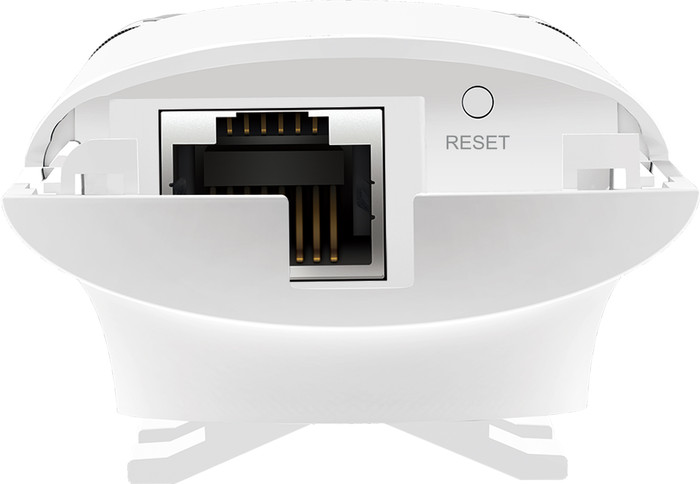
The casing of this access point is waterproof, so it's suitable for outdoor use.
The power is supplied via the network cable, so you don't need a socket.
You can connect multiple access points to each other for a wider coverage.
To reach the highest speed that this access point offer, the connected devices need to support 5GHz.
This access point doesn't include a network cable, check out our recommended bundles for this.
The TP-Link Omada EAP225-Outdoor is a waterproof access point for outdoors. This allows you to provide an entire campsite or recreation area with fully wireless internet. Thanks to MU-MIMO and a maximum speed of 867Mbps, all your guests can enjoy a stable and fast internet connection. You can link multiple access points for a larger range. You can manage all hotspots in the well-organized TP-Link software. Create different guest networks and determine who can and can't access the files on your network drive. Via the software, you can also print a temporary password that expires after the visitor has left. You can power the access point via the network cable. That way, you don't need a power cord outside.
Range
Installation ease
Gebruiksgemak
Speed
Design
According to the specifications and compared to other products/brands, this product is a very interesting deal. Very fast and with a double radio so that older 2.4GHz devices can be used smoothly next to the newer 5Ghz without disturbing each other. The product is clearly aimed at the larger installations where different APs need to be managed centrally. When used as a standalone unit, the built-in web interface must be used for configuration. For a layman or do-it-yourselfer with limited IT knowledge, this can be a challenge. We chose this product to replace a Mesh system that was not really reliable in practice due to repeated unexpected failures.
Pascal De Plancke
29 April 2018
Automatically translated from Nederlands
As a replacement for my (not so old) N-access points I ended up with this EAP245. Bought in part because of the good experiences with other TP Link products. Recently also purchased the router from TP Link type AC2300, see also my review.
I also looked at the DECO M5 from TP Link and think it is a wonderful system. What I'm afraid of is limiting the bandwidth (just like with repeaters/extenders) since the chip in it has to both transmit/receive and connect to the other DECO satellites simultaneously.
That is why we opted for 2 access points again, but a business version.
The EAP245 has a nice design so you don't have to place it in a corner or out of sight. That also makes a difference in range. After some walking back and forth through the house, I seem to have a good to excellent connection everywhere. It can only be better in the attic, but I don't go there that often and I can always mount an extra copy there (but first pull the cable). Concrete walls/floors in today's houses impose many restrictions. Every access point has a bit of trouble with that.
However, the dimensions are a bit on the bulky side, I think it could have been a little smaller. The box also includes a mounting plate if you want to hang the EAP from the ceiling (business use). I did use the mounting plate, but then to hang the AP on the wall in a nice spot in the living room. I also have some use for it in the garden.
I connected 1 copy in the living room via the power adapter. The other copy is on the first floor via PoE. I have both set up with a fixed IP address. That simply offers a more stable network without hitches. You can configure the EAP via the standard method, but I always like to look at all kinds of configuration options. And for that you can configure both APs simultaneously via the EAP controller software. Note that EAP controller software is not available for MAC. You will therefore have to borrow a laptop from a family member or friend if you are an Apple user. Another option (and that is possible with any MAC) is to log in directly to the AP via the web browser. Then you can also change various settings, but I noticed that you have more setting options via the EAP controller software. This is also confirmed when you read the TP Link site at FAQ.
One thing I ran into was setting up a guest network, and I mean configuring it properly and securely. Contrary to what I read in reviews here and there, it is not just creating an extra SSID and portal. That portal is a nice touch (just like logging in visitors at a hotel) but it doesn't cover the load. If you create it via the 1-2-3 method and you then connect to the extra SSID (for the guests), it turns out that you can still access your own NAS via that WiFi connection. Client isolation does not prevent this either. Something that is not desired for the visitors.
After some searching I found out to create an access control rule. You can link this to the extra SSID, and you can set it up in such a way that you cannot connect to the other devices in the same subnet. After performing the necessary tests again, it turned out to work well that way.
A trick is to back up the settings. If something goes wrong, it is easy to reset the settings.
The EAP controller software is quite extensive, but can be improved here and there. You can also monitor your WiFi network very well. Nice trick, but you don't actually do that every day in practice.
The EAPs work here in house to our full satisfaction. Offer a good range, never drop out and ensure a stable WiFi network. That last one is the most important.
Overall an excellent AP for a decent price.
Erika
11 March 2018
Automatically translated from Nederlands
I had wanted to expand my wireless network for some time and was looking for a decent "wireless" solution that wasn't too expensive. This TP-Link EAP245 certainly meets my requirements. The downloadable control software is a must for an administrator and gives you very good control and overview of all settings. You can create users/accounts and impose restrictions or give them priority over other accounts. The software also allows you to manage multiple TP-Link access points. The device works flawlessly in my situation. Uploading large files to my NAS and simultaneously watching movies from different rooms and all this wirelessly ... no problem anymore. The nice thing is that a "time schedule" can be set so that you can determine who can use the internet when and for how long ;-) . A great device. I am super satisfied with it. Without a doubt, I'll be getting another one of these.
Gino Renne
7 February 2018
Automatically translated from Nederlands