Jabra Evolve 75 UC Stereo Wireless Office Headset
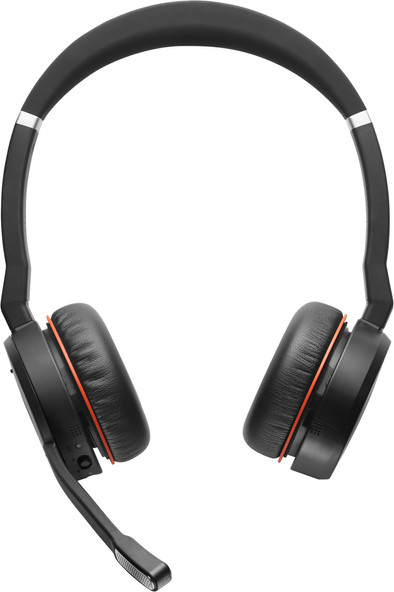
Never available again
View alternatives in the sidebar
View alternatives in the sidebar
According to our office headset expert
With the Jabra Evolve 75 Stereo, you won't get distracted by your surroundings. With active noise canceling, you won't hear your loud colleagues. That way, you can give your conversation partner your full attention. You can connect the office headset to 2 devices at the same time via Bluetooth. That way, you can switch between a phone call and your Spotify playlist. With the wireless range of 30m, you can easily walk to the printer without losing connection with your conversation partner. If you're in a call, your colleagues can see that by the red light on the ear cup. That way, they won't disturb you during work.
Headphones wearing method | Over your head |
|---|---|
Connection type | Wireless |
Office headset suitable for device | PC, Smartphone |
Suitable for type of communication software | Universal Communication |
5 stars
11
4 stars
13
3 stars
2
2 stars
0
1 star
0
I bought the Jabra Evolve 75 to use as a headset, not so much for music. Originally bought a Jabra Elite 85H, but did not notice that it is not suitable for a laptop or PC (no USB dongle, and standard Bluetooth too limited). The usb bluetooth dongle works "out of the box". Plug in, turn on, done. Just update both the dongle and the headset. Although it is an on-ear headset, it is quite comfortable. Noise canceling (ANC) works reasonably to well, but you can still hear something. Not a problem for me, disturbing sounds are considerably muffled. It does give significantly less noise than the Elite 85H. Once connected to the phone (just a bluetooth connection) it works perfectly. I usually work with Cisco Webex (that's why I bought the UC version) but as soon as I get a call it's just a tap on the right ear, Webex is put on mute (both for myself and the participants) and I can make my phone call. Once the call ends, Webex will turn back on. Another review complains that sounds from the PC or laptop interrupt the phone conversation, but that can be set with the softphone settings of Jabra Direct (prioritize computer audio off). I disabled softphone anyway because I don't use skype for calls. If you put on a headset, it is often difficult that you cannot hear yourself speak. You can set that with the software (side tone) from -9dB to +6dB (or off). You sometimes also pick up some ambient noise, such as the laptop fan on your desk. Not adjustable on the headset itself. The options from the headset are limited (mute, volume, calling, anc off/on, hear through), but that also saves a lot of buttons. You can, however, press a button on your left ear cup to listen in with your surroundings; unfortunately your connection will be muted and you will no longer hear the other party. So just listening to both doesn't want to be this way. But handy if you want to talk to someone privately without taking off your headset. Other Jabra headsets/headphones can often be operated with an app on the phone, but this headset is not. Not a problem for me, although the Elite did have an equalizer and things like that. The dongle and the headset can be configured independently of each other. The UC or MS variant is determined by the supplied dongle, the headsets are identical. The difference between the two remains somewhat vague, but the MS dongle seems to have slightly more options for MS Meetings, although there is nothing to be found in the manuals (for both). The UC variant also works fine with Microsoft Meetings by the way. The headset comes in a nice sturdy case.
Robbert van der Hoorn
22 September 2020
Automatically translated from Dutch
In itself a nice headset of reasonable quality. the problem I experience and why I no longer use it is that I have connected two devices via bluetooth (mobile phone and laptop), and every time I have a mobile phone call and the laptop makes a sound (mail, message, teams... ) puts the mobile call on hold! You can't start or end Skype for B conversations either via the buttons on the ear cup.
Jan Luyckx
9 April 2020
Automatically translated from Dutch
Likes it well so far. No negatives discovered yet. Too bad it doesn't have a usb c connection for that price
Peter Razenberg
21 February 2021
Automatically translated from Dutch
Product number | 831690 |
|---|---|
Manufacturer code | 7599-838-109 |
Brand | Jabra |
Warranty | 2 years |
Processing of your defect | Carry-in warranty |
Office headset suitable for device | PC, Smartphone |
|---|---|
Suitable for type of communication software | Universal Communication |
Supported communication software | Cisco, Unified Communications |
Pick up/hang up phone call | |
Standby time | 15 hours |
Spoken notifications |
Built-in microphone | |
|---|---|
Microphone recording type | Mono |
Microphone mute function | |
How to mute | Via the button on the ear cup |
Collapsible microphone |
Connection type | Wireless |
|---|---|
Bluetooth | |
Bluetooth version | 4.1 |
Nano receiver | |
Software compatibility | |
USB port |
Type of ear cushions | On-ear |
|---|---|
Ear cushion material | Foam, Imitation leather |
Headphones wearing method | Over your head |
Number of ear cups | 2 |
Rotatable ear cups | |
Foldable |
Power source | |
|---|---|
Power supply type | USB port PC/laptop |
Cable length | 1 m |
Base station |
Weight | 0,177 kg |
|---|---|
Material | Plastic |
Finish | Matte |
Color | Black |