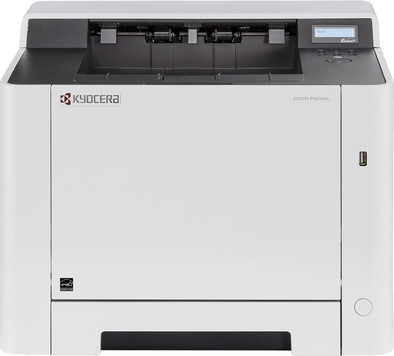
Kyocera Ecosys P5021cdw
Never available again
View alternatives in the sidebar
View alternatives in the sidebar
According to our printer expert
The Kyocera Ecosys P5021cdw is a color laser printer for a small office. With a speed of 21 prints per minute, you'll have to wait less than 3 seconds for a print. This printer doesn't have functions you don't need. With the Ecosys P5021cdw, you can easily print documents from a USB drive or wirelessly via Apple AirPrint or the Kyocera app. This model includes a 3-year on-site warranty on your printer, which means that a technician will come by if needed. The P5021cdw has a small LCD screen, which you can use to adjust your settings.
Print technology | Laser | |
|---|---|---|
Printer type | Printing only | |
Automatic duplex printing | ||
Color printer | ||
Maximum print size | A4 | |
Photo paper drawer | ||
Built-in WiFi |
5 stars
5
4 stars
8
3 stars
4
2 stars
0
1 star
0
As I've seen in previous posts, the integration wasn't that easy... but once you know it, super simple. Connect the device to your network via the cable. Find the IP address that your device has been given. Apparently windows8+ can do this if you are looking for a new printer (network). Go to this page (network address of the printer), and to login .. Admin / Admin do your setup, I took a fixed IP (192.168.1.60) for the network card, and a fixed IP for the wifi (192.168.1.61) just uplink with the wifi wpa (the paraphrase is your wpa2 password), and integrated. Just launch a ping, to both addresses, and reply :) ! For windows installation (from win8), just : Install new printer, search ,.. Hey.. found a Kyocera. , click, and ok. IT'S THAT SIMPLE ! but you should know. Hopefully there is "the next" who can definitely use this.
Daniel Monsieux
7 August 2020
Automatically translated from Dutch
With this end-of-series entry-level model from Kyocera, you have an affordable professional printer that won't disappoint.
timpie
22 November 2020
Automatically translated from Dutch
Positive from the start: Packaging is a cardboard box without Styrofoam, only with a vacuum bag for the printer itself. Easy to take out of the box. And a compact printer regardless of its 21 kg weight. Compared to other printers, the toners are small and handy with a low price of around 2 euro cents per page. This is ideal for low to moderate use, e.g. home or small office. The print quality itself is excellent with sharp text and fine diagrams, but less suitable for photos. Setup with LAN for macOS and iOS is simple, plug in and ready to go. All common printer protocols are supported. The screen is a bit small but enough for the basic configuration, as needed. An extensive and comfortable configuration panel is available via the browser.
Michael Maier
10 December 2020
Automatically translated from Dutch
With Coolblue Extended Warranty, you are protected against costs due to quality defects of your printer for the next 4 years. During the entire term, we will reimburse up to the original purchase price. You can easily add the Extended Warranty in your shopping cart.
€ 33,99
one-timeAdd your printer to your shopping cart. In the next step, you can add the Extended Warranty. You can exchange or return your purchase for free within 30 days.
Product number | 834209 |
|---|---|
Manufacturer code | 870B61102RD3NL0 |
Brand | Kyocera |
Warranty | 2 years |
Processing of your defect | Carry-in warranty |
Printer size | Large | |
|---|---|---|
Width | 41 cm | |
Depth | 41 cm | |
Height | 32,9 cm | |
Color | White | |
Weight | 21 kg |
Printer type | Printing only | |
|---|---|---|
Photo printer | ||
Portable (mobile use) | ||
Usage location | Office |
Toner cartridge line | Kyocera TK-5220 | |
|---|---|---|
Print technology | Laser | |
Number of cartridges/toner cartridges | 4 | |
Color printer | ||
Print speed black (ISO) | 21 ppm | |
Print speed color (ISO) | 21 ppm | |
First black page ready after | 11 seconds | |
Speed class | Good | |
Usage costs per page | 0,05 euro | |
Maximum print resolution height | 1200 dpi | |
Maximum print resolution width | 1200 dpi | |
Maximum print size | A4 | |
Automatic duplex printing | ||
Borderless printing | ||
Maximum print size duplex printing | A4 |
Scan functionality | ||
|---|---|---|
OCR |
Copying functionality |
|---|
Fax functionality |
|---|
Built-in screen |
|---|
Suitable for HP+ |
|---|
Compatible with operating system | Android, ChromeOS, Linux, Windows, iOS, macOS | |
|---|---|---|
Connection type | Wireless | |
Apple AirPrint | ||
Email print | ||
WPS (Wireless Protected Setup) | ||
Female standard USB-A port version | 2.0 | |
Number of Ethernet ports | 1 | |
NFC | ||
Built-in WiFi | ||
Bluetooth | ||
WiFi direct | ||
USB port |
Manual input tray | ||
|---|---|---|
Photo paper drawer | ||
Output capacity output drawer | 550 | |
Maximum print size standard paper tray | A4 | |
Input capacity standard paper tray | 250 | |
Number of standard paper trays | 1 |