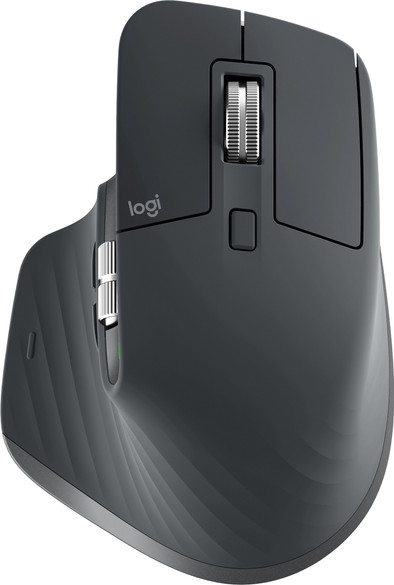
Logitech MX Master 3 Wireless Mouse Black
Never available again
View alternatives in the sidebar
View alternatives in the sidebar
According to our mouse expert
The Logitech MX Master 3 is the successor of the successful MX Master 2S. The MagSpeed scroll wheel is even faster and quieter than before. This way, you can scroll through all your Excel rows in no time. The Logitech Flow feature is also back, so you can use the mouse on multiple devices at the same time and switch with the push of a button. The design is even more comfortable for your hands, so it's even easier to work with. Lastly, the mouse now has a Darkfield sensor, which allows you to navigate on any surface. You can use the mouse on a glass table, the counter, or behind your desk. Connect the mouse via a USB receiver or via Bluetooth, if your USB ports are already occupied.
Connection type | Wireless | |
|---|---|---|
Bluetooth | ||
Mouse model | Standard | |
Mouse size | Large | |
Ergonomic design | ||
Left or right-handed | Right-handed | |
Suitable for gaming | ||
Silent mouse |
5 stars
242
4 stars
87
3 stars
6
2 stars
0
1 star
0
Aansluitmogelijkheden
Ergonomie
Nauwkeurigheid
Formaat
Design
For Office/ Work use a super mouse. Coming from its predecessor the MX Master 2 S, this is a worthy incremental upgrade.
The placement of the two side buttons is better than the predecessor in my opinion. Clicks could have been better as these feel a bit mushy. The magnetic scroll wheel is even faster, quieter and feels more solid. Charging is done with a USB C cable, charge for 1 minute and you can last a few hours.
Software is inventive and macros have already been set for many applications, the disadvantage is that these are stored locally and not on the mouse itself. So install software at home and install it at work.
Build quality is good and solid, in 2019 the weight is on the heavy side. (precursor is heavier but still)
An ideal mouse for productivity or media consumption, also suitable for casual gaming (patience, minesweeper, civ ;P)
Bekir Atabey
29 September 2019
Automatically translated from Dutch
Wow, this is really an improvement!!! The forward and back buttons in particular have now finally been redesigned and are much more usable without misclicking. You can now also use this mouse in Photoshop, for example, hand, panning, brush size and scrolling can now be done with the mouse. Useful. Only the thumb button, which I use as the start button (Windows 10) is a bit stiff... That was a bit more flexible with the MX2. But that could be just me, I still have to get used to this newbie. All in all a top mouse. Ok, it's not cheap, but for that money you have the best mouse in the world!
Michel Paquot
1 October 2019
Automatically translated from Dutch
Perfect mouse for the office and everyday use. The rotating scroll wheel is certainly ideal. The horizontal scroll wheel is also very useful for tables and excel.
T.S.
12 March 2020
Automatically translated from Dutch
Product number | 838633 |
|---|---|
Manufacturer code | 910-005694 |
Brand | Logitech |
Warranty | 2 years |
Processing of your defect | Carry-in warranty |
Mouse model | Standard | |
|---|---|---|
Input | Laser | |
Number of buttons | 7 | |
Ergonomic design | ||
Left or right-handed | Right-handed | |
Adjustable DPI | ||
Mouse controls | Buttons, Scroll wheel | |
Suitable for gaming | ||
Programmable buttons | ||
Number of programmable buttons | 5 | |
Lighting peripherals | ||
Silent mouse | ||
Horizontal scrolling | ||
Mouse surface | Any surface | |
Product family | MX |
Connection type | Wireless | |
|---|---|---|
Type of USB port | Standard USB-A, USB-C | |
Nano receiver | ||
Frequency bands | 2.4GHz | |
Bluetooth | ||
Bluetooth version | 4.0 | |
Number of devices that can be paired | 3 |
Plug and Play | ||
|---|---|---|
Compatible with operating system | Windows |
Power supply type | Rechargeable battery | |
|---|---|---|
Battery level indicator | ||
Replaceable battery | ||
Battery included |
Color | Black | |
|---|---|---|
Mouse size | Large | |
Width | 8,43 cm | |
Height | 5,1 cm | |
Depth | 12,49 cm | |
Material | Plastic | |
Finish | Matte and glossy |