Never available again
View alternatives in the sidebar
View alternatives in the sidebar
Product number | 839923 | |
|---|---|---|
Manufacturer code | 9H.JKC77.37E | |
Brand | BenQ | |
Warranty | 2 years | |
Processing of your defect | Carry-in warranty |
Sharpness | 4K (UHD) | |
|---|---|---|
Brightness | 2000 ANSI lumen | |
Contrast ratio | 30000 | |
Throw ratio | 1,13 - 1,47 m | |
Recommended for use | Home cinema | |
Recommended for type of room | Living room | |
Smart function properties | ||
Projector size | Large |
HDR support | ||
|---|---|---|
Type of HDR | HDR10 | |
Minimum image size (diagonal) | 30 inches | |
Maximum image size (diagonal) | 200 inches | |
Aspect ratio projection | 16:9 | |
Projector technology | DLP | |
3D | ||
3D technology | Active | |
DLP Link |
Projection distance for 100-inch projection | 2,49 m | |
|---|---|---|
Type throw ratio | Normal throw | |
Zoom function | ||
Maximum projection distance | 10 m | |
Keystone correction | ||
Keystone correction | Vertical | |
Vertical keystone degrees | 30 ° |
Type of light source | Standard | |
|---|---|---|
Expected lifespan lamp (normal use) | 10000 hours | |
Replaceable lamp |
Maximum noise level | 28 dB | |
|---|---|---|
Noise level (saving mode) | 28 dB |
Media player | ||
|---|---|---|
Memory card reader |
Built-in WiFi | ||
|---|---|---|
Bluetooth |
HDMI connector | ||
|---|---|---|
Type of HDMI connector | Standaard HDMI Type A | |
Number of HDMI connectors | 2 | |
USB port | ||
Type of USB port | Mini USB-B, Standard USB-A | |
USB function | Play media, Power source, Software updates | |
Number of USB ports | 3 | |
VGA connector | ||
Mobile HD Link (MHL) | ||
Digital optical connector | ||
Headphone jack | ||
Tripod connection | ||
Screen trigger | ||
Kensington lock |
Weight | 4,2 kg | |
|---|---|---|
Height | 12,7 cm | |
Width | 38 cm | |
Depth | 26,3 cm | |
Color | White |
Battery (power source) |
|---|
anything for a smile
Sharpness | 4K (UHD) | |
|---|---|---|
Brightness | 2000 ANSI lumen | |
Throw ratio | 1,13 - 1,47 m | |
Recommended for type of room | Living room | |
Smart function properties | ||
Maximum noise level | 28 dB |
According to our projector expert
Thanks to the 4K UHD resolution, even the smallest details of the image are clearly visible.
With this projector, you watch colorful and bright HDR images.
Thanks to lens shift, you can also project a high quality image at an angle.
This projector doesn't have a smart platform, so you can only play content via a laptop or Chromecast, for example.
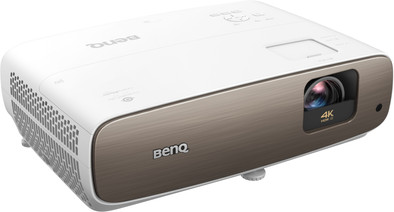
With the BenQ W2700, you can create an impressive movie theater experience in your living room. This projector effortlessly projects 4K UHD images. This resolution sharply focuses on the smallest details of a movie or series, from a blade of grass to an actress' hair. When you watch HDR images, you can get the most out of the color gamut of this projector. This way, you can enjoy the most subtle nuances, while bright hues are lit up clearly. The vertical lens shift function and zoom function ensure a subtle placement. So you can easily aim the projection upwards or downwards, or adjust the image size without having to move the projector.
The BenQ W2700 has a throw ratio of 1.13 - 1.47:1, which means that you can put the projector between 1.13 and 1.47m from the screen for a 1m wide projection. For a 2m wide projection, you can double that distance to 2.26 and 2.94cm. Be sure to check where you want to put the projector and if there's space.
The first impression, an honest first impression review.
Just hung this BenQ W2700 from my ceiling and installed everything. That took a while because I first had to remove my old beamer, the Sanyo PLV Z4 from 2005 (!), and then adjust the settings in my Logitech Harmony Hub. The big moment has arrived, via my Harmony App on my iPhone I clicked on the button 'Beamer 4K BluRay R2', which instructs the Harmony Hub to send a series of commands to different devices. My amplifier was turned on and the correct settings activated, as well as the settings in my HDMI splitter. The BenQ W2700 was turned on and input set to HDMI 1.
It takes a while for the image, but after about 30 seconds, the lamp has to warm up, a blurry-looking logo of BenQ appeared on the screen. At the top of the beamer is a cover and when you slide it out you can zoom in and focus the image using a few levers. Since the beamer hung upside down from the ceiling, these buttons are easily accessible. Focusing was beep in a second, as was tuning of the correct size image.
The first thing I noticed, when the first image was projected on my screen, were the letters that look extremely sharp on the screen and the dark background which also looked good dark; the white letters are really very sharp and clear. I expected improvement compared to my old beamer which was already 15 years old, but I did not expect so much improvement. This is because this BenQ W2700 can offer a very high contrast ratio, 30,000 to 1 versus 7000 to 1 with my old Sanyo PLV Z4 from 2005. The sharpness is also evident because the BenQ simulates 4K, it is not a native 4K beamer but using a special technique, the beamer can realize almost the same amount of pixels as native 4K projects, but at a fraction of the price. And don't be discouraged by the fact that this doesn't involve a native 4K projector, the results are truly stunning of the same quality as a native 4K projector. Only a very trained eye can tell the difference.
The second thing that struck me was that I had not yet closed all the curtains in my apartment, but that the image was nevertheless clearly visible. That's because this BenQ has 2000 ANSI Lumens of light output versus 1000 ANSI Lumens, half that my 2005 Sanyo PLV Z4 was able to cough up.
In short, a huge step forward in images and that is an understatement. The projector also offers a 3D display. However, I have yet to try this feature.
Conclusion first impression:
After I had set all the settings of the beamer correctly, which only took a minute, I decided to set up a blu-ray. I can only say that the image is magnificent. In particular, the colours, skin tones and overall brightness and contrast differ; dark is really 'nice' dark.
Are there no downsides? Yes, a few. For example, the beamer does make audible noise, but this becomes less when you place the beamer in a so-called eco position. This produces slightly less light, but you won't notice it in a shielded room. I also find it a drawback that, unlike my old Sanyo PLV Z4 projector, this projector does not have an automatic closing hatch for the lens that closes again when the projector is turned off. You have to manually take the lens cover on and off when using it. This is to prevent dust in the room from accumulating in front of the lens.
But those are minor issues in my view and do not outweigh the excellent out of the box image quality that it is all about in the end. For €1500,- I now have a projector at home that actually conjures up cinema-quality images in 4K resolution on my screen. Watching movies is taken to a higher level. I can wholeheartedly recommend this projector to anyone.
Dhr Edward
2 February 2020
Automatically translated from Nederlands
Is the replacement for the beamer of our photo club. Low noise, super sharp and high color quality. Received as a "hero" on the first club night.
Pieter
4 November 2019
Automatically translated from Nederlands
No TV can beat this image on price
Simon
13 January 2020
Automatically translated from Nederlands