Devolo Magic 2 LAN Triple Starter Kit (No WiFi)
Never available again
View alternatives in the sidebar
View alternatives in the sidebar
According to our powerline adapter expert
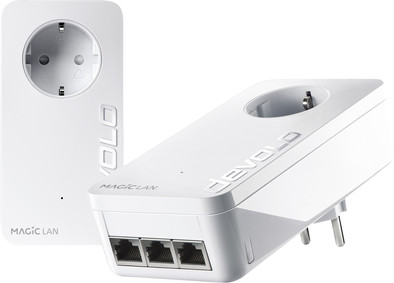
Create 3 extra network connections in your house with the Devolo Magic 2 LAN triple Starter Kit without WiFi. This lets you create extra-fast network connections wherever you want, with wired connections for your TV, game console, and media player. Or connect your laptop in the study as well, besides your desktop. The internet works via the power grid in your house, so you don't have to run any cables.
Ethernet speed | Gigabit Ethernet (1000Mbps) | |
|---|---|---|
Built-in WiFi | ||
Number of powerline adapters | 2 | |
Number of powerline stations | 1 | |
Socket integrated | ||
Maximum ethernet speed | 2400 Mbit/s | |
Automatic phase coupling | ||
Integrated switch |
5 stars
8
4 stars
19
3 stars
4
2 stars
0
1 star
1
Installation ease
User friendliness
Speed
Design
Looking for a solution to improve the WiFi in our house (sort of concrete bunker) over several floors, without having to run extra Ethernet cables, I came across the Powerline system. Nice concept to make the electrical wiring of your house work as a data network. In this area there are 2 brands that I think are leading, TP Link and Devolo. I chose the Devolo system because of the higher theoretical speed of 2400 Mbit/s, knowing that you would have quite a bit of speed loss in practice, I should at least be able to achieve the internet speed of my provider, 250 Mbit/s. The reason I chose the LAN version is because I first wanted to test whether the Powerline adapters can live up to what the manufacturer says. Since you can easily expand the Starter Kit, if you like it, that seemed the most convenient to me. In terms of costs, it is not immediately a dent in your wallet.
Ordering and delivery went quite smoothly. The same goes for installing the system. It is REALLY Plug&Play, instead of Plug&Pray. The set also comes with 2 Cat5E cables. Not bad cables in itself, but for a few euros you already have Cat6 cables that also deliver 1Gb/s only at a higher frequency, 250Mhz instead of 100Mhz, this means that more data can flow through the cable.
The installation: Plugged both modules into a socket, one connected to the router/modem with the supplied cable, waited a minute or 2-3, both modules have a white light. I still had to look for the Cockpit software via the Devolo website, look up your relevant type of device, and at the bottom of the product description you will find a number of downloads, including the Cockpit software.
The speed: Well, I had already taken into account that the speed between the modules would be slightly lower than the theoretical speed (taking into account about 50%). But in my case, where the module that is connected to the router is on a different group than the socket that the other module is on, I don't think the speed is really great. The module on the router currently indicates 175Mbit/s, the other module 200-395Mbit/s, measured via Devolo Cockpit. I expected the speed between the modules to be slightly higher, but I think that has to do with the fact that both modules are connected to different electrical groups. If I plug the modules into sockets that are on the same electrical group, the speed will quickly increase towards 400+Mbit/s. At the moment (modules in 2 different groups) I have a wifi router (300Mbit/s) attached to it, if I then perform an Ookla Speedtest over the internet, via the wifi signal, a reasonable 60Mbit/s comes out. Enough for home-garden-kitchen internet traffic. Even Youtube still works well at this speed, so don't expect Netflix to pose a problem either. So tip, if you want to get the most out of the modules, connect them to the same electrical group if possible. Second tip that you get right away. If you decide to plug the second module into a different socket, there will be a reset button on each of the two modules. Just press the reset button on both modules, white lights will flash (for setting up a new connection between both devices), and it works. It seems that if you plug both modules into a grounded socket, the speed should be slightly higher. I still have to find out for myself whether that is really the case, but theoretically it should be correct.
Design: These modules are a bit large for a double socket. You have to fiddle a bit, but it's possible.. It doesn't really fit very well, but it works (in my opinion the most important ;-) ) Conveniently, you don't really sacrifice a socket because of the socket in the modules, which is super handy.
Software: I had mentioned the Devolo Cockpit before. Excellent basic tool to manage your modules. The only thing I regret is that if you hover your mouse over the icons, you can't see what those icons are for. When you have opened the Cockpit, you will see your modules on your screen. On the right side of each module is a slide-out menu. The top option, arrow gear, opens a screen in your web browser where you can adjust your settings, for only that module in question. So for other modules you have to click on the “arrow-gear” icon of that module. In the Powerline menu, I changed the VDSL 17a (default) setting to Full Power. That gave me the best speed. There are also options to protect your network with passwords, useful if you are in an apartment block.
To expand: According to the manufacturer, this set is easy to expand. Connecting your new modules to the existing “network” should be child's play. Considering the installation of this Starter kit, I think that's fine. Whether I'm going to expand my Powerline network, I'll have to think about that for a while. Look at it for a few days first. If I were to expand it, I would expand my current set with the Magic2 WiFi set, a few extra WiFi points in our concrete bunker wouldn't hurt.
In short, if you're considering expanding your network, but don't feel like running Ethernet cables everywhere, a Powerline network might be the solution for you.
Faizel Joemrati
1 May 2020
Automatically translated from Dutch
Bought this set a few weeks ago. Very happy with it in the beginning because it achieved speeds that I would also achieve with an Ethernet cable (between 235 mbp/s download and 25 mbp/s upload). This is of course very dependent on the internet provider you have. Average ping via speedtest was also between 10 and 20, all in all very satisfied.
After a few weeks of testing I experience instability in the network such as lag spikes and packet loss/jitter. I don't have this with a (normal) ethernet cable. Resetting the product to factory settings will resolve the issues in the short term.
Conclusion: benefited very briefly from it and consider it a bad buy (especially considering the price tag).
ps. the software with which you can personalize the product comes across as very dated.
Phil
1 May 2020
Automatically translated from Dutch
Use this set to have a wired internet connection in my garage, this works much better than expected. Keep in mind that I have one unit connected in the meter cupboard of my apartment and the other in a detached garage box.
Vincent Stevens
27 May 2020
Automatically translated from Dutch
Product number | 852155 |
|---|---|
Manufacturer code | 8515 |
Brand | Devolo |
Warranty | 2 years |
Processing of your defect | Carry-in warranty |
Built-in WiFi | ||
|---|---|---|
Ethernet speed | Gigabit Ethernet (1000Mbps) | |
Maximum ethernet speed | 2400 Mbit/s |
Automatic phase coupling | ||
|---|---|---|
IGMP Snooping | ||
Seamless roaming | ||
Bridge option |
Number of powerline adapters | 2 | |
|---|---|---|
Number of powerline stations | 1 | |
Socket integrated | ||
Total number of sockets | 2 | |
Integrated switch | ||
Ethernet ports adapter 1 | 3 | |
Ethernet ports adapter 2 | 1 | |
Height | 14,3 cm | |
Width | 7,2 cm | |
Depth | 4,1 cm | |
Color | White |