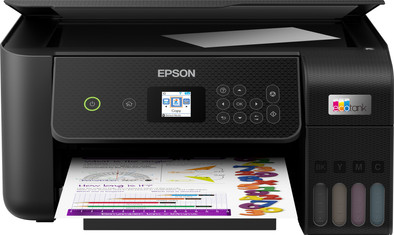
Epson EcoTank ET-2825
Never available again
View alternatives in the sidebar
View alternatives in the sidebar
According to our printer expert
Print technology | Ink tank | |
|---|---|---|
Printer type | All-in-one | |
Type of ink | Ink bottles | |
Automatic duplex printing | ||
Automatic document feeder (ADF) | ||
Automatic duplex scanning | ||
Color printer | ||
Maximum print size | A4 |
5 stars
174
4 stars
174
3 stars
34
2 stars
10
1 star
0
Installation ease
Options
Print quality
With the Epson EcoTank ET-2825 I save a lot on my running costs thanks to the ink tanks, which I refill without spilling. For double-sided printing I have to turn the sheets myself.
Low running costs This printer does not use cartridges, but has an ink tank that you fill with ink from bottles. I find refilling with ink bottles easier than with cartridges. You put an ink bottle on the attachment and the ink automatically flows into the tank. I was afraid of stains on my kitchen table, but the ink automatically stops running out of the bottle when the tank is full. So no messing around. The biggest advantage of these ink tanks is that it is much cheaper than cartridges. With one set of ink bottles you should print 4,500 pages in black and white and 7,500 in color. That is equivalent to 72 cartridges. After printing about 300 pages, my ink level is still the same. If you print a lot, this printer is certainly an affordable option.
Ease of use I installed the printer using the Epson Smart Panel app on my smartphone. This went very smoothly. You follow a number of steps via the app and the majority of the installation is done automatically. Connecting the printer to my WiFi network also went smoothly. My laptop does not have a USB input to connect to the printer, but this is not a problem. Printing via Apple AirPrint and the Epson Smart Panel app is easy. You can copy or scan at the touch of a button via the LCD screen. The printer does not automatically print double-sided, so you have to manually turn the sheets.
Quality and speed The printer is a bit on the slow side. Printing a 20-page color document takes about 3 minutes. A full-page image is ready after a minute. I often print small documents myself, so I don't mind waiting a while. If you often print reports with many pages, I would choose a faster printer. The quality of text and color documents is good. This is not a photo printer, but I am positively surprised at the quality of the images. Make sure you choose the right settings, otherwise you will get flat colors.
Kayleigh. Printer specialist.
28 March 2022
Automatically translated from Dutch
Surprisingly good printer, extremely low printing costs
Ruud B
10 January 2022
Automatically translated from Dutch
This is a simple type. Print well. Feels a bit subtle. It is recommended to save the driver on your PC. Can come in handy in the event of an unexpected malfunction. Incidentally, there is a "fault" program that can help you. I think it is a pity that the storage location for scans does not remain in the memory, or for example 4 fixed choices. When scanning from phone, it is handy that you have it on your phone gets. Ink is very easy to refill. The display is a bit awkwardly positioned, and the menu is a bit blurry (literally and figuratively) But it doesn't need to be used often. Is a bit awkward when scanning from printer (destination folder)
P Folkersma, Schildwolde
20 March 2022
Automatically translated from Dutch
With Coolblue Extended Warranty, you are protected against costs due to quality defects of your printer for the next 4 years. During the entire term, we will reimburse up to the original purchase price. You can easily add the Extended Warranty in your shopping cart.
€ 24,99
one-timeAdd your printer to your shopping cart. In the next step, you can add the Extended Warranty. You can exchange or return your purchase for free within 30 days.
Product number | 893423 |
|---|---|
Manufacturer code | C11CJ66413 |
Brand | Epson |
Warranty | 2 years |
Processing of your defect | Carry-in warranty |
Printer size | Medium | |
|---|---|---|
Width | 37,5 cm | |
Depth | 34,7 cm | |
Height | 17,9 cm | |
Color | Black | |
Weight | 3,9 kg |
Printer type | All-in-one | |
|---|---|---|
Photo printer | ||
Print quality photos | Stand | |
Portable (mobile use) | ||
Usage location | Home |
Cartridge line | Epson 104 | |
|---|---|---|
Print technology | Ink tank | |
Type of ink | Ink bottles | |
Number of cartridges/toner cartridges | 4 | |
Color printer | ||
Print speed black (ISO) | 10 ppm | |
Print speed color (ISO) | 5 ppm | |
First black page ready after | 10 seconds | |
Speed class | Standard | |
Usage costs per page | 1 eurocent | |
Maximum print resolution height | 1440 dpi | |
Maximum print resolution width | 5760 dpi | |
Maximum print size | A4 | |
Automatic duplex printing | ||
Borderless printing |
Scan functionality | ||
|---|---|---|
Automatic duplex scanning | ||
Maximum optical scan resolution width | 1200 dpi | |
Maximum optical scan resolution height | 2400 dpi | |
Scanner type | Flatbed scanner | |
Maximum scan size | A4 (21x29.7cm) | |
Automatic document feeder (ADF) | ||
Scan sizes | A4 | |
Scan speed (PPM) | 4 ppm | |
Color depth output | 24 bpp | |
Scan to | App, Application, Dropbox, Email, Email address, Email server, FTP, File, Folder, Folder with images, Image, Network, PC (local), PDF, PDF/A, Secured PDF | |
OCR |
Copying functionality | ||
|---|---|---|
Copy speed black (ISO) | 4 ppm | |
Copy speed color (ISO) | 4 ppm | |
Maximum copy resolution height | 1440 dpi | |
Maximum copy resolution width | 5760 dpi |
Fax functionality |
|---|
Built-in screen | ||
|---|---|---|
Color screen | ||
Touchscreen |
Compatible with operating system | Android, Windows, Windows Phone, iOS, macOS | |
|---|---|---|
Connection type | Wired, Wireless | |
Apple AirPrint | ||
Email print | ||
WPS (Wireless Protected Setup) | ||
Female standard USB-A port version | 2.0 | |
NFC | ||
Built-in WiFi | ||
Bluetooth | ||
WiFi direct | ||
USB port |
Manual input tray | ||
|---|---|---|
Photo paper drawer | ||
Output capacity output drawer | 30 | |
Maximum print size standard paper tray | A4 | |
Input capacity standard paper tray | 100 | |
Number of standard paper trays | 1 |
Memory card reader |
|---|