Wacom Intuos Pro Large
Never available again
View alternatives in the sidebar
View alternatives in the sidebar
Compatible with operating system | Windows, macOS | |
|---|---|---|
Multi-touch | ||
Connection type | Wired, Wireless | |
Width | 43 cm | |
Depth | 28,7 cm |
According to our drawing tablet expert
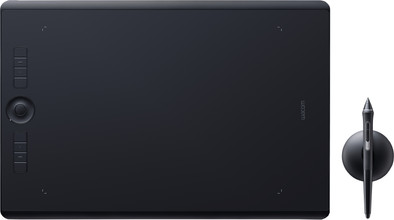
With the Wacom Intuos Pro Large, you can digitally shape all your creative ideas as professional designer. Thanks to the slim design, the drawing tablet is only 8mm thick and it's also lighter than its predecessors from the Intuos Pro series. The drawing tablet is sturdy, thanks to the aluminum and glass fiber casing. With the Wacom Pro Pen 2, you can draw precise lines thanks to the 8192 pressure levels. The buttons of the drawing tablet are adjustable, so you can use useful shortcuts. This way, you won't have to search long before you find the right creative tool.
5 stars
22
4 stars
10
3 stars
0
2 stars
0
1 star
0
User friendliness
Accuracy
Screen quality
Size
After more than 8 years it was time for a new drawing tablet. I went from a Wacom Intuos 3 (purchased in 2009) to this model, the Wacom Intuos Pro Large. And what a present it was to unwrap! Not only in a nice box from CoolBlue (your packaging is great! You already write it on the bottom of the box, but my daughter of 1 tested it anyway, the box does indeed taste like cardboard ;-) ). Okay, back on topic: the drawing tablet! It is beautifully packaged, but the tablet itself is also simply beautiful. The design is not only beautiful, but also practical. This way you can store the loose tips for your pen in the pen holder. You also have all kinds of colored metal rings to personalize your pen. Handy if, for example, you work in an office where several people work with such a tablet. The drawing surface is a bit rougher than I am used to from my old tablet, which has a smooth surface. It feels like paper. Although I prefer a smooth surface, I can imagine that for someone who has purchased a drawing tablet for the first time, this rough one is finer. The transition from paper to tablet is then less significant. A sample of the available drawing sheets is also included. So if you (like me) want a smoother skin, these are for sale separately. You have the option of the normal sheet that is standard on it, a smoother version or a rougher version. The buttons on the tablet are super handy to use and can also be set personally. You also have the option to operate the tablet with your hand (instead of or in combination with the pen), but you can also turn it off by pressing a button on the left. With me it is turned off by default, I see the intended added value in it, but in practice I do not find it useful. Sidenote: So from 2009 I don't use a mouse anymore. Before that I had a very tense arm and also RSI complaints. Never had a problem with anything since using a tablet. Besides being useful in my profession (graphic designer/illustrator), I recommend a drawing tablet to everyone. Take one with a large leaf, otherwise you will still be working 'cramped' and it will be of little use.
Lisette Rodenhuis
2 December 2017
Automatically translated from Dutch
First Stylus I've ever worked with. Chose the largest format because I have the space for it and thought it was worth the money to write/draw on a large surface. I like the product exactly as I imagined. So far very satisfied. My drawing/writing quality is just as good as on paper. There is no lag, responds as fast as a computer mouse, making completely smooth movements is easy.
Jeroen
18 September 2019
Automatically translated from Dutch
Perspective of a digital painter. So specifically for those who plan to spend hours doing arty stuff every day.
After three weeks of intensive use, I can recommend this product, but with a big footnote.
First of all it is a fantastic thing to work with, pressure levels and precision are perfect for painting. The format is fine for a natural sitting position, especially in combination with a large monitor you can work from the shoulder. Feels solid and premium like previous Intuos iterations. But there is a big difference in user experience that I did not expect and did not appreciate at first.
I have used several Wacom products and this feels more like working on paper thanks to a rougher surface. Once used to it, it works fine, but it means that the nibs wear really quickly. In my experience with other Wacoms, I can usually get a point from months to a year. With the Intuos pro I am halfway through my second nib after three weeks. The degree of wear gradually decreases as the surface itself wears down. You notice that pretty quickly. But unless you are willing to order a separate smooth surface for your Intuos or use a plastic protector, you can assume that you will have to order points at some point.
I must say it does add to the 'traditional medium' experience. Going through your points quickly feels like going through your sketching pencils quickly. Nothing feels better than putting yet another unusable pencil stub in the jar and sharpening a fresh pencil. It gives such an ego boost of "yeah another through, I'm doing a good job here" while at that moment you are passionately hating the imperfections in your work. So you will get that in return. But the difference in point wear compared to other models is really so great that you can wonder whether the quality is simply below par.
Eric
11 October 2018
Automatically translated from Dutch
Coolblue takes care of everything, from taking out an insurance to repairs
For almost all accidents
More coverage in case of damage than your standard warranty
No deductible
First, add your drawing tablet to your shopping cart. On the next page, choose one of the Protection Plans below. You always have a 30-day return window and pay no deductible in case of damage or theft.
2-year Protection Plan
€ 51,-
one-time2-year Protection Plan with theft cover
€ 60,-
one-time
Product number | 757250 | |
|---|---|---|
Manufacturer code | PTH-860-S | |
Brand | Wacom | |
Warranty | 2 years | |
Processing of your defect | Carry-in warranty |
Drawing tablet has integrated screen | ||
|---|---|---|
Lines per inch (LPI) | 5080 lpi | |
Height of active drawing area | 21,6 cm | |
Width of active drawing area | 31,1 cm | |
Multi-touch | ||
Number of buttons | 8 | |
Programmable buttons | ||
Tilt sensitive | ||
Tilts | 60 ° | |
Compatible with operating system | Windows, macOS |
Connection type | Wired, Wireless | |
|---|---|---|
Bluetooth | ||
Bluetooth version | 4.2 |
Weight | 1300 g | |
|---|---|---|
Width | 43 cm | |
Depth | 28,7 cm | |
Height | 0,8 cm |
Power source | ||
|---|---|---|
Power supply type | Power grid, Via a different product | |
Cable length | 1 m |