Wacom Cintiq Pro 16
Never available again
View alternatives in the sidebar
View alternatives in the sidebar
According to our drawing tablet expert
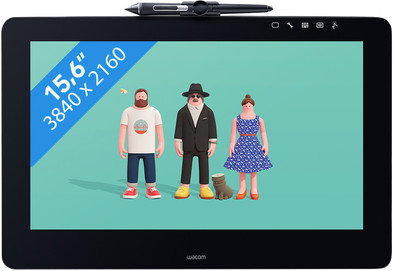
With the Wacom Cintiq Pro 16, you can draw directly on the screen and you won't require a lot of space on your desk. This 15.6-inch drawing tablet is very compact and can be set in place with the integrated stand. The tilt-sensitive Wacom Pro Pen 2 with 8192 pressure levels allows you to draw sharp lines and to be very accurate in your design. The motion resolution of 5,080 LPI enables this as well. On the screen with UHD resolution, you can see even the smallest details of your creations. The Cintiq Pro 16 can be connected to a computer via a USB-C connector.
Note: the drawing tablet is only suitable for operating systems Windows 7 SP1 or later and Mac OS 10.1 or later.
Compatible with operating system | Windows, macOS |
|---|---|
Multi-touch | |
Connection type | Wired |
Width | 25 cm |
Depth | 17 cm |
5 stars
14
4 stars
13
3 stars
2
2 stars
0
1 star
0
User friendliness
Accuracy
Screen quality
Size
I first worked on a wacom bamboo and then upgraded to a wacom intuos. However, I couldn't quite get used to drawing on the tablet, and then with my eyes on my laptop screen. With the Wacom Cintiq this problem is a thing of the past and I can work much more precisely! It works more efficiently, and I am very happy to get started.
A (big) disadvantage is the lack of shortcut buttons. The previous version of this one did. You now have to buy this separately, and it is not a cheap tablet. But you can connect a Nintendo switch controller with bluetooth to your PC, so it works just as well. ;-)
I also find it a pity that there are so many cables to connect. 1 cable in the tablet, which in turn connects with a 'wacomlink', which again connects a USB cable and a thunderbolt cable. why the whole detour? Unnecessary if you ask me.
Furthermore, the screen is beautiful and very precise. It makes me happy!
Cerys
18 August 2017
Automatically translated from Dutch
The Cintiq Pro is a great upgrade from the Bamboo for me. Equally accurate, but much easier to work directly on the screen and many options to set personal preferences.
Saskia Brand
22 March 2017
Automatically translated from Dutch
Let me start by saying, that everything you expect is right. Pen sensitivity is good, build quality, screen is nice, pen is light and feels good in the hand, but doesn't feel as premium, not like the wacom remote that wasn't included.
I tried a wacom companion 13 for this, this one is much better in every way.
Although I am very satisfied with it. there is always something to complain about:
Screen size tight for photoshop. (certainly for cs6 and before, these scales badly, you have to switch back to 1440p resolution) if you can afford it, go for the 24 inch version. if you use programs with many menus and options. (not an option for me, certainly not the touch version)
The screen buzzes, this can be solved by turning the screen upside down. This is important because I think it would also be useful for audio engineers who do everything in software.
This is not a 10 bit display, now few people will mind, for 10 bit you need a heavily overpriced quadro or amd equivalent graphics card.
When I calibrate the screen I notice that when clicking with the tip there is a deviation, that is my motor, not the device, I solve this to turn off the clicking of the tip, and put the pen on the indicated cross and then with the other hand with the remote or the mouse.
No buttons or remote included, this is a shame because the screen is quite small to work with icons.
and of course, invest in cleaning wipes.
DAvid Stremmelaar
23 September 2018
Automatically translated from Dutch
Product number | 771989 |
|---|---|
Manufacturer code | DTH-1620A-EU |
Brand | Wacom |
Warranty | 2 years |
Processing of your defect | Carry-in warranty |
Drawing tablet has integrated screen | ||
|---|---|---|
Screen size | 15,6 inches | |
Panel type | IPS panel | |
Resolution height | 2160 pixels | |
Resolution width | 3840 pixels | |
Response time | 30 ms | |
Brightness | 250 cd/m2 | |
Contrast ratio | 930 | |
Color temperature | 6500 K | |
Color gamut | 87 % | |
Height of active drawing area | 194 mm | |
Width of active drawing area | 345 mm | |
Multi-touch | ||
Left or right-handed | Left-handed, Right-handed | |
Number of buttons | 0 | |
Programmable buttons | ||
Tilt sensitive | ||
Tilts | 64 ° | |
Compatible with operating system | Windows, macOS | |
Digital notepad |
Connection type | Wired |
|---|---|
Connector type | DisplayPort, USB |
Port type | DisplayPort, USB |
Number of USB ports | 1 |
Type of USB port | standard USB-A |
Number of DisplayPort ports | 1 |
Bluetooth |
Weight | 1,5 kg |
|---|---|
Width | 25 cm |
Depth | 17 cm |
Height | 0,7 cm |
Material | Plastic |
Plastic type | Plastic |
Finish | Matte and glossy |
Power source | |
|---|---|
Power supply type | Via a different product |
Cable length | 1 m |