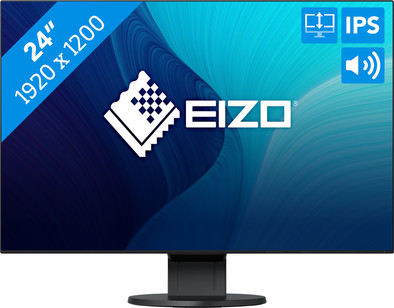
Never available again
View alternatives in the sidebar
View alternatives in the sidebar
Sharpness | WUXGA | |
|---|---|---|
Curved | ||
Aspect ratio | Standard (16:10) | |
Refresh rate | 60 Hz | |
Response time | 5 ms | |
Panel type | IPS panel | |
Color depth | Less than 17 million colors (less than 8-bit) | |
Built-in speakers |
According to our monitor expert
5 stars
2
4 stars
3
3 stars
0
2 stars
0
1 star
0
Installation ease
Image quality
Price-quality ratio
Design
Eizo makes beautiful monitors. This is no exception. The menu is easy to operate and there are many options to adjust the image to your liking. The minimal frame and handy foot give the whole a super chic design.
Unfortunately, one thing you cannot adjust, and that is the amount of pixels the screen has 1920/1200. This is basically a good ratio (more height) but the pixel density (PPI) makes text a bit harder to read. My primary goal is to read code. This means a lot of text. Unfortunately this is a bit tiring with this pixel density PPI (93 I think) and the font smoothing on my MacBook Pro does help a bit, but not enough. I misunderstood this during the purchase.
I showed the screen to an older person (60+) who had no problem with it. In addition, you can also move the screen a little further than usual, making it appear sharper. Unfortunately in my case not really an option.
I myself have placed an Asus ROG game screen 27 inches next to it with WQHD (2560/1440) to compare and then you see that it is all just a bit sharper. This makes reading text more pleasant. The Eizo does have much better colors and photos and films come out beautifully. Compared to my Sony 4k 10 bit HDR TV, the Eizo screen is perhaps even more beautiful.
If you had shown me this screen loaded for 3 years then I would really like it, but with the new retina macbooks and high resolution on the phone you see that this PPI is no longer really of this time.
I read that Eizo will come with a new 27 inch in January 2018. The 4k version. I'll be keeping an eye on this one. Overall a nice screen, but not for me.
Hope this review helps you make a good choice.
Ernst
29 November 2017
Automatically translated from Dutch
On my Mac Pro I always worked with 2x 24 inch Apple Cinema Display displays. Unfortunately, one display broke and I had to look for a new monitor to replace it. That's how I ended up with the Eizo Flexiscan EV2456-BK. In terms of image quality, this monitor can stand next to an Apple display, although I have the feeling that the colors of the Eizo are slightly more realistic. It is of course not a 5K screen, but it is very solid that it is well readable from all angles. I hesitated for a while with a 38 inch curved screen, but for 400 euros less I now have 2 screens of 24 inches instead of one of 28 inches.
Wim C.
12 December 2017
Automatically translated from Dutch
Eizo software will not work properly if you combine the ev2455-BK and the ev2456-BK. ECO sense, for example, is not supported on the ev2456, but it is supported on the ev2455. a Software Poweroff is converted into a powersaving and not an actual poweroff
Erik Kemmeren
23 September 2019
Automatically translated from Dutch
With Coolblue Extended Warranty, you are protected against costs due to quality defects of your monitor for the next 5 years. During the entire term, we will reimburse up to the original purchase price. You can easily add the Extended Warranty in your shopping cart.
€ 33,99
one-timeAdd your monitor to your shopping cart. In the next step, you can add the Extended Warranty. You can exchange or return your purchase for free within 30 days.
Product number | 780357 | |
|---|---|---|
Manufacturer code | EV2456-BK | |
Brand | EIZO | |
Warranty | 5 years | |
Processing of your defect | At your home |
Recommended display resolution | 1920x1200 | |
|---|---|---|
Sharpness | WUXGA | |
Aspect ratio | Standard (16:10) | |
Refresh rate | 60 Hz | |
Response time | 5 ms | |
Panel type | IPS panel | |
Brightness | 350 cd/m2 | |
Local dimming | ||
HDR support | ||
Contrast ratio | 1000 | |
Touchscreen | ||
Screen reflection | Anti-glare | |
Blue light filter | ||
Flicker-free technology | ||
Color space | sRGB | |
sRGB color coverage percentage | 100 % | |
Color depth | Less than 17 million colors (less than 8-bit) | |
Adaptive Sync | ||
Resolution width | 1920 pixels | |
Resolution height | 1200 pixels | |
Anti-reflection type | Anti glare | |
Horizontal viewing angle | 178 ° |
Height | 33,86 cm | |
|---|---|---|
Width | 53,1 cm | |
Depth | 20,86 cm | |
Weight | 5,7 kg | |
Color | Black | |
Including stand | ||
Material | Plastic | |
Cable management | ||
Appearance | Business, Neutral | |
Curved |
Number of HDMI connectors | 1 | |
|---|---|---|
Number of Female HDMI type A 1.4 ports | 1 | |
Number of headphone jacks | 1 | |
Type of headphone connection | 3.5mm (TRS) | |
Number of Female Standard DisplayPort 1.3 ports | 1 | |
Number of female standard USB-A ports | 2 | |
Female standard USB-A port version | 3.1 | |
Number of female 3.5mm TRS Audio Jack ports | 1 | |
Number of female standard USB-B (3.0 form) ports | 1 | |
Number of female standard VGA ports | 1 | |
Number of female 3.5mm TS Audio Jack ports | 1 | |
Type of USB port | Standard USB-A, Standard USB-B (3.0 form) | |
Number of USB ports | 3 | |
Suitable for daisy chaining | ||
Type of USB cable included | USB-A to USB-B | |
USB-C dock |
Included by default | DisplayPort cable, USB cable | |
|---|---|---|
Not included by default | HDMI cable, USB-C cable |
Adjustable in height | ||
|---|---|---|
Tiltable | ||
Pivotable stand | ||
Pivot function | ||
VESA mount option | ||
VESA mount | 100x100mm |
Energy label | D | |
|---|---|---|
Energy consumption standby | 0,5 W | |
Energy consumption active | 11 W | |
Energy consumption per 1000h | 14 kWh | |
Annual energy consumption | 20,44 kWh | |
Annual energy costs | 8,18 euros |
Built-in speakers | ||
|---|---|---|
Sound system | Stereo | |
Webcam | ||
Split screen | ||
Kensington lock | ||
Best tested |
Recommended for use | Internet, email, and text processing, Office work, Watching movies in Full HD |
|---|

