Never available again
View alternatives in the sidebar
View alternatives in the sidebar
According to our monitor expert
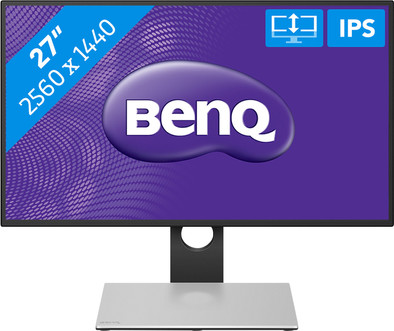
The BenQ PD2710QC is a 27-inch monitor suitable for graphic designers, which you can also use as a USB-C docking station. Via the USB-connection in the monitor's stand, you can connect a USB-C laptop or MacBook to the monitor and provide your laptop with power. This lets you create a mobile workplace with just one cable, to which you can quickly connect your laptop. This BenQ is adjustable in several ways, so you can adjust it to your posture. The Flicker-Free technology and the blue light filter help prevent sleeping problems and irritated eyes. You'll create an ergonomic workplace with this monitor, and work with image processing in true-to-life colors thanks to the 100% coverage of the sRGB color space.
Sharpness | Quad HD (1440p) | |
|---|---|---|
Curved | ||
Aspect ratio | Standard (16:9) | |
Refresh rate | 60 Hz | |
Response time | 5 ms | |
Panel type | IPS panel | |
Color depth | 17 million colors (8-bit) | |
Built-in speakers |
5 stars
5
4 stars
5
3 stars
0
2 stars
0
1 star
0
Very nice large sharp screen, pleasant for the eyes and for long hours of work. With one USB-C cable, power to MacBook and image to screen. Very easy to adjust in all directions, haven't needed portrait mode yet, but it works fine. Can be placed very high so that a 13" laptop can stand open on the base. I prefer to place my laptop next to it, then the base takes up a relatively large amount of space. Another disadvantage is that both the screen and the hub (the base ) need a power cable - but then your laptop doesn't need a separate power cable anymore, so eventually no more power outlets in use I also miss an extra USB-C port in the hub, there's only one and it's in use to connect to MacBook.
To be clear, even if it is one whole, the hub and the screen are in principle separate "devices". You have to turn them both on and connect them together. This is done via Mini-Displayport, the cable is included, but is unnecessarily long. Some cable management skills are recommended if you don't want to have your entire desk full of cables. However, this is only a detail. Otherwise top product!
Lorens
27 January 2019
Automatically translated from Dutch
We have several of these and are very happy with them.
Wouter Vermeylen
15 May 2018
Automatically translated from Dutch
Great monitor, just need to test the USB-C without charging, but it will probably work well. Take into account an extra charger from the foot of the monitor.
B. de Miranda
28 July 2018
Automatically translated from Dutch
With Coolblue Extended Warranty, you are protected against costs due to quality defects of your monitor for the next 5 years. During the entire term, we will reimburse up to the original purchase price. You can easily add the Extended Warranty in your shopping cart.
€ 26,99
one-timeAdd your monitor to your shopping cart. In the next step, you can add the Extended Warranty. You can exchange or return your purchase for free within 30 days.
Product number | 783710 |
|---|---|
Manufacturer code | 9H.LG2LA.TSE |
Brand | BenQ |
Warranty | 2 years |
Processing of your defect | Carry-in warranty |
Recommended display resolution | 2560x1440 | |
|---|---|---|
Sharpness | Quad HD (1440p) | |
Aspect ratio | Standard (16:9) | |
Refresh rate | 60 Hz | |
Response time | 5 ms | |
Panel type | IPS panel | |
Local dimming | ||
HDR support | ||
Contrast ratio | 1000 | |
Touchscreen | ||
Screen reflection | Anti-glare | |
Blue light filter | ||
Flicker-free technology | ||
Color space | sRGB | |
sRGB color coverage percentage | 100 % | |
Color depth | 17 million colors (8-bit) | |
G-sync | ||
G-sync Ultimate | ||
Adaptive Sync | ||
Resolution width | 2560 pixels | |
Resolution height | 1440 pixels | |
Anti-reflection type | Anti glare | |
Horizontal viewing angle | 178 ° | |
Vertical viewing angle | 178 ° |
Height | 62,48 cm | |
|---|---|---|
Width | 61,38 cm | |
Depth | 2,78 cm | |
Weight | 7,4 kg | |
Color | Black, Silver | |
Including stand | ||
Material | Plastic | |
Cable management | ||
Appearance | Neutral | |
Curved |
Number of HDMI connectors | 1 | |
|---|---|---|
Number of Female HDMI type A 1.4 ports | 1 | |
Number of headphone jacks | 1 | |
Type of headphone connection | 3.5mm (TRRS) | |
Number of USB-C ports | 1 | |
Number of USB 3.0 Female USB-C ports | 1 | |
Number of Female Standard DisplayPort 1.2 ports | 2 | |
Number of female standard USB-A ports | 4 | |
Female standard USB-A port version | 3.0 | |
Number of female 3.5mm TS Audio Jack ports | 1 | |
Number of female 3.5mm TRRS Audio Jack ports | 1 | |
Number of USB ports | 5 | |
Type of USB port | Standard USB-A, USB-C | |
Number of USB ports | 5 | |
Type of USB cable included | USB-C to USB-C |
Included by default | DisplayPort cable, USB cable |
|---|
Adjustable in height | ||
|---|---|---|
Tiltable | ||
Pivotable stand | ||
Pivot function | ||
VESA mount option | ||
VESA mount | 100x100mm |
Energy consumption standby | 0,5 W | |
|---|---|---|
Energy consumption active | 45 W |
Built-in speakers | ||
|---|---|---|
Sound system | Stereo | |
Webcam | ||
Split screen | ||
Kensington lock | ||
Best tested |
Recommended for use | Internet, email, and text processing, Office work, Watching movies in Full HD |
|---|

