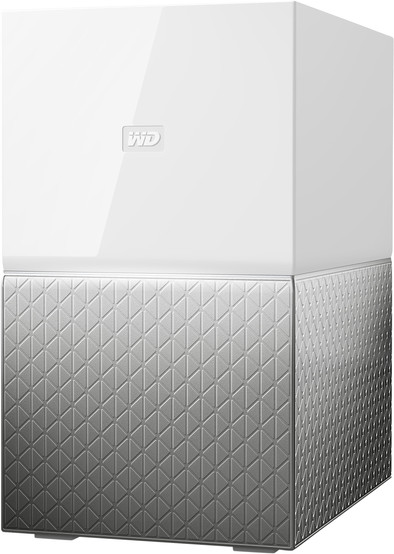
WD My Cloud Home Duo 4TB
Never available again
View alternatives in the sidebar
View alternatives in the sidebar
According to our NAS expert
Create a personal cloud with the WD My Cloud Home Duo 4TB NAS. You can connect this external hard drive to the home network, which gives you access to your music and photos from all of your devices. From anywhere in the world. Thanks to the 2 hard drives, you can set the My Cloud Home Duo up to automatically duplicate all files. This way, the drive automatically creates a backup and your data is always safe. Use both drives at the same time for a full storage capacity of 4TB. With this external drive, you can edit a photo on your computer and send it from your tablet afterwards. The drive is plug and play. You can easily install it via your phone.
Number of hard drive slots | 2 | |
|---|---|---|
Suitable for hard drive size | 3.5-inch HDD | |
Internal RAM | 1 GB | |
Processor cores | Quad-Core (4) | |
Built-in hard drive | ||
Total storage capacity | 4 TB |
5 stars
3
4 stars
3
3 stars
3
2 stars
1
1 star
0
Installation
Energy consumption
Speed
Software
Charmed by the design (despite the fact that it still goes into the meter box) and when turning it on I noticed that the My Cloud Home is very quiet. But then comes the installation configuration. I can imagine that this puts people off, a manual or even quick reference card is missing! All you will find is a link to the MyCloud website where you can connect to your MyCloud Home. Although this goes smoothly, I can imagine that many users drop out spontaneously. You will only discover what is possible when you install various Apps. But just transferring your old content to the MyCloud Home will initially not work without an App (in my case iOS/Apple). Anyway, after some research (long live Google) I managed to configure the MyCloud Home (with Plex, among others). It does what it's supposed to do and I'm just happy with it.
Marco Kievit
30 August 2018
Automatically translated from Dutch
Super NAS for the average user. All your files are conveniently located in a central place that you can always access. Another advantage is that the DUO variant stores your files on two disks. In addition, with the PLEX support you can easily show your photos/movies on other devices with a PLEX app. Very easy to install, thanks to Western Digital's extensive documentation.
Gert
23 September 2018
Automatically translated from Dutch
remote storage and access from any device, including mobile worth it if you need the necessary storage but don't want to take it everywhere
Jürgen De Meyer
10 August 2018
Automatically translated from Dutch
Product number | 794255 |
|---|---|
Manufacturer code | WDBMUT0040JWT-EESN |
Brand | Western Digital |
Warranty | 2 years |
Processing of your defect | Carry-in warranty |
Built-in hard drive | ||
|---|---|---|
Replaceable hard drive | ||
Number of hard drive slots | 2 | |
Suitable for hard drive size | 3.5-inch HDD | |
Total storage capacity | 4 TB | |
RAID | JBOD, RAID 0, RAID 1 | |
Internal RAM | 1 GB | |
Total number of RAM slots | 1 |
Connection type | Wired | |
|---|---|---|
LACP Link aggregation | ||
Thunderbolt connector | ||
Number of Ethernet ports | 1 |
NAS functions | Backup server, Media server | |
|---|---|---|
NAS application center | ||
Plex support | ||
Type of Plex support | Full HD (1080p), HD Ready (720p), SD (480p) | |
Number of IP camera licenses included | None | |
DLNA | ||
UPnP AV support | ||
FTP server | ||
On/off switch | ||
Kensington lock | ||
Apple Time Machine support | ||
Chromecast support | ||
Suitable for IFTTT | ||
Recommended for use | Media streaming, Personal cloud, Store photos and videos |
Processor brand | RealTek | |
|---|---|---|
Processor family | A53 | |
Processor code name | Cortex | |
Processor cores | Quad-Core (4) | |
Clock speed | 1,4 GHz |
Depth | 16 cm | |
|---|---|---|
Width | 10,2 cm | |
Height | 17,9 cm | |
Type NAS | Upright | |
Color | White | |
Weight | 2,4 kg |