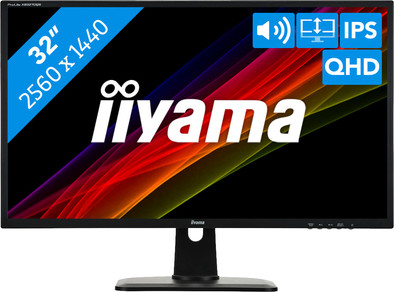
iiyama ProLite XB3270QS-B1

Never available again
View alternatives in the sidebar
View alternatives in the sidebar
With Coolblue Extended Warranty, you are protected against costs due to quality defects of your monitor for the next 5 years. During the entire term, we will reimburse up to the original purchase price. You can easily add the Extended Warranty in your shopping cart.
€ 21,99
one-timeAdd your monitor to your shopping cart. In the next step, you can add the Extended Warranty. You can exchange or return your purchase for free within 30 days.
Product number | 805013 | |
|---|---|---|
Manufacturer code | XB3270QS-B1 | |
Brand | Iiyama | |
Warranty | 3 years | |
Processing of your defect | Via Coolblue |
Screen size | 32 inches | |
|---|---|---|
Recommended display resolution | 2560x1440 | |
Sharpness | Quad HD (1440p) | |
Aspect ratio | Standard (16:9) | |
Refresh rate | 75 Hz | |
Response time | 4 ms | |
Panel type | IPS panel | |
Brightness | 300 cd/m2 | |
Local dimming | ||
HDR support | ||
Contrast ratio | 1200 | |
Touchscreen | ||
Screen reflection | Anti-glare | |
Blue light filter | ||
Flicker-free technology | ||
Color space | sRGB | |
sRGB color coverage percentage | 100 % | |
Color depth | 17 million colors (8-bit) | |
Adaptive Sync | ||
Resolution width | 2560 pixels | |
Resolution height | 1440 pixels | |
Anti-reflection type | Anti glare | |
Horizontal viewing angle | 178 ° |
Height | 54,45 cm | |
|---|---|---|
Width | 73 cm | |
Depth | 23 cm | |
Weight | 8,9 kg | |
Color | Black | |
Including stand | ||
Material | Plastic | |
Cable management | ||
Appearance | Neutral | |
Curved |
Number of HDMI connectors | 1 | |
|---|---|---|
Number of Female HDMI type A 1.4 ports | 1 | |
Number of headphone jacks | 2 | |
Type of headphone connection | 3.5mm (TRRS) | |
Number of Female Standard DisplayPort 1.2 ports | 1 | |
Number of female 3.5mm TS Audio Jack ports | 2 | |
Number of female 3.5mm TRRS Audio Jack ports | 2 | |
Suitable for daisy chaining |
Included by default | DisplayPort cable, HDMI cable | |
|---|---|---|
Not included by default | USB-C cable |
Adjustable in height | ||
|---|---|---|
Tiltable | ||
Pivotable stand | ||
Pivot function | ||
VESA mount option | ||
VESA mount | 100x100mm |
Energy label | G | |
|---|---|---|
Energy consumption standby | 0,5 W | |
Energy consumption active | 33 W | |
Energy consumption per 1000h | 33 kWh | |
Annual energy consumption | 48,18 kWh | |
Annual energy costs | 19,27 euros |
Built-in speakers | ||
|---|---|---|
Sound system | Stereo | |
Webcam | ||
Split screen | ||
Kensington lock | ||
Best tested |
Image quality according to customers | Good | |
|---|---|---|
Design according to customers | Neutral | |
Recommended for use | Internet, email, and text processing, Office work, Watching movies in Full HD |
anything for a smile
Sharpness | Quad HD (1440p) | |
|---|---|---|
Curved | ||
Aspect ratio | Standard (16:9) | |
Refresh rate | 75 Hz | |
Response time | 4 ms | |
Panel type | IPS panel | |
Color depth | 17 million colors (8-bit) | |
Built-in speakers |
According to our monitor expert
With 2560x1440, this monitor has a higher resolution than comparable monitors.
Adjust the monitor height for good visibility and a comfortable sitting position.
The blue light filter of this screen reduces the risk of tired eyes and sleeping problems.
Due to the brightness level of 300cd/m2, the screen isn't as clear as that of comparable models.
The iiyama ProLite XB3270QS-B1 is a 32-inch WQHD screen for graphic designers. Thanks to the resolution of 2560x1440, you'll have a sharper and more-detailed image display than Full HD screens. This way, the screen is suitable to edit 1080p material and display your tools and tabs at the same time. On top of that, colors remain clearly visible from multiple angles, thanks to the IPS panel. If you edit your video material, you'll hear the audio directly via the integrated stereo speakers, or you can connect your own headset or speakers via the headphone jack.
5 stars
45
4 stars
36
3 stars
1
2 stars
0
1 star
0
Installation ease
User friendliness
Image quality
Price-quality ratio
Design
Before writing this review, I used the monitor quite intensively for a few weeks. I work a lot with graphics software for video editing (Premiere Pro, AfterEffects, Audition) and photo editing (Photoshop and Lightroom). I do all this on my laptop because I need it for school and work, but to be able to edit really nicely, a 15" screen is of course not ideal.
I first bought the AOC Q2790PQU 27" monitor but I preferred to go for the 32" so I exchanged the AOC monitor for this IIyama. Although the AOC had a nicer design (thinner bezels) and more input options for HDMI but also for USB peripherals, I'm glad I went for the 32" because it works just that little bit better with video editing.
Although you mainly work with video editing with FullHD 1080p videos, editing FullHD on a QHD screen is much more pleasant. There is a huge trend on UHD (4K) screens, but UltraHD also has a lot of disadvantages that you do not have with a QHD screen. If you want a 4K screen, you must also have a computer with a video card that supports 4k, an HDMI 2.0 or a displayport 1.2 output, otherwise it is of no use to you. And if you also want to watch and stream 4k online, you can also increase your internet speed because 4k videos are great! Just for comparison: all Dutch television channels will not broadcast in 4k in the coming years. Currently they don't even broadcast in 1080p but in 1080i (interlaced)...
And that's why a QHD screen is really ideal.. I have a 1050 ti video card and in the store they said it doesn't support 2k resolution, but as soon as the hdmi is in everything went automatically to 2560x1440 resolution. And where you can scale up considerably with many 4k screens to be able to read the letters, with QHD everything is perfectly legible and you have a lot of work space, which you miss with full hd.
Installing was done in no time and the screen is adjustable in all directions, which is very nice. There is no support for the Pivot position, the position where you tilt the screen to use it vertically. But you could still use it in Pivot. Because the screen is so big and the height of the stand is not very high, you can't tilt it when it's on your desk or table, but if you put it to the edge of the table or on a sturdy platform, you can use it just fine. tilt and you can set in your windows that your screen should be vertical.
The control buttons for the OnScreenDisplay where you can set the brightness, contrast, colors, etc. do not work very well. This may be personal but I find the navigation through the menu very clumsy and you have to press a button four times before you can finally adjust your brightness. What I am very pleased with are the LED lights.. Because they are at the bottom so that you do not shine an annoying blue LED light in your eyes or that illuminate half the room in the dark, which you do have with many equipment but if, like me, you don't want them on at all, you can just turn them off in the OSD settings. Just like the big IIyama logo when starting up the monitor, you can also turn it off.
This monitor does have a disadvantage that unfortunately often occurs with the somewhat cheaper IPS panels, and that is that there is quite a bit of backlight leaking on the IPS panel. With editing and other graphic software you don't really have a problem with it, but as soon as you start watching movies you really notice it. Many movies have black bars above and below. Those bars were once used out of necessity for converting movies when we were still listening to the walkman but nowadays the black bars are not a necessity but they call it a 'cinematic' look. In any case, just above and below with ips panels, backlight leaks can occur and then those black bars are half black half gray / illuminated black.
I talked about this with Coolblue, the guy in the store knew what it was but when I called after installing the monitor they didn't even know what backlight leaking is and couldn't help me further. I found that a bit strange and especially a shame because I would like to know whether this occurs more often with this model or whether I may have a defect. But if they don't even know what you're talking about, it won't help.
Conclusion: a fantastically beautiful screen and really perfect for video and photo editing. Especially if you don't have a very big budget, but would still like to have a high-resolution 32" monitor. If you do have a budget larger than €289, don't go for this one right away, but first take a look at screens that might cost a little more but they probably also have a lot less backlight leaking.
Gerard
16 November 2018
Automatically translated from Nederlands
I've been using the monitor for 2 weeks now. I use the monitor for making technical drawings and programming.
At normal working distances, the viewing angle plays a role due to the wide screen. The image then becomes slightly gray on the sides, but is very acceptable.
Very easy to install using wing screws.
I think you get a lot for your money when buying this monitor. Lots of workspace. I am a very satisfied user.
According to a test on the internet, it is very true to color.
After 2 weeks of use I buy a second one.
Frans
17 May 2019
Automatically translated from Nederlands
I bought this monitor as a second monitor when I have to work at home on my Macbook Pro. I mainly work with photo editing and text editors.
I also wanted a larger monitor for readability. I had searched for others but read that IPS panels gave better results.
In addition, I also found the adjustability of the stand important.
So far I really like this monitor, especially for this price. The image quality is good and very sharp. At first I thought the colors were a bit disappointing, and offer too little detail. However, after I set the color space on my laptop for the screen to 'Adobe sRGB', the colors are very distinguishable and come out nicely (glad I discovered this!)
What is also very useful is the VESA standard of the monitor. I still have a good, heavy, VESA standard lying around and I can replace the existing standard with this new standard without a doubt (hasn't been necessary yet, but I think I'll do that).
Emmanuel Bachman
28 August 2018
Automatically translated from Nederlands

