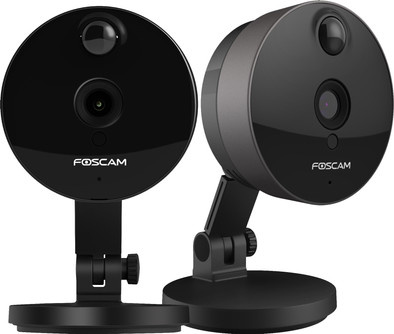
Foscam C1 Black Duo Pack
Never available again
View alternatives in the sidebar
View alternatives in the sidebar
According to our IP camera expert
With the Foscam C1 Duopack you immediately have 2 IP cameras that monitor your home day and night. Use the camera as a baby monitor, or as a security camera when you are not at home. Watch and listen - wherever and whenever you want - live with an app on your smartphone. If motion or noise is detected when you are not at home, you will also receive a notification of that app. You can save images on a microSD card, in the cloud (paid) or on a NAS for later viewing. So you know exactly what happens when you are not at home
Usage location | Indoors | |
|---|---|---|
Subscription needed for full use | ||
Storage options | Cloud, NAS, SD card | |
Smart home platform | Homey | |
2-way audio | ||
IP camera type | HD camera, Indoor camera, Night camera, WiFi camera |
5 stars
184
4 stars
190
3 stars
35
2 stars
16
1 star
3
Installation ease
User friendliness
Image quality
Options
Cheap is expensive? The Foscam c1 is mainly cheap. That was the reason to buy it. 120 euros for 2 cams? They don't come much cheaper. Don't be fooled by the HD statements. This cam is HD ready and gives at most 720P which is nowhere near full HD. But to keep an eye on the cat at home, this camera does its thing. Do you want more to stream on YouTube or via a server, for example? I would take a slightly more expensive one and at least with 1080
Plug&Play but still not For people without knowledge of networks and cables, this thing works right away. Easy as 1-2-3. Out of the box, app on your phone, connect via QR code and flames. You can set up everything via your phone and via the Foscam Cloud you can also connect via an internet page. Big thumbs up. But if you want to call the C1's via RTSP then there is a bit more involved. And you can explore the depths of the Internet to find out exactly how it all works. Manuals are hard to find and there is nothing special in the box
RTSP and more (This is why this review earns €100) Do you want to use the camera for an external streaming program other than the web page or smartphone? Then pay attention!
OBS and Xsplit use RTSP urls with which you can call webcams. However, with the C1 it is not so easy.
Step 1: Install the supplied CDrom and find the IP of the camera. CDs? what are those? Don't worry, the IP tool can also be found by typing in google: Foscam IP tool
Step 2: Double click the IP address of the camera to open the camera tools in the web browser. Chrome does NOT work so go back to IE or FireFox and install the necessary software to make the web browser work, default login is admin and no password. Then come up with something yourself
Step 3: DO NOT update the Firmware! It is raining complaints on forums about the latest update of the C1 and that Foscam is throwing the hat at it. So leave it for what it is. Or not, myself do not know my fault.
Step 4: Go to Settings – Network via the web browser and go there. Because my cams are in a network, he automatically gets the address via DHCP, go to ONVIF and set it to ENABLE. (save and refresh then)
Step 5: According to pretty much all manuals it says that you have to hit an RTSP url that looks like this if my C1 login name would be Cool and password Blue, and if the IP address of the cam would be: 192.168 .1.1.125:88
Rtsp://Cool:Blue@192.168.1.125:88/videoMain
However, it doesn't take it. Change the 88 in the RTSPport box that is at ONVIF!! With me 554 BOOM! OBS, VLC or XSplit grab that camera and you're done.. Have fun streaming
As a layperson and not an IT specialist, I spent an evening trying to figure this out via all kinds of sites, so I would like to share this with you!
General settings tips:
Sander van den Brand
20 October 2016
Automatically translated from Dutch
What am I doing in my sleep? Yes, that was my question and that's why I went looking for a good night camera and ended up with the Foscam C1.
Great thing! Good picture quality, easy to install and a good price. The camera can be connected to the network both wired and with WiFi. I opted for wired for a more stable connection so as not to miss anything from my nighttime adventures. The settings are easy to adjust via the web interface. However, when accessing this interface you have to download a plugin before you can login, which is a bit less. As a result, the web interface cannot be viewed on your iPhone. Sometimes settings are not completely clear, such as saving images via FTP or locally. But that could also be me. Image is also easy to save on an SD card via the SD slot on the back of the camera. You can even set when the camera records images, specific times and only motion detection. Only the time settings do not always run smoothly and could be better and easier.
The camera has many options. Think of DDNS, UPNP and even mail settings. When a movement is detected, an email can be sent, a snapshot can be taken or a sound can be played. But there are more features available. For example, there is a speaker and microphone that you can easily use remotely via the Foscam app. Say 'goodbye' to the burglars ;) Please note, for this you must first make your camera accessible externally in your router (Port forwarding). The camera has a wide viewing angle and is also easy to place or hang, screws and plugs are even included.
Furthermore, the camera works seamlessly with my Synology NAS. I connected the C1 to this and now runs through my NAS without any problems.
In short, top thing, good image quality, good price and easy to set up, although the installation can sometimes be a bit cumbersome. But once set this up it works fine.
So buy!!
anoniem
18 August 2015
Automatically translated from Dutch
I use this camera as a security camera in combination with my Synology NAS. After I've been using another Foscam (FI9821W) for about a year, I now needed an extra camera due to a move. There was no need to be able to move it remotely and I preferred a small camera. Because I liked the quality of the first camera, I went for a Foscam again, which became the C1.
Installation is very simple due to the QR code on the back. Simply download an app on the iPhone, scan the QR code from that app and your camera is ready to use! Awesome!!!
Once installed, I also tried the new Foscam app and it turned out very well. Lots of options for alerts and the audio function works very well! I also really like the option to turn off the LED lights on the front. This way you don't sit all day looking at a blue light that still attracts attention.
Then I connected the camera to the Synology, again without any problems. Security center recognizes the camera and you can easily add it. The recorded image is very clear, I think even better than on the FI9821W. Even in the dark, everything is clearly visible up to a meter or 7. What struck me is that if you stand closer to the camera in the dark, it takes a long time before the intensity of the IR lights is adjusted, so that a possible fast burglar only is a brightly lit object, with no obvious landmarks.
I stream the images wirelessly via a ziggo ubee modem. This also turns out to be easy. The data stream for moving images is about 500kb/s according to the Foscam app and this runs smoothly when you review the recordings. I sometimes have a hitch in live view.
All in all a very good camera! The only drawback I have encountered is the relatively short power cord. Since I try to hide the cameras a bit, they are both a bit away from a power point, which is difficult now.
Jorick
24 August 2015
Automatically translated from Dutch
Product number | 822881 |
|---|---|
Manufacturer code | C1-B-2X |
Brand | Foscam |
Warranty | 2 years |
Processing of your defect | Carry-in warranty |
Type of image definition support | HD ready (720p) | |
|---|---|---|
Video resolution width | 1280 pixels | |
Video resolution height | 720 pixels | |
Horizontal viewing angle | 100 ° | |
Vertical viewing angle | 115 ° | |
Image quality according to customers | Standard | |
Pan | ||
Tilt | ||
Zoom (IPcam) | ||
Digital zoom | 0 | |
Fisheye | ||
Frames per second | 23 fps |
Number of cameras | 2 | |
|---|---|---|
IP camera type | HD camera, Indoor camera, Night camera, WiFi camera | |
Usage location | Indoors | |
Alarm system needed for use | ||
Subscription needed for full use | ||
Motion detection sensor | ||
Infrared lighting | ||
Infrared light range | 8 m | |
Infrared motion sensor | ||
Suitable for placement behind glass | ||
Dynamic DNS client | ||
2-way audio | ||
Built-in microphone | ||
Review event | ||
Number of seconds to review event | 0 s | |
Streaming |
Power supply type | Power grid | |
|---|---|---|
Battery (power source) | ||
Storage options | Cloud, NAS, SD card | |
SD card slot | ||
Type of SD card | microSD | |
Number of days you can view for free | 0 d | |
Installation ease according to customers | Simple | |
Built-in WiFi | ||
PoE support | ||
UPnP AV support | ||
ONVIF certified | ||
PSIA certified |
Height | 12 cm | |
|---|---|---|
Width | 7 cm | |
Depth | 7 cm | |
Color | Black | |
Mounting possible | ||
Water-resistant |
Controls via app | ||
|---|---|---|
Controlled via Android app | ||
Controlled via Apple app | ||
Smart home platform | Homey |
Guaranteed support with updates | 24 months after release date | |
|---|---|---|
Year introduced | 2015 | |
Introduction month | January |