Never available again
View alternatives in the sidebar
Sharpness | 4K (UHD) | |
|---|---|---|
Curved | ||
Aspect ratio | Standard (16:9) | |
Refresh rate | 60 Hz | |
Response time | 5 ms | |
Panel type | IPS panel | |
Color depth | 1 billion colors (10-bit) | |
Built-in speakers |
According to our monitor expert
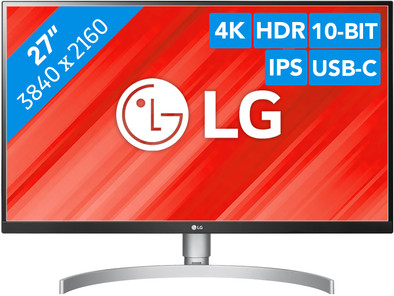
The LG 27UL850 is a 27-inch monitor with 4K resolution on which you can edit photos, watch movies, and play games. You experience colors very vividly and realistically thanks to the DisplayHDR 400 support and the 99% sRGB color range. This way, you get to enjoy the smallest details of your holiday snapshots and favorite movies. If you play games, the FreeSync technology ensures smooth moving images. You can also connect a Playstation to enjoy games in 4K, for example. The 27UL850 is height-adjustable, so you can adjust it to your sitting height. This way, you're always comfortably in front of the monitor without straining your neck or shoulders. With the USB-C connector, you can connect devices such as a MacBook and charge peripherals.
Note: As a result of 4K resolution, text and icons become smaller, which you can't always enlarge. For a 4k output, you need a modern laptop or PC with a fairly powerful video card. Make sure it has at least a DisplayPort 1.2, HDMI 2.0, or Thunderbolt 2 connection.5 stars
60
4 stars
30
3 stars
0
2 stars
0
1 star
1
Installation ease
User friendliness
Image quality
Price-quality ratio
Design
Very nice screen. After much deliberation, I made the choice for this screen. Was looking for a monitor for around 500 euros with good color reproduction and USB-C to charge my MacBook Pro 15-inch 2018. Definitely no regrets! I was particularly concerned about the possible color difference between the Mac's beautiful Retina display and this one. I work as a designer, so it's super important that this screen shows the right colors. I've worked on an Apple Thunderbolt display before, so I was excited to switch to another brand. Since Apple now recommends LG 4k/5k Ultrafine screens (above my budget), I thought other LG screens would be good too. And or!
Rigging and installation went smoothly. Footrest clicks into the screen. Connect a laptop via USB-C and you're done!
However, the monitor didn't show the same color profile as my MacBook, way too blue and way too much contrast. I was also unable to change color settings (contrast or RGB values) via the monitor's menu. Then tried HDMI to USB-C (via Apple adapter). Got the right colors now, so was afraid this had to do with the USB-C connection. Long story short: You can turn on the High Dynamic Range via Apple's System Preferences > Display. Don't do this, turn it off and voila!
Tim
31 March 2020
Automatically translated from Dutch
Bought the LG 27UL850 myself for use next to an LG 34UM88C that I bought a few years ago. In short, a very nice screen, very sharp with a beautiful color reproduction.
Two advantages for me in addition to the image quality are, on the one hand, the many options to adjust the display and the various inputs. You can adjust a lot when it comes to color reproduction, contrast, brightness and HDR settings, allowing you to create a display that is exactly to your liking. In addition, the many inputs ensure that I can easily switch between my PC (DisplayPort), Playstation (HDMI) and iPad Pro (USB-C).
If you're looking for a 4K monitor for work, casual gaming and entertainment, the 27UL850 is the right choice for you!
Wessel
22 November 2019
Automatically translated from Dutch
Product is good, especially for the price recommended. Connecting everything with 1 USB-C connection is very pleasant. Image quality is excellent, even with non-integer scaling on macOS. HDR certification is nonsense, however. It should also be mentioned that the USB-A connection on the back does not work as expected. These ports are disconnected upon waking from sleep. This is not a problem for a mouse, for example, but these ports are therefore not suitable for an external hard drive, for example.
Frenk
7 April 2020
Automatically translated from Dutch
With Coolblue Extended Warranty, you are protected against costs due to quality defects of your monitor for the next 5 years. During the entire term, we will reimburse up to the original purchase price. You can easily add the Extended Warranty in your shopping cart.
€ 39,99
one-timeAdd your monitor to your shopping cart. In the next step, you can add the Extended Warranty. You can exchange or return your purchase for free within 30 days.
Product number | 833775 | |
|---|---|---|
Manufacturer code | 27UL850 | |
Brand | LG | |
Warranty | 2 years | |
Processing of your defect | Carry-in warranty |
Recommended display resolution | 3840x2160 | |
|---|---|---|
Sharpness | 4K (UHD) | |
Aspect ratio | Standard (16:9) | |
Refresh rate | 60 Hz | |
Response time | 5 ms | |
Panel type | IPS panel | |
Brightness | 350 cd/m2 | |
Local dimming | ||
HDR support | ||
Contrast ratio | 1000 | |
Touchscreen | ||
Type of HDR | DisplayHDR 400 | |
Screen reflection | Anti-glare | |
Blue light filter | ||
Flicker-free technology | ||
Color space | sRGB | |
Color depth | 1 billion colors (10-bit) | |
Adaptive Sync | ||
Type of adaptive sync | FreeSync | |
Resolution width | 3840 pixels | |
Resolution height | 2160 pixels | |
Anti-reflection type | Anti glare | |
Horizontal viewing angle | 178 ° |
Height | 36,4 cm | |
|---|---|---|
Width | 61,3 cm | |
Depth | 4,46 cm | |
Weight | 6,1 kg | |
Color | Black | |
Including stand | ||
Material | Plastic | |
Cable management | ||
Appearance | Neutral | |
Curved |
Number of HDMI connectors | 2 | |
|---|---|---|
Number of Female HDMI type A 1.4 ports | 2 | |
Number of headphone jacks | 1 | |
Type of headphone connection | 3.5mm (TS) | |
Number of USB-C ports | 1 | |
Number of USB 3.0 Female USB-C ports | 1 | |
Number of Female Standard DisplayPort 1.4 ports | 1 | |
Number of female standard USB-A ports | 2 | |
Female standard USB-A port version | 3.0 | |
Number of female 3.5mm TS Audio Jack ports | 1 | |
Type of USB port | Standard USB-A, USB-C | |
Number of USB ports | 3 | |
Type of USB cable included | USB-C to USB-C |
Included by default | DisplayPort cable, HDMI cable, USB cable |
|---|
Adjustable in height | ||
|---|---|---|
Tiltable | ||
Pivotable stand | ||
Pivot function | ||
VESA mount option | ||
VESA mount | 100x100mm |
Energy label | G | |
|---|---|---|
Energy consumption standby | 0,3 W | |
Energy consumption active | 40 W | |
Energy consumption per 1000h | 30 kWh | |
Annual energy consumption | 43,8 kWh | |
Annual energy costs | 9,64 euros |
Built-in speakers | ||
|---|---|---|
Sound system | Stereo | |
Webcam | ||
Split screen | ||
Kensington lock |
Recommended for use | Image editing and graphic design, Internet, email, and text processing, Watching movies in 4K |
|---|
