Neomounts by Newstar NM-D775SILVER Monitor Arm Gas Spring Silver
Never available again
View alternatives in the sidebar
View alternatives in the sidebar
According to our monitor arm expert
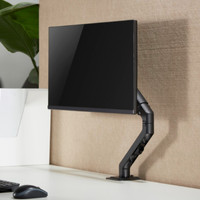
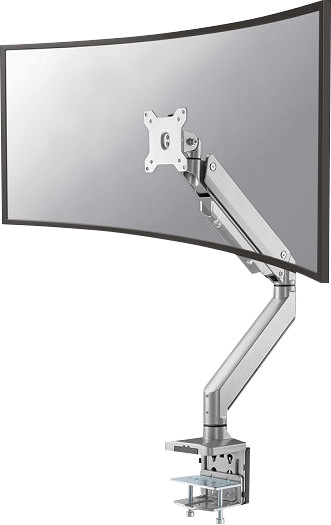
Work more ergonomically and more comfortably with the Neomounts by NewStar NM-D775SILVER Monitor Arm Gas Spring Silver. You can easily mount the arm on your desk with the included clamp. You can attach a monitor with a size up to 49 inches to this desk arm with gas spring. After, you can simply adjust the angle of the screen or rotate it so that you work on your monitor with a more ergonomically-sound posture. If you want to hide the cables neatly out of sight, you run them through the cable duct that you can tuck away with the screw-on plates. The gas spring can hold up to 15kg, so you can attach nearly any monitor to the arm.
Maximum screen size | 32 inches | |
|---|---|---|
Maximum weight | 16 kg | |
Mounting surface | Desk | |
VESA mount | 100x100mm, 75x75mm | |
Cable management | ||
Gas spring |
5 stars
9
4 stars
4
3 stars
4
2 stars
1
1 star
0
Installation
Weight/size
Accessories
Design
I hesitated between this arm and the D775BLACKPLUS, because the "PLUS" can carry screens up to 49 inches and this arm "only" supports screens up to 32 inches. On the other hand, I see it happening soon that I'm going to buy a new monitor and this arm is perfectly adequate for my current Dell 27-inch monitor. The difference between these 2 arms is, as far as I have been able to discover, only in the carrying capacity, 16 kilos vs 18 kilos.
I bought this arm as a Second Chance and it was considerably cheaper, making the price comparable to many other computer stores. The reason for this was probably because one of the Allen screws in the lower bracket was mounted inside out and therefore could not be attached to the foot. But after a little bit of fiddling, the screw was out and the arm could easily be put together. It is literally clicking together and tightening a screw with the included tool (you still need a Phillips screwdriver). Attaching the foot to the desktop is also easy, in my case this was done by tightening 1 bolt and clamping the foot in this way
A note about the type of clamps for the foot: on the Coolblue website, the 2nd image shows another clamp that needs to be tightened with 2 screws, in addition to the images of the clamps actually supplied. The manual available on the Coolblue website also provides instructions on this (clamp with 2 bolts). In that regard, you have to rely on the manual that comes with the D775BLACKPLUS. Maybe Newstar also has this arm in circulation with this other (old?) clamp, but I certainly didn't have this one. By the way, no further problem, only with that other clamp you can clamp the foot on table tops up to 80 mm, with the clamp I have it can "only" up to 45 mm. With thicker desktops you will have to drill a hole to be able to use the other clamp supplied. What can be useful is that a holder is supplied that you place on the back of the foot, in which you can place the 2 Allen keys. If you ever need to remove/re-adjust the bracket, you'll have them right at hand.
Adjusting the bracket is also easy, after having hung the monitor on the bracket, it is a matter of tightening the bolts with the supplied Allen key. Removing the bottom cap from the cable tray seems a bit tricky, because it's plastic, but with a little force it comes off easily. The top plastic cover is secured with a screw, so it takes a little more work. I have 4 cables that have to go in the gutter (power supply, DVI, DISplayport and USB upstream). It doesn't help that the DVI cable is quite thick, but in my case 4 cables is really the maximum that fits. Putting the caps back on was the most work in the end, but once they are in place, they do stay put.
Moving the screen is wonderfully easy and it also cleans up the desktop because I no longer have that huge foot. What I was concerned about was whether the monitor wouldn't move further from the wall than it was on the base. This turned out to be unfounded, because the bracket can simply be put tightly against the wall and can therefore be placed a little further away from me. I should have bought this thing much sooner for that matter, I'm very happy with it!
Deeh-Yung
11 March 2021
Automatically translated from Dutch
Great monitor arm, after placing the VESA (10x10) coupling on the screen, placing the monitor is done in no time; click and done. Monitor can also be easily disconnected if necessary, there are no keys or the like for this. required
Rene
20 August 2019
Automatically translated from Dutch
The monitor arm was easy to assemble and keeps the LG 49WL95C at a good height. Even a bump against your desk (whereby the monitor started dancing with previous arms) the monitor now remains calm as set. Even with a ~15kg monitor as the aforementioned LG.
Mark Rekveld
14 January 2020
Automatically translated from Dutch
Product number | 835005 |
|---|---|
Manufacturer code | NM-D775SILVER |
Brand | Neomounts |
Warranty | 2 years |
Processing of your defect | Carry-in warranty |
Color | Silver | |
|---|---|---|
Weight | 6 kg |
Mounting surface | Desk | |
|---|---|---|
Cable management | ||
Mount flexibility | Swivels and tilts | |
Rotates | ||
Adjustable in depth | ||
Maximum weight | 16 kg | |
Adjustable height in centimeters | 27 - 60 cm | |
Full-motion adjustibility | ||
Minimum screen size | 10 inches | |
Maximum screen size | 32 inches | |
Adjustable in height | ||
VESA mount | 100x100mm, 75x75mm | |
Tilts | 90 ° | |
Swivel | 180 ° | |
Number of clamping arms | 1 | |
Ergonomic design |