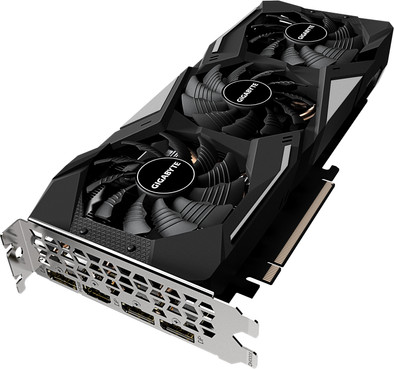
Very fast card in the 3-fan version, this card has a much higher clock speed (1860Mhz) than most RTX cards, but at half the money.
A top card with which you can play all current games on high/ultra settings without any problems.
Beautiful design with a full metal backplate which provides extra strength of the card as well as protection during installation and just looks great in a design case with glass side panel. RGB Gigabyte logo which can be controlled with RGB Fusion 2.0 in all kinds of colors as well as programs.
=========
=ATTENTION ! =
I use the motherboard Gigabyte Z390 Aorus Pro Wifi, which also contains various RGB parts that are controlled with the motherboard supplied software: RGB Fusion 2.0
So if you install the software for the card you will encounter 2 problems.
-
you don't need to install the generic driver (from site or cd) no, you need to install nVidia's GeForce Experience software.
link:
https://www.nvidia.com/nl-nl/geforce/geforce-experience/
with the general driver you get error messages and the software cannot be loaded either, this is not the case with the nVidia GeForce Experience software.
-
if you always want to keep the fan(s) running (eg when mounting the card vertically), you need to install Aorus Engine. But beware (!) this software not only controls the fans, but also wants to install RGB Fusion 2.0. DON'T (!) DON'T (!) if you do install this, you will kill your RGB Fusion 2.0 of the motherboard (!) Static (fixed) colors are fine, but woe betide if you use a color gradient ( e.g. double flash or something else) then it will not work properly and RGB Fusion 2.0 will also crash. What happens: if you set e.g. double flash to red and fast, this flashing only works 5x and then it falls to static red (fixed color not flashing) if you set color cycle then this works 32x and after that it is just all lights off.
After a long search I found out what the problem is and I also found a solution (workaround) for the problem that had arisen.
The problem:
it is that if you install RGB Fusion 2.0 from Aorus Engine, it adds extra RGB settings with which you can, for example, color the RG logo "smart". green if the card is cold, yellow if it is warm, and red if it is hot. This color control is done with a thermal sensor somewhere on the card about every 30 seconds. (time after which your RGB crashes, so also) the moment the measurements are taken is that the moment your RGB on your motherboard no longer does what you have set. Bale of course.
The solution:
you can install everything, no problem, also Aorus Engine,
link:
https://www.gigabyte.com/Graphics-Card/GV-N166SGAMING-OC-6GD/support#support-dl-utility
but after the installation of Aorus Engine, you will be asked if you still want to install RGB Fusion. Please enter NO(!) here.
The screen will disappear and everything will still work as you set it up.
But beware, you're not quite done with it yet.
After you restart the computer 1x, as soon as you are in Windows, you will again receive the message whether you want to install RGB Fusion.
Again, enter NO(!) and check the box below: Do not show this screen again.
If you do it like this it will work fine and all the RGB of your motherboard will work as well as the RGB of your video card.
So what's not working?
The thermal RGB settings of the GPU, that doesn't work with this and you don't see that option in the whole RGB Fusion 2.0
You can see the rest (normal) settings of all the RGB and you can use it.
I have the same card on another motherboard, Gigabyte Z390 Aorus Elite, but here I have no problems at all when I install Aorus Engine and then also (double) RGB Fusion 2.0. Everything works on that board, including the thermal RGB control.
Based on my experiences in the computer field, I therefore looked for whether there might be a UEFI/BIOS update available for the motherboard Gigabyte Z390 Aorus Pro Wifi that addresses this problem.
And yes, there is.
Version F11 is loaded from the factory, and version F12C can be downloaded from the Gigabyte support site.
But unfortunately the RGB problem that I am experiencing on my motherboard Gigabyte Z390 Aorus Pro Wifi is not solved with this new firmware.
I also downgraded to the F11 UEFI/BIOS firmware.
Otherwise a nice card, and easy to build.
Enough connections on the back, including 1x HDMI and 3x DP (Display Port)
The card is quiet when the fans are spinning, but audible when you're gaming and the fans have to work at full speed.