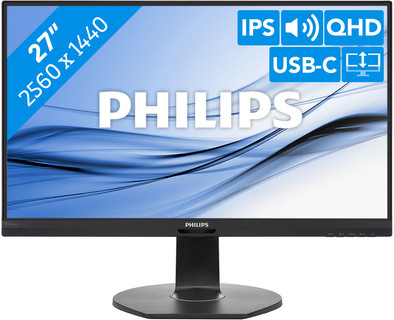
Philips B-Line 272B7QUPBEB
Never available again
View alternatives in the sidebar
View alternatives in the sidebar
According to our monitor expert
Set up your whole home office or workspace via 1 cable with the 27-inch Philips B-Line 282B7QUPBEB QHD monitor. This Philips monitor has a built-in USB-C docking station. This way, you can easily connect your laptop to the monitor and charge it directly. Because everything is done with 1 cable, your desk will stay tidy. The screen is equipped with two sustainable filters, the Philips LightSensor and PowerSensor. The LightSensor reduces power usage by adjusting the brightness based on the ambient light. the PowerSensor dims the screen when you're not behind your desk. In addition to the sustainable features, you can ergonomically set up the monitor. Rotate, tilt, and adjust the height of the monitor to find the right posture for your working day. This way, you'll be comfortable during your working day and reduce the risk of neck and back pains.
Sharpness | Quad HD (1440p) | |
|---|---|---|
Curved | ||
Aspect ratio | Standard (16:9) | |
Refresh rate | 75 Hz | |
Response time | 5 ms | |
Panel type | IPS panel | |
Color depth | 17 million colors (8-bit) | |
Built-in speakers |
5 stars
13
4 stars
7
3 stars
0
2 stars
1
1 star
1
Because the screen is combined with a USB-C hub, it is ideal to connect your laptop as well as your smartphone to the screen with only the thunderbolt 3 cable. With the USB keyboard and mouse I can work fine with Samsung Dex on my phone. (I was also able to type and post this review very well :-))
Johan ten Hove
25 May 2021
Automatically translated from Dutch
I have been using the monitor for several months now in combination with a Macbook Air 2020 (intel chip). Applications: internet, mail, Office, Photoshop, InDesign, Illustrator. It is very nice not to have a bunch of cables and adapters running between the monitor and the Macbook due to the easy connection via USB-C. After a lot of searching decided to go for QuadHD in combination with my Macbook and not for 4K. This does not make much sense for a 27 inch screen. You will of course see a difference in pixel density with the retina screen of the Macbook if you sit with your nose on top of it, but I don't notice this at a normal working distance. The only drawbacks I find that Smartcontrast sometimes very abruptly changes the brightness and color of the display when you move from one application to another, or when you go from a lighter to a darker site in your browser, for example. Anyway, this can be turned off, and otherwise works quite well. The USB ports on the back of the monitor are not suitable for connecting adapters for wireless peripherals. This interferes with the connection (also stated in the manual of the monitor). Can be solved by using a short USB extension cord for your receiver, or to connect it directly to your laptop with a small adapter.
Britt
30 August 2021
Automatically translated from Dutch
just good
Mano Van den Beuken
15 July 2021
Automatically translated from Dutch
With Coolblue Extended Warranty, you are protected against costs due to quality defects of your monitor for the next 5 years. During the entire term, we will reimburse up to the original purchase price. You can easily add the Extended Warranty in your shopping cart.
€ 33,99
one-timeAdd your monitor to your shopping cart. In the next step, you can add the Extended Warranty. You can exchange or return your purchase for free within 30 days.
Product number | 879491 |
|---|---|
Manufacturer code | 272B7QUPBEB/00 |
Brand | Philips |
Warranty | 2 years |
Processing of your defect | Carry-in warranty |
Recommended display resolution | 2560x1440 | |
|---|---|---|
Sharpness | Quad HD (1440p) | |
Aspect ratio | Standard (16:9) | |
Refresh rate | 75 Hz | |
Response time | 5 ms | |
Panel type | IPS panel | |
Local dimming | ||
HDR support | ||
Contrast ratio | 1000 | |
Touchscreen | ||
Screen reflection | Anti-glare | |
Blue light filter | ||
Flicker-free technology | ||
Color space | sRGB | |
sRGB color coverage percentage | 132 % | |
Color depth | 17 million colors (8-bit) | |
Adaptive Sync | ||
Resolution width | 2560 pixels | |
Resolution height | 1440 pixels | |
Anti-reflection type | Anti glare | |
Viewing distance | 43 - 115 cm | |
Horizontal viewing angle | 178 ° |
Height | 54,8 cm | |
|---|---|---|
Width | 61,4 cm | |
Depth | 25,7 cm | |
Weight | 7,38 kg | |
Color | Black | |
Including stand | ||
Material | Metal, Plastic | |
Cable management | ||
Appearance | Neutral | |
Curved |
Number of HDMI connectors | 1 | |
|---|---|---|
Number of Female HDMI type A 1.4 ports | 1 | |
Number of headphone jacks | 1 | |
Type of headphone connection | 3.5mm (TRS) | |
Number of USB-C ports | 1 | |
Number of USB 3.1 Female USB-C port | 1 | |
Number of Female Standard DisplayPort 1.2 ports | 2 | |
Number of female standard USB-A ports | 2 | |
Female standard USB-A port version | 3.1 | |
Number of female 3.5mm TRS Audio Jack ports | 1 | |
Type of USB port | Standard USB-A, USB-C | |
Number of USB ports | 3 | |
Type of USB cable included | USB-A to USB-C, USB-C to USB-C |
Included by default | DisplayPort cable, HDMI cable, USB cable |
|---|
Adjustable in height | ||
|---|---|---|
Tiltable | ||
Pivotable stand | ||
Pivot function | ||
VESA mount option | ||
VESA mount | 100x100mm |
Energy label | E | |
|---|---|---|
Energy consumption standby | 0,5 W | |
Energy consumption active | 19,02 W |
Built-in speakers | ||
|---|---|---|
Sound system | Stereo | |
Webcam | ||
Split screen | ||
Kensington lock |
Recommended for use | Internet, email, and text processing, Office work, Watching movies in Full HD |
|---|

