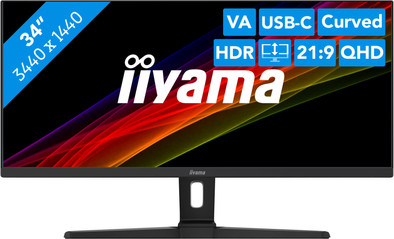
iiyama ProLite XCB3494WQSN-B1
Never available again
View alternatives in the sidebar
View alternatives in the sidebar
According to our monitor expert
With the iiyama ProLite XCB3494WQSN-B1 34-inch curved USB-C gaming monitor, you can enjoy an extra large overview of your work in the ultrawide mode. Thanks to the ultrawide 34-inch size, you have more screen space to open multiple programs and tabs next to each other. This allows you to work more efficiently and makes multitasking a bit easier. In addition, the 1500R curve ensures that the screen curves around your field of view. As a result, you can see everything on the screen at a glance and everything looks more natural. Don't want a hassle with cables? No problem. Organize your entire desk with 1 cable via the built-in USB-C port. This port transmits image signals, transfers data, and charges your device with 65W power. This monitor also has a KVM Switch, which you can use to easily switch between other connected devices. Are you done working? Switch to your gaming laptop at the push of a button. Finally, the maximum 120Hz refresh rate ensures that the screen is also suitable for gaming. So you can also enjoy entertainment after a long working day.
Note: you need a powerful video card for QHD gaming, such as an NVIDIA GeForce RTX GPU or AMD Radeon RX 5000 series GPU, an Xbox One, the Xbox Series X or S, or a PlayStation 5.
Note: the maximum refresh rate via HDMI is 100Hz. For 120Hz gaming, you have to use the monitor via the DisplayPort or USB-C port.
Sharpness | Quad HD (1440p) | |
|---|---|---|
Curved | ||
Aspect ratio | Ultrawide (21:9) | |
Refresh rate | 120 Hz | |
Response time | 0,4 ms | |
Panel type | VA panel | |
Color depth | Less than 17 million colors (less than 8-bit) | |
Built-in speakers |
5 stars
2
4 stars
2
3 stars
0
2 stars
0
1 star
0
Good UW monitor, and also (USB-c) docking
Sander van der Vleuten
25 June 2022
Automatically translated from Dutch
After a very disappointing purchase of the Philips 34 inch variant of this screen in the same price range, I got it. You immediately notice that Iiyama is a professional brand: the screen is plug and play over USB C and the high refresh rate of 120 Hz works immediately, both on Windows and my MacBook Pro 14 (M1 Pro). The built-in dock works well and is also plug and play. The Philips screen on the Macbook had enormous limitations such as 6 Bit color depth and max 75 Hz over USB-C. The image looked faded compared to this screen.
Image quality is very good, reviews show that the screen in sRGB mode has a Delta E of less than 2, which makes it also suitable for graphic work in sRGB. The contrast is also significantly better than the Philips, as well as the brightness. At 30 percent, the screen is as bright as the Philips at 80 percent.
Note: If you use USB-C for charging, image and data, the built-in 3-port hub is limited to USB 2.0 speeds. I think Ethernet then either doesn't work or is limited to 100 Mbits, but haven't tested this. This is a small concession in my opinion and furthermore this is one of the best screens in the Ultrawide segment that you can buy under 750 euros.
Soulaiman
29 July 2022
Automatically translated from Dutch
For me, the size of this screen is just right, the resolution is perfect and on a high refresh rate it is very easy on the eyes. The USB-C Dock with Ethernet works flawlessly without drivers on both Windows and Mac. Highly recommended!
Jeffrey
22 September 2022
Automatically translated from Dutch
With Coolblue Extended Warranty, you are protected against costs due to quality defects of your monitor for the next 5 years. During the entire term, we will reimburse up to the original purchase price. You can easily add the Extended Warranty in your shopping cart.
€ 39,99
one-timeAdd your monitor to your shopping cart. In the next step, you can add the Extended Warranty. You can exchange or return your purchase for free within 30 days.
Product number | 907543 |
|---|---|
Manufacturer code | XCB3494WQSN-B1 |
Brand | Iiyama |
Warranty | 3 years |
Processing of your defect | On-site service |
Recommended display resolution | 3440x1440 | |
|---|---|---|
Sharpness | Quad HD (1440p) | |
Aspect ratio | Ultrawide (21:9) | |
Refresh rate | 120 Hz | |
Response time | 0,4 ms | |
Panel type | VA panel | |
Local dimming | ||
HDR support | ||
Contrast ratio | 3000 | |
Touchscreen | ||
Screen reflection | Anti-glare | |
Blue light filter | ||
Flicker-free technology | ||
Color space | sRGB | |
sRGB color coverage percentage | 99 % | |
Color depth | Less than 17 million colors (less than 8-bit) | |
Adaptive Sync | ||
Type of adaptive sync | FreeSync Premium | |
Resolution width | 3440 pixels | |
Resolution height | 1440 pixels | |
Anti-reflection type | Matte | |
Viewing distance | 57 - 153 m | |
Horizontal viewing angle | 178 ° |
Height | 45,5 cm | |
|---|---|---|
Width | 80,9 cm | |
Depth | 27,5 cm | |
Weight | 8,7 kg | |
Color | Black | |
Including stand | ||
Material | Plastic | |
Cable management | ||
Appearance | Business, Neutral | |
Curved |
Number of HDMI connectors | 1 | |
|---|---|---|
Number of headphone jacks | 1 | |
Type of headphone connection | 3.5mm (TRS) | |
Number of USB-C ports | 1 | |
Number of USB 3.0 Female USB-C ports | 1 | |
Number of female standard USB-A ports | 3 | |
Female standard USB-A port version | 3.0 | |
Number of female 3.5mm TRS Audio Jack ports | 1 | |
Number of female standard USB-B (3.0 form) ports | 1 | |
Type of USB port | Standard USB-A, Standard USB-B (3.0 form), USB-C | |
Number of USB ports | 5 | |
Suitable for daisy chaining | ||
KVM switch | ||
Type of USB cable included | USB-A to USB-C |
Included by default | DisplayPort cable, HDMI cable, USB cable |
|---|
Adjustable in height | ||
|---|---|---|
Tiltable | ||
Pivotable stand | ||
Pivot function | ||
VESA mount option | ||
VESA mount | 100x100mm |
Energy label | G | |
|---|---|---|
Energy consumption standby | 0,5 W | |
Energy consumption active | 40 W | |
Energy consumption per 1000h | 41 kWh | |
Annual energy consumption | 59,8 kWh | |
Annual energy costs | 37,11 euros |
Built-in speakers | ||
|---|---|---|
Sound system | Stereo | |
Webcam | ||
Split screen | ||
Kensington lock |
Recommended for use | Image editing and graphic design, Internet, email, and text processing, Office work, Watching movies in Full HD |
|---|

