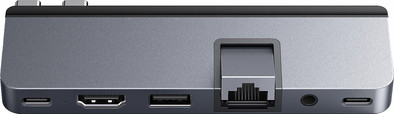
Targus HyperDrive DUO Pro 7-in-2 USB-C Hub - Gray
Never available again
View alternatives in the sidebar
View alternatives in the sidebar
According to our dock for laptops expert
With the Targus HyperDrive DUO Pro 7-in-2 USB-C Hub - Gray docking station, you can expand the number of ports of your Apple MacBook (2016 or more recent) and connect all your peripherals. It snugly fits in both USB-C ports on 1 side of your MacBook. The MagSafe charging port remains free, so you can continue to charge your MacBook with that while you work. You can connect a 4K monitor to the HDMI port of this dock. That way, you create more space for all your windows and work more productively. The Targus also has a USB-C port that supports Thunderbolt 4 / USB 4. You can transmit video, data, and power via this port. The dock also has various ports for things like headphones, your accessories, and a microSD. Slow WiFi? Use the Ethernet port for a stable, wired connection.
This docking station works on all Windows laptops and MacBook models with a USB-C port that transmits a video signal. This is how you can check if your laptop has a suitable USB-C.Extra functionalities docking station | Charge MacBook via own charger, Charge phone via docking station, Connect headphones, Connect wired network | |
|---|---|---|
Type of main connector | Dubbel Usb c (for MacBook), USB-C | |
Total available video outputs | 1x HDMI | |
Number of connectable monitors | 1 | |
Type of USB port | Standard USB-A, USB-C |
5 stars
0
4 stars
0
3 stars
0
2 stars
0
1 star
0
Product number | 925260 |
|---|---|
Manufacturer code | HD575-GRY-GL |
Brand | Targus |
Warranty | 2 years |
Processing of your defect | Via Coolblue |
Made for laptop models | Apple MacBook, Chromebook, Microsoft Surface, Windows laptop |
|---|
Laptop docking station suitable for | Connect 1 monitor | |
|---|---|---|
Extra functionalities docking station | Charge MacBook via own charger, Charge phone via docking station, Connect headphones, Connect wired network | |
Type of main connector | Dubbel Usb c (for MacBook), USB-C | |
Supported video technology on Docking Station | MST, Thunderbolt 4 | |
Number of USB ports | 3 | |
USB function | Charge, Charging an external device, Data transfer, Device connection, Play media, Power source, Record audio, Software updates | |
Type of USB port | Standard USB-A, USB-C | |
Number of female standard USB-A ports | 1 | |
Female standard USB-A port version | 3.0 | |
Power standard USB-A port | 100 W | |
Amperage standard USB-A port | 0 A | |
Number of USB-C ports | 2 | |
Protocol Female USB-C port | HDMI Alternate Mode, Thunderbolt Alternative Mode, USB, USB electricity | |
USB version Female USB-C port | 3.0, 4.0 | |
Number of USB 3.0 Female USB-C ports | 1 | |
Fast charging USB-C port | ||
Fast charging second USB-C port | ||
Total available video outputs | 1x HDMI | |
Number of HDMI connectors | 1 | |
Female HDMI Type A port version | 2.1 | |
Number of Ethernet ports | 1 | |
Ethernet speed | Gigabit Ethernet (1000Mbps) | |
Number of headphone jacks | 1 | |
Type of headphone connection | 3.5mm (TRRRS) | |
Memory card reader | ||
Memory card | MicroSD | |
Number of connectable monitors | 1 | |
Maximum image resolution 1 monitor | 4K (3840x2160) | |
Maximum refresh rate 1 monitor | 60 Hz |
Color | Gray |
|---|---|
Height | 1,2 cm |
Width | 4 cm |
Depth | 12 cm |
Weight | 0,13 kg |