Never available again
View alternatives in the sidebar
View alternatives in the sidebar
According to our monitor expert
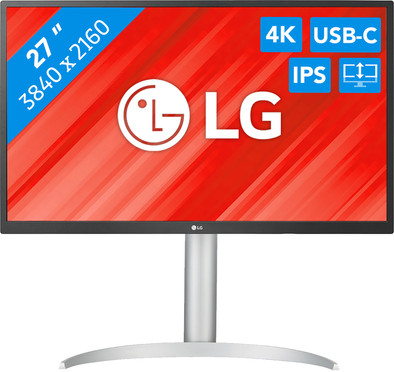
Edit photos and videos in Adobe programs on the LG 27UP550P 27-inch 4K HDR monitor. The 4K resolution is almost 4 times as sharp as Full HD, so you see even the smallest details. That way, you can easily make detailed edits in graphic software. Colors also look vibrant thanks to the HDR10 support. Spend a lot of time behind your monitor? Adjust it in height, tilt the screen, or put it in portrait mode. That way, you ensure an ergonomic work posture and prevent neck and back pain. You also see the same sharp images from every viewing angle thanks to the IPS panel. That means you can easily watch a movie with 2 people as well.
Sharpness | 4K (UHD) | |
|---|---|---|
Curved | ||
Aspect ratio | Standard (16:9) | |
Refresh rate | 60 Hz | |
Response time | 5 ms | |
Panel type | IPS panel | |
Color depth | 1 billion colors (10-bit) | |
Built-in speakers |
5 stars
4
4 stars
3
3 stars
0
2 stars
0
1 star
0
I tested the LG 27UP550P at my workplace and I am very satisfied with it. With this business monitor I have a sharp image and I can adopt a comfortable sitting position. It also has enough connecting cables and a nice, sleek design. The only downside is that the monitor does not have built-in speakers.
Sharp image This LG monitor has a 4K screen with HDR10 support and an excellent brightness of 300 nits. This makes the image not only clear and easy to read, but also sharper than the average business monitor. Small details and colors look razor sharp, which is nice on long working days. I don't have to bend over to get a better look. The monitor also has good viewing angles, so that a colleague who is watching can see everything clearly.
Adjustability This monitor is tiltable and I can also adjust its height, so that I can set it to my ideal eye level. I think an extra plus of this LG is the pivot function. Because the screen can be rotated 90 degrees, I also use the monitor in vertical portrait mode. This is especially nice when reading long texts or pages. This way I have to scroll less. In the normal horizontal position, the monitor is also large enough for two windows next to each other. With my laptop I have a total of three windows, which is more than enough for me. The only disadvantage is that the monitor does not have built-in speakers. Because I don't have separate speakers, I use those on my laptop. All the sound therefore comes from the right, because I have the monitor in the middle of my desk.
Accessories and design With this monitor I received an HDMI cable, DisplayPort cable and USB C to USB C cable. This allows me to connect the monitor to every device I have. What I really like is the white design of this monitor and its accessories. As a whole, these fit together nicely and give my workplace a sleek look.
Sam. Monitoren specialist.
11 November 2023
Automatically translated from Dutch
nice monitor, especially because of the USB-C connection, which allows me to plug and play with my MacBook with 1 cable.
WildVReemd
29 November 2023
Automatically translated from Dutch
USB c powers your laptop
Henk de Vries
28 December 2023
Automatically translated from Dutch
With Coolblue Extended Warranty, you are protected against costs due to quality defects of your monitor for the next 5 years. During the entire term, we will reimburse up to the original purchase price. You can easily add the Extended Warranty in your shopping cart.
€ 19,99
one-timeAdd your monitor to your shopping cart. In the next step, you can add the Extended Warranty. You can exchange or return your purchase for free within 30 days.
Product number | 936552 |
|---|---|
Manufacturer code | 27UP550P-W.AEU |
Brand | LG |
Warranty | 2 years |
Processing of your defect | Via Coolblue |
Recommended display resolution | 3840x2160 | |
|---|---|---|
Sharpness | 4K (UHD) | |
Aspect ratio | Standard (16:9) | |
Refresh rate | 60 Hz | |
Response time | 5 ms | |
Panel type | IPS panel | |
Local dimming | ||
HDR support | ||
Contrast ratio | 1000 | |
Touchscreen | ||
Type of HDR | HDR10 | |
Screen reflection | Anti-glare | |
Blue light filter | ||
Flicker-free technology | ||
Color space | sRGB | |
sRGB color coverage percentage | 98 % | |
Color depth | 1 billion colors (10-bit) | |
Adaptive Sync | ||
Type of adaptive sync | FreeSync | |
Resolution width | 3840 pixels | |
Resolution height | 2160 pixels | |
Anti-reflection type | Anti glare | |
Horizontal viewing angle | 178 ° |
Height | 57,41 cm | |
|---|---|---|
Width | 62,26 cm | |
Depth | 23,93 cm | |
Weight | 6,3 kg | |
Color | Multicolored | |
Including stand | ||
Material | Metal, Plastic | |
Cable management | ||
Appearance | Business, Neutral | |
Curved |
Number of HDMI connectors | 2 | |
|---|---|---|
Number of Female HDMI type A 2.0b connectors | 2 | |
Number of headphone jacks | 1 | |
Type of headphone connection | 3.5mm (TS) | |
Number of USB-C ports | 1 | |
Number of USB 3.0 Female USB-C ports | 1 | |
Number of Female Standard DisplayPort 1.4 ports | 1 | |
Number of female standard USB-A ports | 2 | |
Female standard USB-A port version | 3.0 | |
Number of Female RJ-45 ports | 0 | |
Number of female 3.5mm TS Audio Jack ports | 1 | |
Type of USB port | Standard USB-A, USB-C | |
Number of USB ports | 3 | |
Suitable for daisy chaining | ||
USB-C dock | ||
Maximum USB-C dock power | 90 W |
Included by default | DisplayPort cable, HDMI cable, USB-C cable |
|---|
Adjustable in height | ||
|---|---|---|
Tiltable | ||
Pivotable stand | ||
Pivot function | ||
VESA mount option | ||
VESA mount | 100x100mm |
Energy label | F | |
|---|---|---|
Energy consumption standby | 0,3 W | |
Energy consumption active | 44,27 W | |
Energy consumption per 1000h | 24 kWh | |
Annual energy consumption | 35,04 kWh | |
Annual energy costs | 14,02 euros |
Built-in speakers | ||
|---|---|---|
Webcam | ||
Split screen | ||
Kensington lock |
Recommended for use | Image editing and graphic design, Internet, email, and text processing, Office work, Photo editing, Video editing, Watching movies in 4K |
|---|

