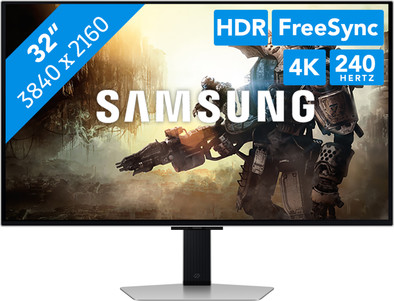
Samsung LS32DG802SUXEN
Our choice for a 32-inch gaming monitor for gaming at the highest level
Choose your monitor:
32 inches - 4K - 240Hz - OLED - HDR10
Our choice for a 32-inch gaming monitor for gaming at the highest level
Choose your monitor:
32 inches - 4K - 240Hz - OLED - HDR10
Current product
Retail price
€ 1.299,-€ 849,-
Retail price
€ 1.399,-€ 919,90
Retail price
€ 1.849,90€ 949,-
€ 799,-
Retail price
€ 1.499,-€ 922,90
240 Hz
240 Hz
240 Hz
180 Hz
480 Hz
4K (UHD)
4K (UHD)
4K (UHD)
5K
4K (UHD)
OLED
OLED
OLED
VA panel
OLED
0,03 ms
0,03 ms
0,03 ms
1 ms
0,03 ms
According to our monitor expert
Sharpness | 4K (UHD) | |
|---|---|---|
Curved | ||
Aspect ratio | Standard (16:9) | |
Refresh rate | 240 Hz | |
Response time | 0,03 ms | |
Panel type | OLED | |
Color depth | 1 billion colors (10-bit) | |
Built-in speakers |
5 stars
15
4 stars
5
3 stars
0
2 stars
0
1 star
0
Installation ease
Image quality
Price-quality ratio
Design
If you are looking for a high-quality small widescreen television (in 16:9 format) around thirty inches for your bedroom, you will have a hard time. Most quality televisions that are equipped with a high-quality OLED panel with a 4K image resolution of 3840 by 2160 pixels are at least fifty inches in size and therefore too large for my intended use. At the CoolBlue in Arnhem I was able to go after good advice and bought a 32-inch smart monitor from Samsung in combination with a good soundbar. Although the Samsung Odyssey OLED G8 G80SD was marketed as a semi-professional gaming monitor, I use it as a television thanks to the user-friendly Tizen operating system. Partly because I mainly watch television via the internet, I am completely satisfied in terms of viewing behavior after installing the NPO, Netflix, Disney+ and the Apple TV application. Although Samsung claims otherwise, the two internal speakers produce mediocre sound, which is why I bought the Mu-so 2 soundbar from the Naim brand, which was also on offer. I then connected the soundbar to the ARC port of the screen via an HDMI cable so that the whole thing functions as one device. I also connected my Nintendo Switch to the smart monitor, which I regularly play on. Despite the many critical reviews on various forums on the internet, I am very satisfied with the smart monitor and television. The very nice image quality in particular stands out. Once you have seen an OLED panel in operation, you never want anything else. An important drawback that I would like to mention is the risk of burn-in due to the new QD-OLED technology that seems to be sensitive to this. I managed to cover this for just under a hundred euros with a five-year insurance policy at ERGO via CoolBlue. Samsung itself claims that burn-in hardly occurs during normal use due to the integrated smart functions that should prevent burn-in. One of these functions are the smart pipes at the back of the screen that passively cool the screen during intensive use. This is because overheating is the biggest enemy of every OLED display.
Otto
16 October 2024
Automatically translated from Dutch
Conclusion: This monitor is an excellent choice for gaming thanks to its fast response time, vivid colors and deep black levels. However, for text-intensive work, such as programming or long periods of reading, it falls short due to the noisy text display caused by the pixel layout. This makes it difficult to work comfortably.
Review: I was already using an excellent 27-inch 1440p gaming monitor with a VA panel (Odyssey G7), on which I could comfortably game, program and work. However, I wanted to switch to a larger screen, because a 32-inch format is better suited for working with multiple scripts and offers more work space.
After reading positive reviews on Rtings, I chose this monitor, mainly because of the good ratings for gaming and the clear text display. The build quality is solid, and the colors are vivid, although I did not necessarily find them better than those of my VA panel. The OLED panel also offers the advantage of a very fast response time and perfectly deep black levels, which is ideal for gaming.
Unfortunately, the monitor turned out to be less suitable for working. Although the text is sharp, the pixel layout (which Windows ClearType cannot handle well) leads to a jittery display. This makes reading text tiring: you can scan a page, but have to actively focus to see individual words clearly. This problem, known as fringing, makes working particularly unpleasant. In dark mode, which I find most pleasant to work with, this effect is even worse.
In the end, I returned the monitor and opted for the LG 32GS95. This monitor, with an extra white subpixel, offers a considerably better text display than the Samsung. However, it is also not as easy on the eyes as my old VA panel.
Sybren
8 December 2024
Automatically translated from Dutch
I bought this monitor a week ago and what a stunningly beautiful image this is! The OLED panel in combination with the 4K resolution ensures beautiful images while gaming where the colors really pop off the screen. Thanks to the matte coating on the screen I can also play during sunny hours because the reflection is really minimal. I have only been able to test this once but so far so good, the curtains can just stay open :). So far super happy with this purchase. The only disadvantage I have found so far is that when I turn on my Samsung TV with my remote control, my monitor also turns on (smart functionality) because they are quite close to each other.
Super happy with my purchase and expect to have a lot of fun with it! The price is of course steep but the quality you get in return makes it more than worth it for me!
Paul
25 November 2024
Automatically translated from Dutch
With Coolblue Extended Warranty, you are protected against costs due to quality defects of your monitor for the next 5 years. During the entire term, we will reimburse up to the original purchase price. You can easily add the Extended Warranty in your shopping cart.
€ 79,99
one-timeAdd your monitor to your shopping cart. In the next step, you can add the Extended Warranty. You can exchange or return your purchase for free within 30 days.
Product number | 951113 |
|---|---|
Manufacturer code | LS32DG802SUXEN |
Brand | Samsung |
Warranty | 3 years |
Processing of your defect | Via Coolblue |
Recommended display resolution | 3840x2160 | |
|---|---|---|
Sharpness | 4K (UHD) | |
Aspect ratio | Standard (16:9) | |
Refresh rate | 240 Hz | |
Response time | 0,03 ms | |
Panel type | OLED | |
Brightness | 250 cd/m2 | |
Local dimming | ||
HDR support | ||
Contrast ratio | 1000000 | |
Touchscreen | ||
Type of HDR | HDR10 | |
Screen reflection | Anti-glare | |
Blue light filter | ||
Flicker-free technology | ||
Color space | sRGB | |
sRGB color coverage percentage | 99 % | |
Color depth | 1 billion colors (10-bit) | |
Adaptive Sync | ||
Type of adaptive sync | Freesync Premium Pro, G-Sync Compatible | |
Resolution width | 3840 pixels | |
Resolution height | 2160 pixels | |
Horizontal viewing angle | 178 ° |
Height | 58,4 cm | |
|---|---|---|
Width | 71,9 cm | |
Depth | 26,3 cm | |
Weight | 8,4 kg | |
Color | Silver | |
Including stand | ||
Material | Metal, Plastic | |
Cable management | ||
Appearance | Neutral | |
Curved |
Number of HDMI connectors | 1 | |
|---|---|---|
Number of Female HDMI type A 2.1 ports | 1 | |
Version female micro usb-B (3.0 form) port | 3.0 | |
Number of female micro usb-B (3.0 form) ports | 1 | |
Number of Female Standard DisplayPort 1.4 ports | 1 | |
Number of female standard USB-A ports | 2 | |
Female standard USB-A port version | 3.0 | |
Number of Female RJ-45 ports | 0 | |
Type of USB port | Micro USB-B (3.0 form), Standard USB-A | |
Number of USB ports | 3 | |
Suitable for daisy chaining | ||
USB-C dock |
Included by default | DisplayPort cable, HDMI cable | |
|---|---|---|
Not included by default | USB-C cable |
Adjustable in height | ||
|---|---|---|
Tiltable | ||
Pivotable stand | ||
Pivot function | ||
VESA mount option | ||
VESA mount | 100x100mm |
Energy label | G | |
|---|---|---|
Energy consumption standby | 0,5 W | |
Energy consumption active | 47 W | |
Energy consumption per 1000h | 47 kWh | |
Annual energy consumption | 68,62 kWh | |
Annual energy costs | 27,45 euros |
Built-in speakers | ||
|---|---|---|
Sound system | Stereo | |
Webcam | ||
Split screen | ||
Kensington lock |
Recommended for use | Gaming, Image editing and graphic design, Internet, email, and text processing, Watching movies in 4K |
|---|
