Welcome to your environment! You can order everything from your assortment with your personal budget here.

You can always return to the normal Coolblue website by clicking here.

Your outstanding budget (incl. VAT) is always visible here, so you know exactly how much you can spend.

Coolblue home

Help with your product

INNO3D GeForce RTX 5080 X3 16GB + CORSAIR RM850x
0 reviews

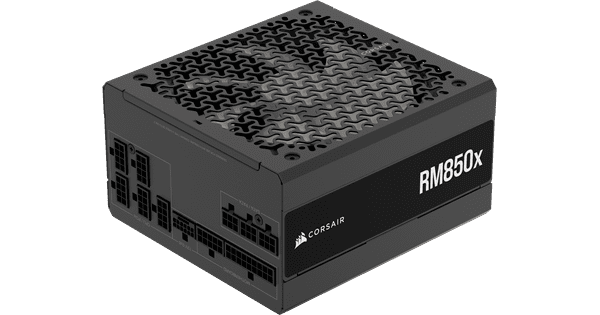
You can play all games smoothly with the INNO3D GeForce RTX 5080 X3 16GB video card and give your computer parts enough power with the CORSAIR RM850x computer power supply unit. With this combination, you can build a powerful gaming PC to play all games smoothly in Quad HD at 60 fps. Thanks to the 16GB, you can also get started with professional video editing. Ray tracing effects also work smoothly in most games in Full HD or QHD. The video card has a heatsink with 9 tubes that remove the hot air from the video card. This video card also has 3 fans, so it stays well cooled. The CORSAIR 850W power has the Cybenetics Gold certificate, which means that it uses 87% of the power for the power to your computer. It also uses fluid dynamic bearing technology for the fans. Thanks to this, the power supply doesn't make noise. Even when you use demanding programs. Advice from our video card expert on compatible parts: Recommended processors: Intel Core i9 14900K, AMD Ryzen 9 9950X, or AMD Ryzen 9 7900X3D Recommended slots in your enclosure: 3

Read all tips here

Which product do you want to see articles about?

How do I install a computer power supply unit in my desktop?

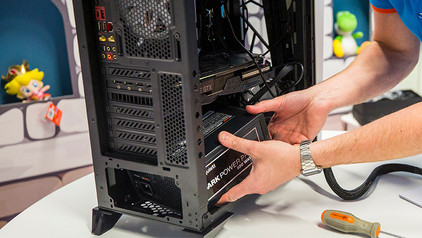
You bought a new computer power supply unit (PSU) for in your desktop. Maybe you're building a new PC, maybe you want to overclock your computer, or maybe the old one simply needed to be replaced. But how do you set up the power supply unit in your PC? I'll explain in this article.

Everything on installing your computer power supply unit

Prevent short circuiting when you install your computer power supply unit. Install your power supply unit correctly in one go and hide the cables out of sight. If you want to reduce the voltage of your power supply unit (PSU), we'll tell you how to do this from start to finish.

How do you prevent a static shock while building your PC?

When you're building your PC, static shocks could be dangerous for your computer parts. A small static shock is enough to destroy your parts. Luckily, there are things you can do to safely work in your PC. Wear a antistatic wrist strap and work on a solid surface, for example. In this article, we'll explain what you should and shouldn't do when building your PC.

How do you prevent a static shock while building your PC?

When you're building your PC, static shocks could be dangerous for your computer parts. A small static shock is enough to destroy your parts. Luckily, there are things you can do to safely work in your PC. Wear a antistatic wrist strap and work on a solid surface, for example. In this article, we'll explain what you should and shouldn't do when building your PC.

How do I install a computer power supply unit in my desktop?

You bought a new computer power supply unit (PSU) for in your desktop. Maybe you're building a new PC, maybe you want to overclock your computer, or maybe the old one simply needed to be replaced. But how do you set up the power supply unit in your PC? I'll explain in this article.

Everything on installing your computer power supply unit

Prevent short circuiting when you install your computer power supply unit. Install your power supply unit correctly in one go and hide the cables out of sight. If you want to reduce the voltage of your power supply unit (PSU), we'll tell you how to do this from start to finish.

How do you prevent a static shock while building your PC?

When you're building your PC, static shocks could be dangerous for your computer parts. A small static shock is enough to destroy your parts. Luckily, there are things you can do to safely work in your PC. Wear a antistatic wrist strap and work on a solid surface, for example. In this article, we'll explain what you should and shouldn't do when building your PC.

How do you prevent a static shock while building your PC?

When you're building your PC, static shocks could be dangerous for your computer parts. A small static shock is enough to destroy your parts. Luckily, there are things you can do to safely work in your PC. Wear a antistatic wrist strap and work on a solid surface, for example. In this article, we'll explain what you should and shouldn't do when building your PC.

How do you optimize NVIDIA Control Panel for gaming?

Did you buy a new NVIDIA GeForce video card or do you want to make your old graphic card faster? You can optimize NVIDIA Control Panel, which is the NVIDIA configuration window. This ensures less hiccups, improved image quality, and more beautiful colors during gaming. We'll explain how you can optimize the GPU in your gaming laptop or desktop in 9 steps.


How do you prevent a static shock while building your PC?

When you're building your PC, static shocks could be dangerous for your computer parts. A small static shock is enough to destroy your parts. Luckily, there are things you can do to safely work in your PC. Wear a antistatic wrist strap and work on a solid surface, for example. In this article, we'll explain what you should and shouldn't do when building your PC.

How do you prevent a static shock while building your PC?

When you're building your PC, static shocks could be dangerous for your computer parts. A small static shock is enough to destroy your parts. Luckily, there are things you can do to safely work in your PC. Wear a antistatic wrist strap and work on a solid surface, for example. In this article, we'll explain what you should and shouldn't do when building your PC.

Subjects

Didn't find your answer?

Find an answer to your question quickly and easily via our customer service.

Coolblue specialist
Personal chat Digitalk.
You're now chatting with Coolblue customer service
This chat is closed
foo
Oeps File size is larger than 5MB. Upload a smaller file.