
Geschrieben von Rowan
Aktualisiert am
2. Juni 2026
·
11:58
Wie lange erhält mein MacBook neue macOS Updates?
Wenn du ein neues MacBook kaufst, möchtest du natürlich so lange wie möglich die neuesten Updates und Funktionen von macOS erhalten. Im Durchschnitt erhält dein MacBook bis zu 7 Jahre nach der Veröffentlichung Updates. Dadurch ist dein MacBook langlebig und für jahrelanges Nutzungsvergnügen geeignet. In diesem Artikel erfährst du, wie lange dein MacBook erwartungsgemäß neue Updates erhält.
Welche MacBook Modelle bekommen neue Updates?
Im Folgenden siehst du genau, welche MacBook Modelle neue macOS Updates bekommen. Dies sind derzeit alle MacBook Modelle ab 2018. Je neuer dein MacBook, desto länger profitierst du von den neuesten Software-Updates und Funktionen. Darüber hinaus sind deine Dateien und Daten am besten geschützt, wenn du immer die neuesten Updates installierst. Durchschnittlich bekommen neue MacBook Modelle rund 7 Jahre lang neue Updates.
Wie installiere ich neue macOS Updates?
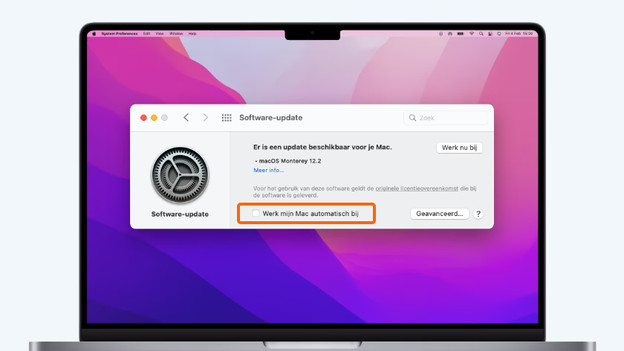
Automatische Updates
Um dafür zu sorgen, dass macOS immer up-to-date ist, schaltest du automatische Updates ein. Das geht folgendermaßen:
- Klicke oben links auf das Apple Logo und wähle Systemeinstellungen.
- Klicke jetzt auf Softwareupdate.
- Siehst du es nicht? Dann besorge dir das Update aus dem App Store.
- Aktiviere die Option Meinen Mac automatisch aktualisieren.
Ab jetzt werden Updates automatisch installiert. Kommst du nicht weiter? Dann installiere das Update später.
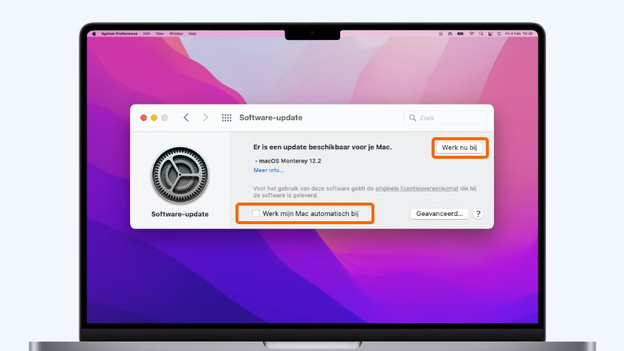
Manuell aktualisieren
Bestimmst du lieber selbst, wann du neue macOS Updates installierst? Du kannst Updates auch manuell ausführen. Das geht so:
- Klicke oben links auf das Apple Logo und wähle Systemeinstellungen.
- Klicke auf Softwareupdate, um zu überprüfen, ob es ein Softwareupdate gibt.
- Klicke auf Jetzt aktualisieren, um neue Updates zu installieren.
Sollen Updates nicht automatisch installiert werden? Dann stelle sicher, dass die Option Meinen Mac automatisch aktualisieren nicht aktiviert ist.
Letztes erwartetes macOS Update nach Modell
| MacBook Modell | Erscheinungsjahr | Prozessor | Zu erwartendes letztes Update |
|---|---|---|---|
| MacBook Pro | 2019 | Intel Core i5 / Intel Core i7 / Intel Core i9 | 2026 |
| MacBook Air | 2019 | Intel Core i5 | 2026 |
| MacBook Pro | 2020 | Intel Core i5 / Intel Core i7 | 2027 |
| MacBook Air | 2020 | Intel Core i3 / Intel Core i5 / Intel Core i7 | 2027 |
| MacBook Pro | 2021 | Apple M1 / M1 Pro / M1 Max | 2028 |
| MacBook Air | 2021 | Apple M1 | 2028 |
| MacBook Pro | 2023 | Apple M2 / M2 Pro / M2 Max | 2030 |
| MacBook Air | 2021 | Apple M2 | 2030 |
| MacBook Pro | 2023 | Apple M3 / M3 Pro / M3 Max | 2030 |
| MacBook Air | 2024 | Apple M3 | 2031 |
| MacBook Pro | 2025 | Apple M4 / M4 Pro / M4 Max | 2032 |
| MacBook Air | 2025 | Apple M4 | 2032 |
| MacBook Pro | 2026 | Apple M5 / M5 Pro / M5 Max | 2033 |
| MacBook Air | 2026 | Apple M5 | 2033 |

Was ist, wenn mein MacBook keine Updates mehr bekommt?
Hast du ein älteres MacBook, das keine Updates mehr bekommt? Du hast dann keinen Zugriff mehr auf neue Funktionen, die Apple einführt. Du bekommst noch ein Jahr lang Sicherheitsupdates. Danach fallen auch diese weg. Tausche dein MacBook dann gegen ein neues Modell ein. Du erhältst dann Rabatt auf deinen neuen Kauf.
Übersicht älterer MacBook Modelle
| MacBook Modell | Erscheinungsjahr | Neueste verfügbare macOS Version |
|---|---|---|
| MacBook Air | 2012 | macOS Catalina |
| MacBook Pro | 2012 | macOS Catalina |
| MacBook Air | 2013 | macOS Big Sur |
| MacBook Pro | 2013 | macOS Big Sur |
| MacBook Air | 2014 | macOS Big Sur |
| MacBook Pro | 2014 | macOS Big Sur |
| MacBook (12 Zoll) | 2015 | macOS Big Sur |
| MacBook Air | 2015 | macOS Monterey |
| MacBook Pro | 2015 | macOS Monterey |
| MacBook (12 Zoll) | 2016 | macOS Monterey |
| MacBook Pro | 2016 | macOS Monterey |
| MacBook Air | 2017 | macOS Mojave |
| MacBook Pro | 2017 | macOS Mojave |
| MacBook Pro | 2018 | macOS Ventura |
| MacBook Air | 2018 | macOS Ventura |
| MacBook Pro | 2018 | macOS Ventura |
Artikel von Rowan
Apple Beratungsprofi.

