Written by Bob
Edited on
17 September 2024
·
07:56
How do you choose an Apple iPhone 15 charger?
Your new iPhone 15, 15 Plus, 15 Pro, or 15 Pro Max includes a charging cable, but no charger adapter. Choose the right Power Delivery fast charger so you can charge your iPhone extra quickly. Go for a charger with a sturdy nylon cable or a wireless charger., for example. We'll help you choose the right charger for your iPhone 15.

Choose Apple iPhone 15 charger
The iPhone 15 is the first iPhone you need a USB-C cable for instead of a Lightning cable. Ask yourself the following questions when choosing a charger for your iPhone 15:
- Do you want a longer cable?
- How fast do you want to charge your iPhone?
- Do you want to charge your device wirelessly?
- Can you reuse your old chargers and cables?
Compare suitable iPhone 15 chargers
- BlueBuilt charger
Charges 50 to 60% in 30 minutes.
With a 5-year warranty.
Without cable.
From
€ 20,90
- Apple charger
Charges 50 to 60% in 30 minutes.
With a 2-year warranty.
Without cable.
From
€ 24,99
- BlueBuilt charger with cable
Charges 50 to 60% in 30 minutes.
With a 5-year warranty.
With an extra sturdy nylon cable.


Do you want a longer cable as well?
You get a 1m long nylon USB-C cable with your iPhone 15 by default. Such a short cable isn't always useful. You may not always have a socket near your couch, for example. That's why it's wise to buy a longer cable with your new charger. Note: the iPhone 15 has a USB-C port. That means you need a USB-C cable for your iPhone, not a Lightning cable that's suitable for old iPhone models.

How fast do you want to charge your iPhone 15?
You can charge your iPhone 15 fastest with a Power Delivery fast charger. With such a fast charger, you can charge your empty battery for 50 to 60% after a 30-minute charge. Without a fast charger, this takes 2 times longer. Choose a charger with at least 20W of power. A higher wattage doesn't damage your battery, but it also won't charge your iPhone faster. Go for a higher power if you want to charge your iPad or MacBook with the same charger.
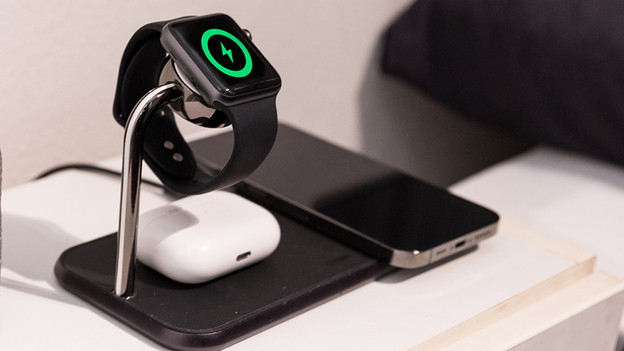
Do you want to charge your iPhone 15 wirelessly?
You can charge your iPhone 15 wirelessly by placing it on a wireless charger. You don't need any cables, it'll start charging automatically. Go for a MagSafe charger and charge your iPhone 2 times faster than with a standard wireless charger. You can also click your device into place magnetically, so your smartphone is always securely attached to the charger. Have AirPods or an Apple Watch as well? Choose an iPhone 15 charging dock and charge all your devices at the same time.

Can you use old chargers and cables?
Your old iPhone cables don't fit into your iPhone 15 port. All devices from the iPhone 15 series have a USB-C port. Older iPhone models have a Lightning port. This means that you need a new USB-C cable for your iPhone 15. You can still use old chargers. Make sure you check the connector carefully. The cable that's included with your iPhone by default isn't suitable for old chargers with a rectangular USB-A port. With those old chargers, charging also takes 2 times longer than with a new USB-C fast charger.
Article by Bob
Charger Expert.