
Written by Emme-Lotte
Edited on
14 July 2026
·
15:22
Difference Apple iPad and Apple iPad Air
In March 2026, Apple announced an update for the light but powerful iPad Air: the Apple iPad Air M4. This new iPad Air differs from the Apple iPad (2025) in many ways, like the processor and the screen. In this article, you can read everything on the differences between the Apple iPad Air (2026) and Apple iPad (2025).
Differences between the iPad and iPad Air
- Apple iPad Air (2026) 13 inches
Larger 13-inch screen
Powerful M4 processor for more demanding programs.
Sharp and colorful screen for watching movies.
More difficult to take with you due to the large size.
From
€ 869,-
- Apple iPad Air (2026) 11 inches
Medium-sized 11-inch screen
Powerful M4 processor for more demanding programs.
Sharp and colorful screen for watching movies.
Easier to take with you thanks to the lighter weight.
From
€ 746,90
- Apple iPad (2025) 11 inches
Medium-sized 11-inch screen
Powerful A16 processor for gaming and demanding apps.
Sharp and colorful screen for watching movies.
Easy to take with you thanks to the compact size.
From
€ 449,-




iPad vs iPad Air
| Apple iPad Air (2026) | Apple iPad (2025) | |
|---|---|---|
| Screen | 11-inch and 13-inch Liquid Retina display | 11-inch Liquid Retina display |
| Processor | M4 processor | A16 Bionic processor |
| Storage capacities | 128, 256, and 512GB | 128, 256, and 512GB |
| Anti-glare screen | Yes | No |
| Apple Intelligence | Yes | No |
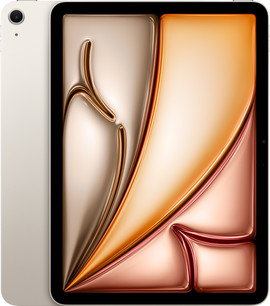
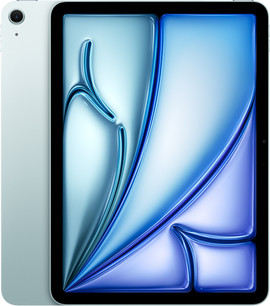
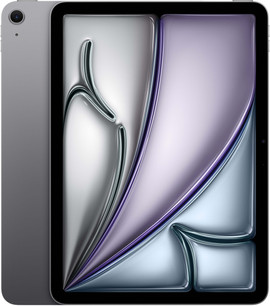
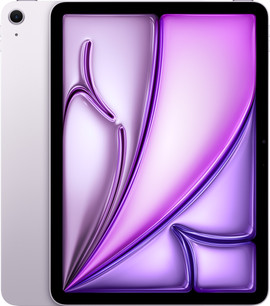
| Colors | Gray, Blue, Starlight, Purple | Silver, Blue, Pink, Yellow |
Design

Apple iPad Air (2026): 11-inch and 13-inch screen
You can choose from a medium-sized 11-inch model or a larger 13-inch iPad Air. On the 13-inch screen, you have more screen space and can easily open 2 apps side by side. You also see all the details of movies and series on the sharp screen. You can easily take the 11-inch iPad Air with you. The selfie camera is placed on the long side of the screen. As a result, you're clearly visible during a video call. You can choose from 4 colors: Gray, Blue, Starlight, and Purple.

Apple iPad (2025): 11-inch screen
The iPad (2025) has a medium-sized 11-inch screen. You can easily take this compact iPad with you on the go. On the sharp screen, you can comfortably watch movies and series. Want to see all details of a sports match or action movie? We recommend the larger iPad Air 13 inches. With the iPad (2025), the selfie camera is also placed on the long side. That way, you're always clearly visible during a video call. You can choose from 4 colors: silver, Starlight, purple, and blue.
Processor and speed

Apple iPad Air (2026): powerful M4 chip
Thanks to the new and more powerful M4 chip, the iPad Air works superfast. That way, demanding programs for photo or video editing don't slow down. That's useful if you use them for work or studies. The iPad Air (2026) is suitable for Apple Intelligence. You can summarize a text, for example. You can choose from various storage capacities: 128, 256, or 512GB.

Apple iPad (2025): slower A16 Bionic chip
The new A16 chip in the iPad (2025) isn't as fast as the M3 chip in the iPad Air (2025), but it's still powerful. You can smoothly play more demanding games, without slowing down. Use your iPad for work or school? We recommend the more powerful iPad Air. The iPad doesn't support AI, which the iPad Air (2025) does. Just as with the iPad Air, you can choose from 128, 256, or 512GB storage. This means you can choose a higher storage than with its predecessor, the iPad (2022). Often download new apps? Choose 256GB or higher.

Accessories for your iPad and iPad Air
You can make the most of your iPad or iPad Air with a stylus or keyboard cover. With an Apple Pencil, you can draw and write precisely on your iPad. With a Magic Keyboard, you can turn your iPad Air into a small laptop. That allows you to type reports and emails superfast. Thanks to the trackpad, you can easily navigate through your apps. You can also protect your iPad or iPad Air from dirt and damages with a cover. Choose a screen protector as well to keep your screen as good as new.
Conclusion
Thanks to the more powerful processor, the iPad Air is a faster tablet compared to the iPad. As a result, demanding games and programs run smoothly. With the larger iPad Air 13-inches, you have more screen space and you can easily open 2 apps side by side. Choose a cover as well to protect your iPad or iPad Air from dirt and scratches.
Article by Emme-Lotte
Apple iPad Expert

