Written by Prescious
Edited on
26 May 2023
·
15:02
How do you set up the PlayStation VR2 (PS VR2)?
You just bought your new PlayStaion VR2 and want to use it as soon as possible. This VR headset was made specifically for the PlayStation 5, so you have to connect it to your PS5. You also have to set up the headset before you can use it. On this page, we'll explain how to easily set up your PS VR2 in 3 steps.

Set up the PlayStation VR2 in 3 steps
Connect the PlayStation VR2 to your PlayStation 5 in 3 steps.
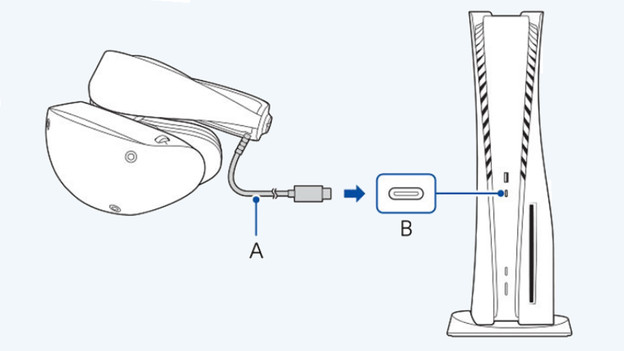
Step 1: connect your PS VR2
- Grab the PS VR2 and connect the USB-C cable to your PlayStation 5.
- Switch on your PlayStation 5.
- Switch on your PS VR2 via the button on the bottom of the headset.
- Grab your PlayStation VR2 controllers.

Step 2: set up your playing field
- Switch on your PS VR2 and go to the home screen.
- Choose your playstyle: sitting down or standing up.
- Draw your own playing field or choose a standard playing field.
- You can always adjust your playing field via the settings or by pressing and holding the PlayStation button.

Step 3: adjust the lenses
- Go to the settings and choose 'Accessories'.
- Choose 'Adjust Lens Distance'.
- Turn the dials on the top until the image look sharper.
- Click 'OK' when the image is good and save the settings.

Adjust the other settings
You can adjust many more options via the settings. Press and hold the PlayStation button and open the quick settings. Here, you can adjust the following settings:
- Display environment
- Screen brightness
- System screen size
- Vibration of VR headset
- Set up playing field
- Adjust visibility
- Track eye movements
- Other settings