
Written by Lucas
Edited on
1 May 2023
·
13:07
How do you adjust the sound of your Sony earbuds or headphones?
Via an equalizer, you can easily adjust the sound of your Sony earbuds or headphones. You can highlight the sound you find important and listen to a personalized sound. In this article, you can read how to use the equalizer in 4 steps.

Adjust the sound in 4 steps
You can read how to adjust the sound of your Sony earbuds or headphones in 4 steps.
Step 1: download the Sony Headphones Connect app.
Step 2: connect your earbuds to the app.
Step 3: choose the equalizer.
Step 4a: choose a preset equalizer.
Step 4b: adjust the frequency bands.

Step 1: download the Sony Headphones Connect app
First, download the Sony Headphones Connect app. Go to the App Store on your iPhone or the Play Store on your Android phone. Then, find the Sony app and download it.

Step 2: connect the earbuds or headphones to the app
Open the app and go through the steps to connect your earbuds or headphones to the app. Didn't you connect your earbuds or headphones to the app via Bluetooth yet? That's the first thing the app asks you to do. In our article, you can read how to to connect via Bluetooth.
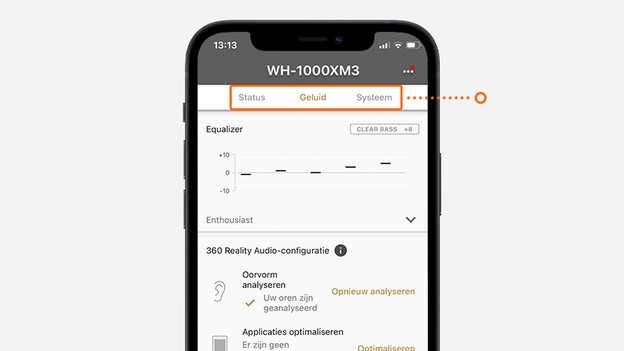
Step 3: go to the equalizer
You'll now see 3 options in the app, Status, Sound, and System. Tap 'Sound' to view all settings relating to sound. Scroll down until you see the equalizer.

Step 4a: choose a preset equalizer
In the equalizer settings, you'll see an arrow pointing downwards at the bottom right. Tap it and choose from various preset equalizers. The name indicates what the equalizer does to the sound. You can swipe through the options and hear which sound you like best.

Step 4b: adjust the sound via the frequency bands
If you want to adjust the sound yourself, tap on the gearwheel at the bottom right. You'll then see 5 frequency bands, with low frequencies on the left and high frequencies on the right. Want to highlight the bass more? Slide the bar at the bottom to the right until you've reached the right bass level. If you tap 'OK' at the top right, your equalizer is saved.

