Written by Sem
Edited on
11 March 2026
·
13:24
How do you connect your PlayStation 5 to the internet?
You need an internet connection for many functions on your PlayStation 5. Think of the Netflix app, online gaming, or streaming your gameplay. You'll have to search for the settings to connect your PlayStation 5 to the internet. In this article, we'll show you how to connect your PlayStation 5 to the internet as quickly and easily as possible.

Get started with the internet connection
Many of the functions of your PS5 require an internet connection. We'll explain how you connect your PS5 to a wireless network.
- Step 1. Go to Settings.
- Step 2. Set up internet connection.
- Step 3. Select network
- Step 4. Check your connection.
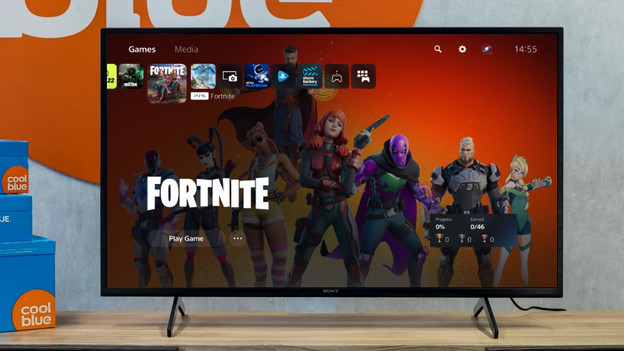
Step 1: go to Settings
You'll find a gearwheel at the top right of the PlayStation 5 homepage. This symbol takes you the your PS5 settings. Click the gearwheel and continue with the next step.
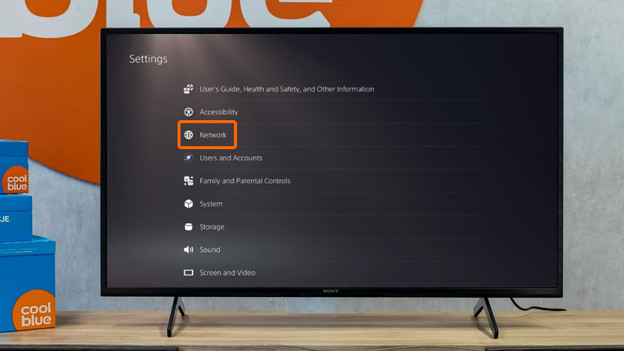
Step 2: open Network and set up connection
In the list of settings, you'll find the heading 'Network'. Press it and then click 'Set up internet connection'. A list of WiFi routers near your PlayStation will appear. Are you using an internet cable? It'll be at the top of the list. For the best WiFi connection, use a gaming router.

Step 3: choose the right network
You'll see different options, including the name of your WiFi network. Did you never give your WiFi network a new name and don't know what it's called? Check the side of your router. You'll find both the network name and the password. Once you've selected the right name, a screen will appear where you have to enter the password. Enter your password. Your PlayStation now connects to the internet. You don't need a password if you use an internet cable. Click 'Configured wired LAN' and your PlayStation connects to the internet.

Step 4: check your connection
After you've set the right password for your router, your PlayStation automatically connects to the internet. This also applies to your internet cable. The PlayStation 5 tests your internet connection. You'll see what the speed of your connection. Is the check complete? You can get started with your favorite game or app right away.
Article by Sem
Gaming Expert.