
Written by Mark
Edited on
4 November 2024
·
13:55
How do you reset your Nintendo Switch?
Does your Nintendo Switch crash or do you have other problems? A reset often helps. You can reset your Nintendo Switch in 3 ways. In this article, you can read which way will solve your problem. That way, you can game on your Nintendo Switch soon again.

Reset in 3 ways
You can reset your Nintendo Switch in 3 ways. Read when you need which type of reset below.
- Restart - problems like a crash or unreadable gamecards.
- Factory settings - if a restart doesn't solve your problems.
- Hard reset - if your Nintendo Switch doesn't start up at all.

Restart your Switch
With a restart, you can solve most of the problems with your Nintendo Switch. Press and hold the on button for 15 seconds. Wait a couple of seconds before you press the on button again. Most problems will be solved after this.
Return to factory settings

Store your saved data
Does restarting your Switch not solve the problem? Reset your Nintendo Switch to factory settings. Please note that this means your Nintendo Switch is reset to its initial settings. After this, you'll have to link your account again. The games you saved on the hard drive of your Nintendo Switch will be deleted too. Do you want to prevent this? Make sure to transfer your save game to a memory card or to upload it to the cloud with Nintendo Switch Online.
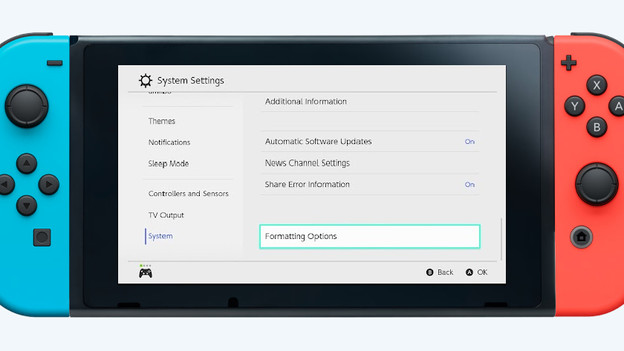
Return to factory settings
All your save data has been secured, so it's time for the reset. Go through the steps below to reset your Nintendo Switch to factory settings.
- Go to 'System Settings' via the home screen and choose 'System' all the way at the bottom.
- Choose 'Delete system information' followed by 'Reset factory settings'.
- Read the information on the screen carefully and confirm by selecting 'Reset factory settings' again.
Your Nintendo Switch will reset to factory settings now, so you can set up your Nintendo Switch again.

Hard reset
There's a third way, which is the hard reset. Only use this way if your Nintendo Switch won't turn on at all anymore, even with a fully charged battery. You won't lose save data if you use this way. Go through the following steps to perform a hard reset:
- Press and hold the on-button for 12 seconds.
- Press and hold the 2 volume buttons and the on-button until the 'recovery screen' appears.
- Choose 'Reset factory settings without deleting saved data'.
- Read the information on the next page and confirm again.
Your Nintendo Switch has now been reset without losing data.

