Written by Sem
Edited on
11 March 2026
·
13:24
How do you reset your PS5 to factory settings?
You want to reset your PlayStation 5. By doing this, the settings will be set the way they were set when you unboxed the PlayStation. This is a useful solution when your PlayStation isn't working properly or settings have been adjusted in the wrong way. You should also reset the PlayStation if you want to sell it or give it away. In this article, we'll explain how to do this.

Reset the PlayStation 5
Before you reset the PlayStation 5, you should go through a number of steps. We'll explain these steps below. Please note that all your settings, information, and downloaded apps will be deleted during a reset.
- Step 1. Settings
- Step 2. System software
- Step 3. Reset options
- Step 4. Reset PlayStation
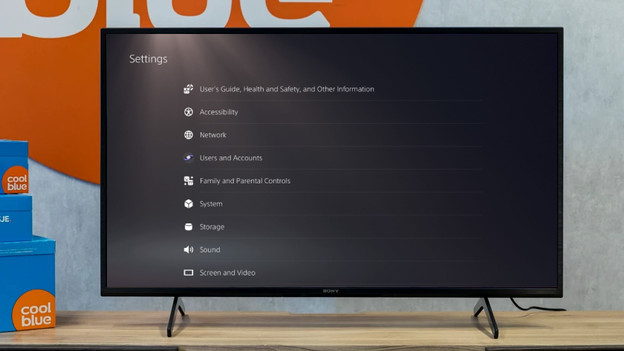
Step 1: go to Settings
You can reset the PlayStation 5 from the home screen of your console. Go through the steps below and reset your PS5 to factory settings.
- Turn on your PlayStation 5.
- Click the cogwheel icon at the top right of the home screen.
You can now see the settings of your console.

Step 2: click the system software
You'll find 'System' in the list of settings. You'll need this setting to reset the software.
- Click 'System' in the settings list.
- A list with settings will appear. Click 'System software' at the top.
- Select 'Reset options' at the bottom of the page.

Step 3: check the reset options
On the screen, 3 options will appear for resetting your console to factory settings. These will be your personal dictionary, standard settings, and a reset of the console. Please note that a reset of your console means that all files, apps, users, and settings will be deleted.
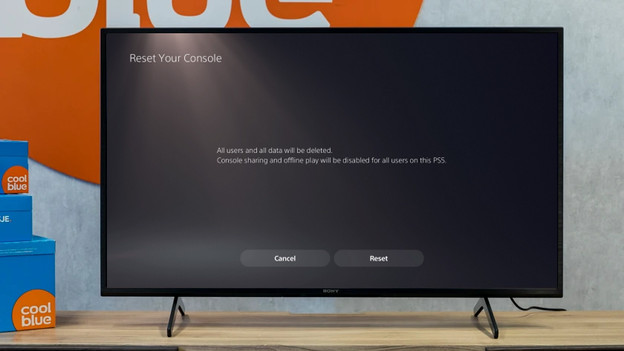
Step 4: reset your PlayStation 5
Did you make a backup of your information, or do you want to delete everything from your console? You're now ready to reset your PS5 to factory settings.
- Select 'Reset your console'.
- Click 'Reset'.
- Your PS5 will now reset to factory settings. This can take a couple of minutes.