Written by Sem
Edited on
20 June 2024
·
13:23
How do you use an Xbox One controller on the Xbox Series X and S?
Do you want to connect your Xbox One controller to the Xbox Series X? We have good news. With an Xbox One controller, you can also play games on your newest Xbox console. We'll explain how you can use both a wireless and a wired controller on the Xbox Series X here.
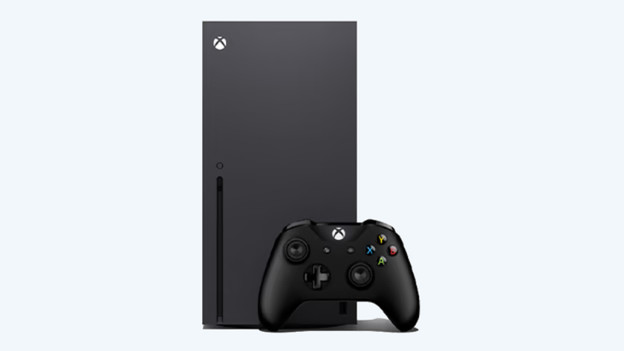
Get started with a wireless Xbox One controller
Use your wireless Xbox One controller as a backup or for a second player on the Xbox Series X and S. You can start using this controller after going through these 3 steps:
Step 1. Press sync button on console
Step 2. Press sync button on controller
Step 3. Connect controller in settings
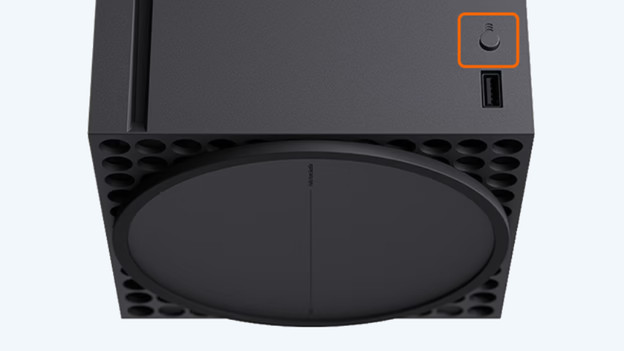
Step 1: press the sync button on your console
First, you press the sync button on your Xbox Series X and S console. This is the black round button above the USB-A port on the back of the console.
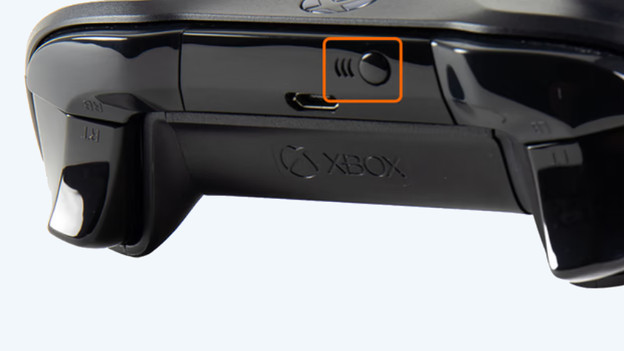
Step 2: press the sync button on your controller
Now press the sync button on your controller as well. This is the black round button on top of the controller, in between the bumper buttons. Hold down the button until the light of the Xbox logo on the controller starts to blink quickly. Wait for the light to stop blinking and burn continuously.

Step 3: connect the controller in the settings
If you want to game with the controller, you have to connect the controller to your profile. Start in the main menu of your console and go to:
- Home
- Profile & system
- Settings
- Account
- Sign-in, security & PIN
- This controller signs in
- LINK CONTROLLER
The controller is now connected to your profile and you can use it to game on the Xbox Series X and S.

Connect a wired controller
You can easily connect a wired Xbox One controller to the Xbox Series X and S. Plug the connector of the controller into a USB-A port on your Xbox Series X and S. The controller connects automatically and you can use it in a few seconds.