
Written by Mark
Edited on
27 February 2025
·
15:40
How do you connect a headset to the Xbox Series X and S?
You can connect your gaming headset to your Xbox Series X and S in various ways. On this page, you can read how to connect your gaming headset. For example, you can read how to connect your headset wired, but you can also read about the automatic connection for Xbox consoles. After reading this article, you can play with your friends again in no time.
Connect your headset to your Xbox Series X and S
You can connect your gaming headset to the Xbox Series X and S in one of the 5 following ways:
Wired
- Via the 3.5mm connector on the controller
- Via the USB-A port on the console
Wirelessly
- Via a USB-A dongle
- Via the sync button
- Via automatic connection

3.5mm audio jack on the controller
The controller of the Xbox Series X and S has a 3.5mm input for wired gaming headsets. Go through the steps below to connect your headset.
- Plug the 3.5mm cable of your gaming headset into your Xbox controller.
- Check whether the sound is coming from your headset.
Isn't the sound coming from your headset? Your cable is probably broken. Contact the customer service in this case.

Wired via the USB-A cable
You can connect some of the wired gaming headsets via a USB-A cable. You can easily plug these into the USB-A port at the front of your Xbox Series X or S. The sound will then come from your gaming headset. Isn't this the case? Your cable is probably broken. Contact the customer service if this is the case.
Wirelessly via a USB-A dongle
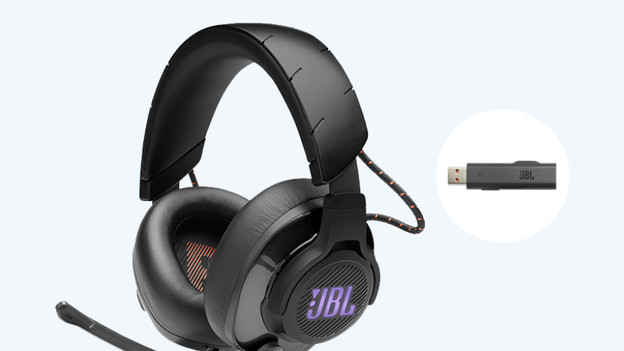
You can connect most wireless gaming headsets via a USB-A dongle to your Xbox Series X or S. You can plug it into the USB-A port at the front of your Xbox. Microsoft uses a different technology than PlayStation for this, so you can't connect many headsets this way. Won't your headset connect via the USB dongle. Connect it in one of the other ways.
Wirelessly via the sync button
The wireless gaming headsets by Microsoft have a special sync button. Go through the following steps and connect this headset to your Xbox:
- Turn the gaming headset on.
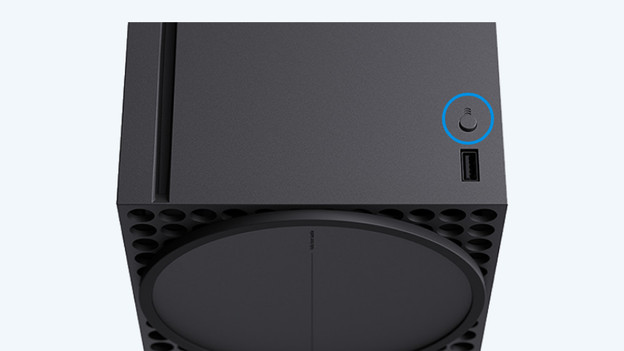
- Press the sync button above the USB-A port at the front of your Xbox Series X or S.
- Your gaming headset will now connect to your Xbox Series X or S automatically.

Wirelessly with automatic connection
Some gaming headsets are made for the Xbox Series X and S. These headsets connect to your Xbox Series X or S within a couple of seconds. The headset gives an audio or light signal when it's been connected successfully.
Article by Mark
Gaming Headset Expert.

