
Written by Daniel
Edited on
12 March 2024
·
16:01
Tips to improve your WiFi range
Bad WiFi signal can totally ruin your night of Netflix fun. Want to expand the WiFi range in your house? Here, we'll give 4 tips for a better WiFi range.
Improve your WiFi range
- Place your router in a central spot.
- Choose the least crowded WiFi channel.
- Install the latest software.
- Expand your network with access points.

Place your router in a central spot
Steel plates, radiators, thick walls, or even a mirror of an aquarium may block part of your WiFi signal, which leads to bad WiFi range in your home. Place the router in a central location at home for better WiFi range.
Don't point antennas at each other
Does your router have external antennas? Always place one antenna upwards and one horizontally to have better WiFi range. The antennas of the router transmit WiFi signal. This signal can be compared to circles in the water when you throw in a stone. If you throw 2 stones next to each other, the circles cancel each other out. When you place both antennas in the same direction, they block each other's signal.
Choose the most calm WiFi channel
A WiFi band consists of multiple channels. These channels form a digital highway for your data. When multiple devices use 1 channel at the same time, they form a traffic jam. This slows down the signal. This may cause loss of WiFi signal. Discover which channels in your house are used with the help of a WiFi scanner or analyzer. Choose the channel of a calm band for the best results.
Increase your channel width
The bandwidth of most routers is set at 20MHz by default. Double the channels of your digital highway with a couple of clicks by changing this bandwidth to 40 or even 80MHz. To do this, go to the wireless settings of your router. This way, you can increase the WiFi range and increase its speed.

Install the latest software
Poor WiFi range can be caused by outdated software on your router. For example, because the router doesn't use all channels or because a new technology is missing. That's why installing new firmware can improve the WiFi range in your house.
You can find how to upgrade the firmware in the manual of your router.
Expand your network with access points or mesh routers
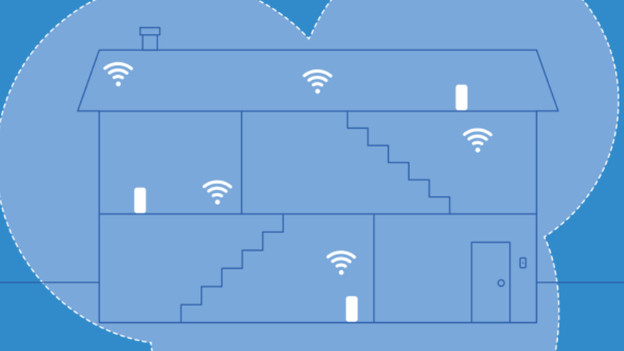
A WiFi network starts with an internet connection, a modem, and a router. A standard router from your provider has fewer channels to connect network devices to. That's why you should expand your network with an access point. These stations have a wired connection to your router and transmit a wireless signal. Or install a mesh system. These systems consist of multiple routers that are connected wirelessly. This makes it feel like you're working next to your router everywhere in your home.

