PAYBACK at Coolblue
Earn PAYBACK points with every purchase at Coolblue. Buy your favorite products online and earn valuable points at the same time. Here's how PAYBACK works at Coolblue.
How does PAYBACK at Coolblue work?
Want to earn double rewards while you buy? When you click through to Coolblue via the PAYBACK app or the PAYBACK online store, you’ll automatically earn PAYBACK points on every eligible purchase. An eligible purchase is an order that isn’t canceled or returned and meets all PAYBACK terms and conditions. We’ll show you exactly how it works and what you need to keep in mind here.
Your advantages with PAYBACK at Coolblue
- Earn points with every purchase Earn valuable PAYBACK points with every eligible purchase at Coolblue when you visit us via the PAYBACK Shop or the PAYBACK app.
- Exclusive coupons and promotions Activate exclusive coupons and promotions in the PAYBACK app or your online account to earn even more points.
- Redeem points flexibly Redeem your collected points in the PAYBACK store or at official PAYBACK partners (for example supermarkets like Edeka) for gift cards, products, or other benefits.
- Combine with Coolblue promotions Earn PAYBACK points while taking advantage of many deals and promotions at Coolblue.
- Easy tracking in the PAYBACK app Keep track of your earned points at any time in the PAYBACK app or in your PAYBACK online account.
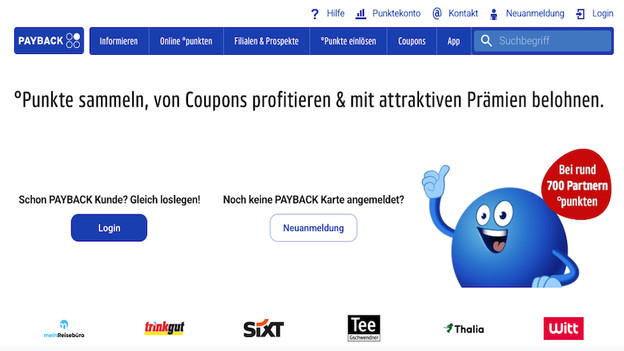
1. Open PAYBACK
Open the PAYBACK app on your smartphone or go to payback.de and log in to your PAYBACK account.
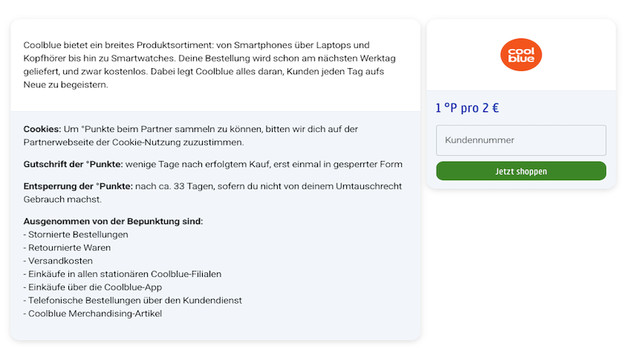
2. Select Coolblue in the PAYBACK store
Search for Coolblue in the PAYBACK store and click on “Zum Shop” (tracking link). This is the only way to ensure your purchase is correctly recorded and the points are credited to your PAYBACK account.
3. Buy at Coolblue and earn points
Buy at Coolblue as usual. Your PAYBACK points will be automatically credited to your account after a successful, eligible purchase.
To redeem your points, go back to the PAYBACK app or the PAYBACK store later and select your desired reward or a PAYBACK partner. You cannot redeem your points directly with Coolblue.
Important information
- Points are credited only via the tracking link Your PAYBACK points will be credited only if you start your purchase at Coolblue via the PAYBACK tracking link (“Zum Shop”) in the PAYBACK app or in the PAYBACK store.
- Can't be redeemed at Coolblue You can't redeem your PAYBACK points directly at Coolblue. To do so, use the PAYBACK Shop or official PAYBACK partners (for example Edeka).
- Cancellations and returns If a purchase is canceled or returned, the corresponding points may be deducted from your PAYBACK account.
- Note the promotional terms and conditions Some promotions or coupons may be time-limited or subject to certain conditions. You can find the exact details in the PAYBACK app or in your PAYBACK online account.
Frequently asked questions
How do I earn PAYBACK points at Coolblue?
Open the PAYBACK app or the PAYBACK store on payback.de, search for Coolblue, and click “Zum Shop.” Place your order at Coolblue as usual. Your purchase will be tracked, and the points will be automatically credited to your account after a successful order.
Do I have to link my Coolblue account to PAYBACK?
No. It's not necessary or possible to link your Coolblue account to PAYBACK. The only important thing is that you visit Coolblue via the PAYBACK tracking link before you make your purchase.
Can I earn PAYBACK points when shopping at Coolblue stores?
No, you can only earn PAYBACK points when ordering online. If you order online and select “Pick up in store,” you’ll still earn points, of course.
How long will it take for my points to be credited to my account?
Depending on your order and how it's processed, it may take some time for your PAYBACK points to be credited. You can find detailed information about the timeframe in the PAYBACK Terms and Conditions. You’ll see in your PAYBACK account as soon as the points have been reserved or credited.
Does this work with ad blockers?
Ad blockers, tracking blockers, or strict browser settings may prevent your purchase from being recorded correctly. To ensure your PAYBACK points are credited, you should disable ad blockers when visiting the PAYBACK app or the PAYBACK store and while shopping at Coolblue, and allow cookies.
Why weren't my points recorded?
In many cases, this is because the purchase was not initiated via the PAYBACK tracking link (“Zum Shop”) or because cookies or tracking were blocked during the ordering process. Points may also not be awarded if an order was canceled, returned, or changed afterward, or if certain products or promotions are excluded from earning points according to the PAYBACK Terms and Conditions. If you haven’t received your points, you can submit a retroactive credit request through PAYBACK.

Ready to get started?
Open the PAYBACK app or the PAYBACK store on payback.de now, search for Coolblue, and click “Zum Shop.” This ensures that your purchase is recorded correctly and that you earn PAYBACK points on every eligible purchase.
