Saitek Pro Flight Instrument Panel PC

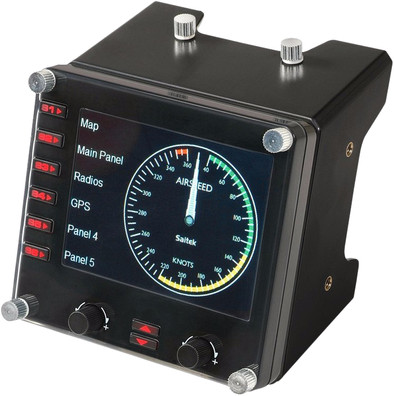
Never available again
View alternatives in the sidebar
View alternatives in the sidebar
Product number | 146902 | |
|---|---|---|
Manufacturer code | 945-000008 | |
Brand | Logitech G | |
Warranty | 2 years | |
Processing of your defect | Carry-in warranty |
Type of controller | Panel | |
|---|---|---|
Force feedback |
Computer platform | PC (Windows) | |
|---|---|---|
Compatible with Windows version | Windows 10, Windows 7, Windows 8 | |
recommended for Virtual reality |
Braided cable | ||
|---|---|---|
Cable length | 1,5 m | |
Connectors | USB-A (standard) | |
USB version | USB 2.0 | |
Wired connector type | Connector (outside device) | |
Number of male standard USB-A connectors | 1 | |
Male standard USB-A connector version | 2.0 | |
Connector type | USB | |
Type of USB connector | Standard USB-A | |
Number of USB connectors | 1 | |
Gender standard USB-A connector | Male | |
Connection type | Wired |
Power supply type | USB port PC/laptop | |
|---|---|---|
Cable length | 1,5 m |
Color | Black | |
|---|---|---|
Weight | 0,24 kg | |
Height | 8 cm | |
Width | 8 cm | |
Depth | 9,4 cm |
anything for a smile
According to our flight stick instrument expert
With this panel you can switch between the different available flight information.
The panel is recognized by Microsoft Flight Simulator X.
It is possible to have multiple panels work together in combination with the Saitek Pro Flight Yoke
For other flights, the panel must be configured manually.
With the Saitek Pro Flight Instrument Panel for the PC, your flight sim experience becomes even more realistic. Thanks to this 3.5 inch color display, you keep an eye on your altimeter, speedometer, trip angle, level and compass. Use the buttons on the panel to switch between the different instruments. Of course you can also make a setup with several Instrument Panels side by side. The information on the Saitek Pro Flight Instrument Panel is transmitted in real-time by your flight simulator software. The Pro Flight Instrument Panel is immediately ready for use with Microsoft Flight Simulator X. Are you flying with a different flight sim? Then use the software kit to program the display for your favorite application.
Please note that this product consists of één flight panel. Images with multiple panels and the Pro Flight Yoke System are for illustration purposes only.
5 stars
8
4 stars
7
3 stars
2
2 stars
0
1 star
0
This thing is a very nice extension for your flight simulator, save your money and put six to get it complete.
But if you are NOT flying, the thing can also serve as a picture frame. The circulating promotional photos are located in the Program Files/Saiktek/DirectOutput folder under the names Fip1.jpg t/n Fip9.jpg Place up to 9 of your own photos in the format 320x240
If you start FSX after that, everything works normally.
Hans Balk
18 March 2012
Automatically translated from Nederlands
A great investment for a nice flight It exceeded all my expectations. Unfortunately, the manuals are brief and not even translatable into Dutch, hopefully a solution will be found soon.
middelkoop p.
3 January 2013
Automatically translated from Nederlands
A valuable extension of my flying experience. That's the best way I can describe it. Especially if you attach it to the Saitek Pro FLight Yoke (the aircraft handlebar). Although you can switch to 6 instruments, I find that a bit cumbersome. And with this comes the biggest drawback: You want more. Make sure that they use power via the USB and that you have enough USB inputs on your PC (or a USB hub with power adapter).
Ted van Hoof
17 January 2013
Automatically translated from Nederlands