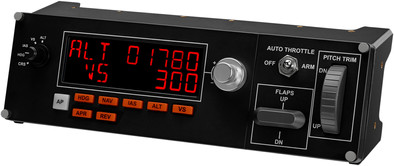
Saitek Pro Flight Multi Panel PC

Never available again
View alternatives in the sidebar
View alternatives in the sidebar
Product number | 146925 | |
|---|---|---|
Manufacturer code | 945-000009 | |
Brand | Logitech G | |
Warranty | 2 years | |
Processing of your defect | Carry-in warranty |
Type of controller | Panel | |
|---|---|---|
Force feedback |
Computer platform | PC (Windows) | |
|---|---|---|
Compatible with Windows version | Windows 10, Windows 7, Windows 8 | |
recommended for Virtual reality |
Braided cable | ||
|---|---|---|
Connectors | USB-A (standard) | |
Cable length | 1,5 m | |
USB version | USB 2.0 | |
Wired connector type | Connector (outside device) | |
Connector type | USB | |
Gender standard USB-A connector | Male | |
Type of USB connector | Standard USB-A | |
Number of USB connectors | 1 | |
Male standard USB-A connector version | 2.0 | |
Number of male standard USB-A connectors | 1 | |
Connection type | Wired |
Power supply type | USB port PC/laptop | |
|---|---|---|
Cable length | 1,5 m |
Color | Black | |
|---|---|---|
Weight | 0,572 kg | |
Height | 8 cm | |
Width | 28,2 cm | |
Depth | 8 cm |
anything for a smile
According to our flight stick radio expert
Monitor and control the autopilot, flaps, auto throttle and elevator trim of your virtual device.
Easy to attach to the Saitek Pro Flight Yoke System.
Only suitable for the Saitek Pro Flight Yoke System.
For a lifelike flight experience with MS Flight Simulator 2004 or X, expand your cockpit with the Saitek Pro Flight Multi Panel. The Saitek Pro Flight Multi Panel combines a handy LED display with lifelike buttons. This controls the autopilot, flaps, auto throttle and elevator trim of your virtual device. That flies a lot easier than when you use the in-game controls on the screen. You simply attach the Saitek Pro Flight Multi Panel to the Pro Flight Yoke System from Saitek, although you can of course also mount it stand-alone in your own cockpit setup.
5 stars
14
4 stars
8
3 stars
0
2 stars
0
1 star
0
the Saitek Pro Flight Multi Panel PC. is a wonderful addition to the rest of my Saitek equipment, the autopilot is easy to operate and on the screen you can see the entered data change ok.
The flight you make will definitely become easier that you don't have to set the AP on the screen with your mouse.
really recommended.
Ordered via Coolblue and delivered the next day for the lowest Internet price.
Ed van Reijswoud
18 October 2013
Automatically translated from Nederlands
This is the second time I ordered something through consoleshop.nl. And again my order was delivered the next day as agreed. What I especially like is the interim updates that show where your order is in the order process
The packaging is more than OK and the shipping is free too.
The advantages of consoleshop.nl:
I recommend everyone to order through Consoleshop, you will not be disappointed.
A happy Consoleshop customer.
Andres van Goozen
8 February 2013
Automatically translated from Nederlands
If you are a big fan of Flight simulation and would like to add an extra dimension to flying via PC, this is a recommended option.
The multipanel is easy to connect via a USB connection. All that remains is to install the software and you're done. Microsoft Flight Simulator recognizes the device as soon as you select an aircraft and start the scenario, the multipanel will turn itself on. The ease of use of the device is simple and easy.
However, you should take the following into account: The standard planes from Microsoft Flightsimulator work perfectly with this multi panel. But for several addon planes it doesn't work completely. To solve this problem, there is a free program on the Internet. (name: spad) Allows you to set the radio panel per addon aircraft. (help document is included)
Coming back to the product, it works nicely and gives you that extra feeling of working from a cockpit and not just from a keyboard and monitor. Definitely recommended, but not necessary, are the other extensions that are available. Such as Saitek radio panel, throttle, Flight Yoke and Flight Instrument Professional. All these items can also be ordered via Coolblue and make your cockpit even more realistic.
Gerald
28 January 2014
Automatically translated from Nederlands