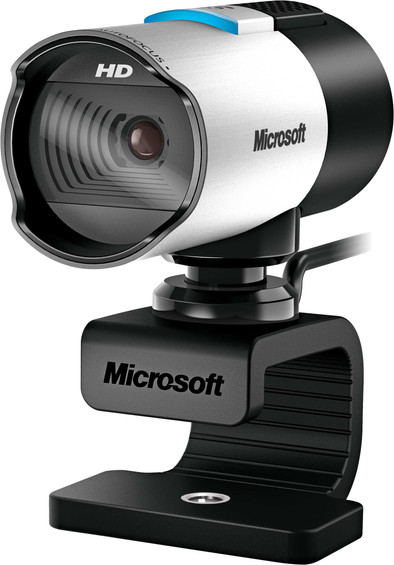
Microsoft LifeCam Studio

Never available again
View alternatives in the sidebar
View alternatives in the sidebar
With Coolblue Extended Warranty, you are protected against costs due to quality defects of your webcam for the next 4 years. During the entire term, we will reimburse up to the original purchase price. You can easily add the Extended Warranty in your shopping cart.
€ 14,99
one-timeAdd your webcam to your shopping cart. In the next step, you can add the Extended Warranty. You can exchange or return your purchase for free within 30 days.
Product number | 228950 | |
|---|---|---|
Manufacturer code | Q2F-00015 | |
Brand | Microsoft | |
Warranty | 2 years | |
Processing of your defect | Carry-in warranty |
Plug and Play | ||
|---|---|---|
Sharpness | HD Ready (720p) | |
Autofocus | ||
Wide-angle | ||
Automatic brightness adjustment | ||
Coverable lens |
Built-in microphone | ||
|---|---|---|
Microphone recording type | Mono | |
Microphone noise suppression | ||
Infrared (IrDA) | ||
Tiltable | ||
Type of webcam holder | Universal clip |
Width | 6 cm | |
|---|---|---|
Depth | 11,4 cm | |
Height | 4,5 cm | |
Weight | 0,15 kg | |
Color | Black, Silver | |
Material | Plastic | |
Finish | Matte and glossy |
Type of USB port | Standard USB-A | |
|---|---|---|
Connection type | Wired | |
Bluetooth | ||
Compatible with operating system | Windows | |
Cable length | 1,5 m |
anything for a smile
Plug and Play | ||
|---|---|---|
Compatible with operating system | Windows | |
Autofocus | ||
Sharpness | HD Ready (720p) | |
Built-in microphone |
According to our webcam expert
This webcam has a Full HD resolution, so you're displayed sharply.
Thanks to the autofocus support on this webcam, your footage will always be sharp.
You don't need a separate microphone anymore thanks to the built-in microphone.
Due to the lack of noise suppression on the microphone, it's more likely to pick up on unwanted ambient noises.
With the Microsoft LifeCam Studio, you'll be caught on camera sharply. It's ideal if you're working from home for a day and making video calls to colleagues, or having a digital catch-up with your family. The LifeCam Studio automatically focuses on your face, so you're the center of attention and don't blend into the background. Pivot the webcam by 180 degrees in every direction to find the right angle. Thanks to the wide-angle lens, you can fit multiple people fit in the frame of the LifeCam for a video call. With the built-in microphone, your voice and those of the people next to you are properly registered.
5 stars
26
4 stars
7
3 stars
2
2 stars
1
1 star
0
This is already the 3rd LifeCam Studio in the family. There is no better proof of satisfaction, I think. The new one replaces an old VGA camera and then the difference is huge of course. We had some issues getting Skype working, but that had nothing to do with the webcam, but everything to do with a quirky PC, The problem was solved quite quickly. And then Skype. We also received compliments about the good image. We could also count on the fast delivery by Coolblue. Hats off to the logistics organisation: ordered late at night, delivered at home the next day in the morning.
Marc Poppe
5 May 2015
Automatically translated from Nederlands
It's beautiful, I was very happy with it, but since the update to Windows 10 I can't get it to work anymore. I wonder if that will ever happen, but I can't ask that question anywhere. I'm now considering buying an ugly, bad, cheap one and throwing it on the shelf, but I think it's such a shame because it's potentially great. So if anyone knows how to do it, I'd appreciate it, because it would be great
flopke
29 March 2017
Automatically translated from Nederlands
(+plus) The image quality is very good and I also think the design is beautiful. However, I can't figure out certain functions in the menu (-minus)
Ramsey Marcos
3 June 2016
Automatically translated from Nederlands