Never available again
View alternatives in the sidebar
With Coolblue Extended Warranty, you are protected against costs due to quality defects of your printer for the next 4 years. During the entire term, we will reimburse up to the original purchase price. You can easily add the Extended Warranty in your shopping cart.

€ 39,99
one-timeAdd your printer to your shopping cart. In the next step, you can add the Extended Warranty. You can exchange or return your purchase for free within 30 days.
Product number | 471142 | |
|---|---|---|
Manufacturer code | 8747B006 | |
Brand | Canon | |
Warranty | 2 years | |
Processing of your defect | Carry-in warranty |
Printer size | Medium | |
|---|---|---|
Width | 15,9 cm | |
Depth | 31 cm | |
Height | 58,4 cm | |
Color | Black | |
Weight | 8,1 kg |
Printer type | Printing only | |
|---|---|---|
Photo printer | ||
Print quality photos | Very good | |
Portable (mobile use) | ||
Recommended for use printers | Printing at home, Printing photos |
Cartridge line | Canon PGI-550 / CLI-551 | |
|---|---|---|
Usage costs for 1 page | 4,9 eurocents | |
Print technology | Inkjet | |
Type of ink | Cartridges | |
Number of cartridges/toner cartridges | 6 | |
Color printer | ||
Print speed black (ISO) | 14,5 ppm | |
Print speed color (ISO) | 10,4 ppm | |
First black page ready after | 5 seconds | |
Speed class | Standard | |
Maximum print resolution height | 2400 dpi | |
Maximum print resolution width | 9600 dpi | |
Maximum print size | A3+ | |
Automatic duplex printing | ||
Borderless printing |
Scan functionality | ||
|---|---|---|
Automatic duplex scanning | ||
OCR |
Copying functionality |
|---|
Fax functionality |
|---|
Built-in screen |
|---|
Printer cable included |
|---|
Compatible with operating system | Android, Windows, iOS, macOS | |
|---|---|---|
Connection type | Wireless | |
Apple AirPrint | ||
Email print | ||
WPS (Wireless Protected Setup) | ||
Female standard USB-A port version | 3.0 | |
Ethernet port | ||
NFC | ||
Built-in WiFi | ||
WiFi frequency printers | 2.4GHz | |
WiFi direct | ||
Bluetooth | ||
USB port |
Location paper input | Back | |
|---|---|---|
Manual input tray | ||
Photo paper drawer | ||
Output capacity output drawer | 0 | |
Input capacity photo paper tray | 20 | |
Maximum print size standard paper tray | A3+ | |
Input capacity standard paper tray | 150 | |
Maximum print size photo paper tray | A3 | |
Number of standard paper trays | 1 |
Memory card reader |
|---|
Quality mark sustainable company | EcoVadis Gold |
|---|
anything for a smile
Print technology | Inkjet | |
|---|---|---|
Printer type | Printing only | |
Color printer | ||
Automatic duplex printing | ||
Maximum print size | A3+ | |
WiFi direct |
According to our printer expert
Send your print jobs wirelessly via WiFi.
Print large posters and brochures in A3 size.
Print razor-sharp photos thanks to the extensive cartridge system.
You can't print duplex automatically.
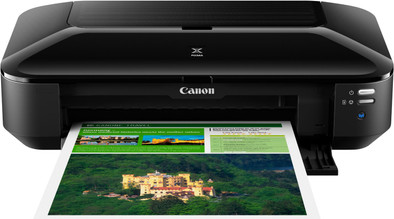
This A3 printer is larger than the average A4 printer.
Installatiegemak
Mogelijkheden
Afmeting
Bedieningsgemak
Afdrukkwaliteit
It is ideal for printing photos in good quality Prints beautiful posters, posters, etc And prints fast
Jocaty
11 February 2016
Automatically translated from Nederlands
First, a note on the advice that comes with the printer to buy cartridges. One black cartridge is forgotten! this printer has two black types that are both necessary. Print quality is wonderful. Unfortunately, the notification that comes with a malfunction is minimal, so it's looking for what you did wrong By the way, nice sound level during printing, I have the idea that the printer is well put together.
H.K. Krijger
22 April 2015
Automatically translated from Nederlands
This is already my third Canon inkjet printer and this one lives up to all my expectations. Like all Canon printers, this printer produces beautiful, sharp, true-to-color prints, is fast and doesn't make a lot of noise. The only thing I missed was a paper tray; Unfortunately, it is only possible to feed paper via the top-loader. This is not a problem for A4, but A3 paper curls because of this. If you would permanently put a stack of A3 in the top loader, the printer would take up a lot of space. Manually feeding paper per print session is therefore really the only option.
Hanneke de Wit
11 July 2014
Automatically translated from Nederlands