Kingston HyperX Savage USB 64GB
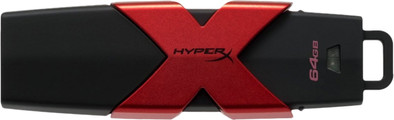
Never available again
View alternatives in the sidebar
View alternatives in the sidebar
Product number | 682643 | |
|---|---|---|
Manufacturer code | HXS3/64GB | |
Brand | Kingston | |
Warranty | 2 years | |
Processing of your defect | Carry-in warranty |
Total storage capacity | 64 GB | |
|---|---|---|
Maximum write speed | 180 MB/s | |
Maximum read speed | 350 MB/s | |
Backup feature | ||
Protected memory (USB) |
Type of USB port | Standard USB-A | |
|---|---|---|
Size USB flash drive | Standard | |
Casing USB flash drive | With protective cover | |
Depth | 7,63 cm | |
Width | 2,35 cm | |
Height | 1,22 cm | |
Weight | 45 g | |
Keychain attachment | ||
Color | Black, Red | |
Material | Plastic | |
Compatible with product type | Laptop | |
Water-resistant | ||
Water-repellent coating | ||
Waterproofness certification | Not certified | |
Dustproof | ||
Shockproof |
anything for a smile
Type of USB port | Standard USB-A | |
|---|---|---|
Total storage capacity | 64 GB | |
Maximum read speed | 350 MB/s | |
Maximum write speed | 180 MB/s | |
Casing USB flash drive | With protective cover |
Equipped with USB 3.1, the Kingston HyperX provides super-fast access to all your files. With a storage capacity of 64GB, there's plenty of room for all your digital files as well.
5 stars
76
4 stars
20
3 stars
3
2 stars
1
1 star
0
Capacity
Speed
Size
I needed a USB stick to move files averaging 4-8GB. Previously I had a simple stick that read and write at 20 MB/s and this could take quite some time. Therefore decided to buy a slightly more expensive but also much faster stick.
Build Quality: The USB stick feels very sturdy and heavy compared to all my other sticks. You notice that you have a decent product in your hands. The only thing that bothers me is the color of the LED (photo 1). Since the USB stick is completely black and red, a red light would have been more appropriate.
Speed: To test the speed of the USB stick I copied several things and also did a benchmark with CrystalDiskMark (photo 2). As you can see in the photo, the HyperX Savage achieves its advertised speeds with ease. It reads at an average of 363 MB/s and writes at 211 MB/s! I also tested the speeds in practice by copying some films and series and in practice I get a reading speed of 381 MB/s and a writing speed of 193 MB/s (photo 3). This means, for example, that copying a 4GB movie from the USB stick to my storage medium takes only 11s and from my storage medium to the USB stick only 21s.
Price: The USB stick is a bit more expensive than the average 64GB stick, but is well worth it because of the good build quality and the enormous speed it achieves.
ATTENTION: To be able to fully utilize the speed of the USB, your storage medium (HDD/SSD) must of course also be fast enough. In order to properly test the USB stick, I copied files from my SSD (photo 3), which has a read and write speed of 550/550 MB/s, so I was sure that my storage medium was not the bottleneck. After that I also copied some files to and from my hard drive (photo 4) and you immediately see that I get much slower speeds. This is not due to the USB stick, but to my hard drive that cannot keep up with those speeds. So if your storage medium is not fast enough and you don't plan to upgrade it in the near future, you might be better off with a slightly slower and therefore cheaper USB stick.
If I experience problems with the USB stick, I will adjust this review.
Ziyed Manoubi
23 October 2016
Automatically translated from Nederlands
Due to the design, the red cross makes the stick too wide!, you can hardly use the USB port in addition. The stick is completely skewed because that red cross on the Kingston is too wide
godelieve
24 August 2017
Automatically translated from Nederlands
Handy fast stick, with handy cap that fits on the back.
Harry Hoetjer
26 July 2017
Automatically translated from Nederlands
