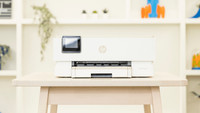
Canon PIXMA TS5050 Black

Never available again
View alternatives in the sidebar
View alternatives in the sidebar
With Coolblue Extended Warranty, you are protected against costs due to quality defects of your printer for the next 4 years. During the entire term, we will reimburse up to the original purchase price. You can easily add the Extended Warranty in your shopping cart.

€ 22,99
one-timeAdd your printer to your shopping cart. In the next step, you can add the Extended Warranty. You can exchange or return your purchase for free within 30 days.
Product number | 745621 | |
|---|---|---|
Manufacturer code | 1367C006 | |
Brand | Canon | |
Warranty | 2 years | |
Processing of your defect | Carry-in warranty |
Printer size | Medium | |
|---|---|---|
Width | 37,2 cm | |
Depth | 31,5 cm | |
Height | 31,5 cm | |
Color | Black | |
Weight | 5,5 kg |
Printer type | All-in-one | |
|---|---|---|
Photo printer | ||
Portable (mobile use) |
Cartridge line | Canon PGI-570 / CLI-571 | |
|---|---|---|
Print technology | Inkjet | |
Number of cartridges/toner cartridges | 5 | |
Color printer | ||
Print speed black (ISO) | 12,6 ppm | |
Print speed color (ISO) | 9 ppm | |
First black page ready after | 5 seconds | |
Maximum print resolution height | 1200 dpi | |
Maximum print resolution width | 4800 dpi | |
Maximum print size | A4 | |
Borderless printing |
Scan functionality | ||
|---|---|---|
Automatic duplex scanning | ||
Maximum optical scan resolution width | 2400 dpi | |
Maximum optical scan resolution height | 1200 dpi | |
Scanner type | File scanner, Flatbed scanner | |
Maximum scan size | A4 (21x29.7cm) | |
Automatic document feeder (ADF) | ||
Scan sizes | A4 | |
Scan speed (PPM) | 19 ppm | |
Color depth output | 48 bpp | |
Scan to | PC (network), USB | |
OCR |
Copying functionality | ||
|---|---|---|
Copy speed black (ISO) | 9 Hz | |
Copy speed color (ISO) | 4800 Hz | |
Maximum copy resolution height | 1200 dpi |
Fax functionality |
|---|
Built-in screen | ||
|---|---|---|
Color screen | ||
Touchscreen |
Compatible with operating system | Android, Windows, Windows Phone, iOS, macOS | |
|---|---|---|
Connection type | Wired, Wireless | |
Apple AirPrint | ||
Email print | ||
WPS (Wireless Protected Setup) | ||
Female standard USB-A port version | 2.0 | |
NFC | ||
Built-in WiFi | ||
WiFi direct | ||
Bluetooth | ||
USB port |
Manual input tray | ||
|---|---|---|
Photo paper drawer | ||
Output capacity output drawer | 50 | |
Maximum print size standard paper tray | A4 | |
Input capacity standard paper tray | 100 | |
Number of standard paper trays | 1 |
Memory card | SD, SDHC | |
|---|---|---|
Memory card reader |
anything for a smile
Print technology | Inkjet | |
|---|---|---|
Printer type | All-in-one | |
Color printer | ||
Maximum print size | A4 | |
Automatic document feeder (ADF) | ||
WiFi direct |
According to our printer expert
It's an all-in-one printer, so you can scan and copy in addition to printing.
With a high print resolution of 1.200 x 4.800 DPI, you can also print images sharply.
With this printer, you can print documents directly from an SD card without the intervention of a laptop or PC.
If you want to print more than 10 pages per minute in color, get a printer with a faster print speed.
Put this Canon PIXMA TS5050 Black on your desk at home and send all your print jobs wirelessly via WiFi. In addition, the printer can also print all your photos or documents from the cloud and those from your social media accounts. Scan and copy your photos and make borderless prints with a high resolution of 1200DPI by 4800DPI. No laptop at hand? Insert your SD card in the TS5050 and use the 3-inch color screen to print your photos or scan documents. You'll also save on costs, thanks to the 5 separate cartridges. You'll only be replacing the one that's actually empty.
Note: do you want to print a photo on photo paper? Place the back (with the logo) facing up in the printer.
Since my Canon PIXMA MP270 broke down, I had to get a new one. With the old printer I was able to print for 7 years without any problems and the choice was quickly made and the new printer had to be a Canon printer again. The new one also had to be an "All in One" type, not too big and good printer properties. My choice fell on this TS5050 printer, after I had read the description of various types. The printer was delivered neatly and well packaged the next day, as agreed. What immediately struck me was the size, small and handy. Included in the box is a manual in various languages, including Dutch, the printer, power cord, CD for the necessary drivers. Unfortunately, no USB cable was included. Read the manual before installing. Although the installation is not really difficult, it is advisable to read this manual carefully. I personally find the manual a bit "oversized", i.e. too many actions to be re-described. Installing is fairly easy. Also connecting the printer with the PC, laptop, Ipad and smartphone. Giving print orders via WiFi is flawless. The sound when printing was okay. It is possible to adjust the sound level via the display on the printer. Then the sound becomes even quieter and you only hear a soft buzz. In short, look no further. If this printer meets your usage requirements, look no further and buy directly. Definitely recommended and for this price you certainly can't beat it.
Ruud Reynaert
31 March 2017
Automatically translated from Nederlands
Received the printer today and immediately set everything up. This is my very first printer so I've kept the positives fairly neutral (for me it's a party anyway!).
I think it's a nice device. I had read in other reviews that it does not come with a USB cable and that is indeed true. I immediately bought a cable to be sure, but the wireless connection meets the requirements and is stable. So I would not recommend cable.
The manual is really, really VERY clear. Everything is explained both on the screen and in the booklet with illustrations and even animations. What worked a bit clumsily was the connection to my 5GHz router. The router transmits 2 signals, so make sure you are connected to the 2.4GHz network before installation. Otherwise you can do the whole thing all over again. (Printer does not support 5GHz)
What I find particularly useful is the Windows 10 app that is available for it. If you go to settings>devices>printers, there is automatically a link to the "Canon Inkjet Print Utility". Works perfectly and keeps track of the ink levels.
However, the printer is only compact if you fold everything, and then it is of no use. With extended parts at the front and rear, it is 70cm deep.
Marion
27 September 2017
Automatically translated from Nederlands
Easy operation except for double-sided printing.
Pieter
22 July 2017
Automatically translated from Nederlands