Alecto WS-5500




Don't have an account yet? Start here
anything for a smile

Retail price
€ 249,-€ 239,90
Delivered tomorrow
5 stars
51
4 stars
43
3 stars
5
2 stars
0
1 star
0
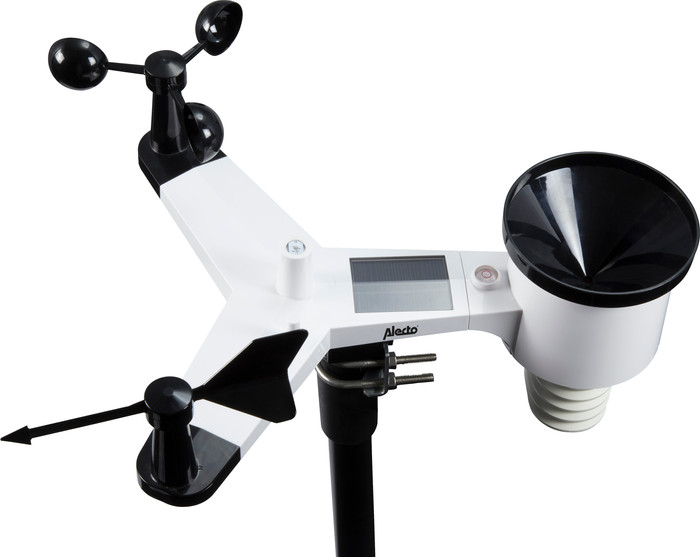
My first weather station. After asking some info from a well-known weatherman in the area, I ended up with the Alteco WS 5500. Great choice as it turns out. Pleasantly surprised when unboxing because only the windcatcher and windvane still had to be fitted, 10 sec work by tightening a small screw. Pay attention if you buy this weather station that extra material is needed to get it working immediately, what I regret is that no batteries are included. If you don't have it at home (For outdoor unit 2 Lithium AA bats) you can't start installing immediately. Also available is a round post of 50mm MAX! outside diameter, otherwise the station cannot be attached to anything. I attached it to a green garden fence post with a diameter of 48mm and it went perfectly, station is 2.6 meters above the ground in a free place. Make sure that the rain tray is exactly North and that the ball of the built-in compass is nicely in the middle. Indoor unit powered by the adapter and the backup batts inserted. Pay attention to this because you need 3 small AAA bats !! Then the indoor unit automatically searches for the outdoor unit and that was no problem at all. What personal settings do, which by the way are easy and the station works! Connecting to WIFI was a piece of cake, just follow what's in the manual. Another story is getting your data online on Weather Underground and other servers. Here it is really some searching, in the manual it is not really correct and well indicated. Maybe post here how I managed it. It is best to first create an account on Weather Underground so that you no longer have to do that while installing the app, because that is where the confusion starts with using back and back.... Created an account on the Weather Underground site via laptop.....or pc...tablet.....and log in. I did it from a laptop. Then on the site choose my profile - choose my devices, then click add new device. Choose personal weather station, Alecto is not listed, choose OTHER....next... Then choose where the address of the unit is requested NOT for address, but manually enter the coordinates next to it, zoom out and in the map until you are where your station is exactly, click in the map at the place where you want to finalize the unit placed and the GPS data will be filled in automatically. Enter a name for your device in the next screen and fill in the rest, also pay attention here with the height figures, these can be entered in FEET, so meters x 3.28 Select hardware back other. You will then receive a station ID and a key, which you can enter in the App on your tablet or phone. (From me Iphone) Three lines at the top left - Device list, click further on the arrow, then you have Ecowitt, press next and then you have Wunder. Enter your station ID and KEY here and save. It takes half an hour before everything is processed on the server and everything appears on your app, so don't panic if it doesn't work immediately. In the meantime I have registered my station on different servers and everything works perfectly. Hopefully by writing this review I've helped people who are having trouble signing up online.
Gino Wallaert
4 July 2020
Automatically translated from Nederlands
I was looking to observe as many weather conditions outside as possible from inside and this has quite succeeded
H de Bruijn
15 November 2018
Automatically translated from Nederlands
is a good weather station, only the image of the wind direction is a bit small, otherwise fine
A G P Zwart
3 October 2017
Automatically translated from Nederlands
Type of weather station | Digital | |
|---|---|---|
Measures the indoor temperature | ||
Measures the indoor humidity level | ||
Measures the outdoor temperature | ||
Measures the outdoor humidity level |
According to our weather station expert
The wireless outdoor sensor works on batteries.
You can measure the temperature, humidity, and air pressure.
Thanks to the illuminated display, you can easily read the data even in the dark.
The 7-inch display is pretty small, but you can find this information in the app as well.
You can install this weather station on a pole, which isn't included.
With the Alecto WS-5500, you can register, share, watch, and compare your own weather observations via the Weather Underground app. This weather station gives you quick insight into your environment. It has sensors for the registration of UV radiation and solar radiation, humidity, wind speed and wind direction, air pressure, indoor and outdoor temperature, precipitation, and ice warnings. You can read all of this on the colored display or via the useful iOS or Android app in simple icons. The WS-5500 is easy to install and has its own energy supply thanks to the built-in solar panel.
Product number | 776417 | |
|---|---|---|
Manufacturer code | WS-5500 | |
Brand | Alecto | |
Warranty | 2 years | |
Processing of your defect | Carry-in warranty |
Power supply type | Battery, Power grid, Rechargeable battery | |
|---|---|---|
Power source | ||
Controls via app | ||
Smart home platform | Amazon Alexa, IFTTT |
Color | Black | |
|---|---|---|
Height | 14,5 cm | |
Width | 23 cm | |
Depth | 3 cm |
Type of weather station | Digital | |
|---|---|---|
Measures the indoor temperature | ||
Measures the outdoor temperature | ||
Measures the indoor air pressure | ||
Measures the outdoor air pressure | ||
Measures the indoor humidity level | ||
Measures the outdoor humidity level | ||
Measures the air quality | ||
Indoor thermometer | ||
Outdoor thermometer | ||
Indoor hygrometer | ||
Outdoor hygrometer | ||
CO2 meter | ||
Measures the wind direction | ||
Measures the wind force | ||
Measures the level of UV radiation | ||
Indoor barometer | ||
Outdoor barometer | ||
Rain gauge | ||
Anemometer | ||
UV radiation meter | ||
DCF-controlled clock | ||
Radio controlled | ||
Moon phase indicator | ||
Sunrise indicator | ||
Communication technology | Digital |
Retail price
€ 249,-€ 239,90
Delivered tomorrow